
Hi everyone, I think this post will be very useful for everyone, I have tried this on few production environments and requires some tweaking but nothing impossible, just make sure you are aware of how the call flows and how it interacts with other endpoints.
Previously the issues I have had with this configuration have been based on DTMF, oddly enough DTMF on International calls only. Fortunately the case was resolved by our provider in conjunction with few commands that are listed in this document.
This is a link from the Cisco website, but I really like this as part of my toolbox!
I think this blog has lately becoming my bookmarks place! - happy reading
CUBE 9.0 Local Transcoding Interface (LTI)
Contents
Introduction
Prerequisites
Requirements
Components Used
Comparison with SCCP-based Transcoding
Sample Audio Transcoding Configuration
Verify Registration
Introduction
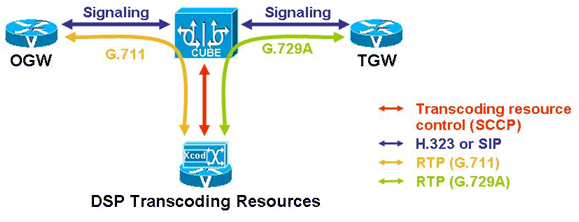
The Local Transcoding Interface (LTI) was a Cisco Unified Border Element (CUBE) transcoding feature originally introduced on Aggregation Services Routers (ASR) platform in 15.1(1)S. Starting with CUBE 9.0, this feature was added to ISR G2 platforms with additional enhancements. LTI includes an internal API to access digital signal processor (DSP) resources. This API bypasses the need for CME configuration and licensing, as well as the use of Skinny Client Control Protocol (SCCP). When both LTI-based and SCCP-based transcoding are configured, LTI takes precedence.
Requirements
Cisco recommends that you have knowledge of these topics:
CUBE
Local Transcoding Interface (LTI)
SCCP
Components Used
The information in this document is based on Cisco Unified Border Element (CUBE) 9.0.
Comparison with SCCP-based Transcoding
CME/SCCP based Xcoding LTI based Xcoding
SCCP protocol is used for controlling DSP resources used for transcoding. Internal API are used to access DSP resources for transcoding.
Transcoding resources (DSPFARM) and CUBE can be on different platforms. Transcoding resources (DSPFARM) and CUBE need to be on the same platform.
SCCP client (SCCP CCM…) configuration and SCCP server (telephony service) configuration is required for CUBE-Ent configuration apart from DSPFARM profile configuration. Only DSPFARM profile configuration is required. SCCP configuration and CUCME configuration is not required when used with CUBE-Ent.
DSPFARM registers with CUCME over TCP socket, using SCCP. No TCP socket is opened and no registration is used.
DSPFARM profile is associated to SCCP using CLI.
dspfarm profile <tag> transcode
associate application sccp
SSPFARM profile is associated to a new application type CUBE.
dspfarm profile <tag> transcode
associate application cube
High density transcoding needs to be enabled through the CLI for higher performance. High density transcoding will be flow around through the transcoder Inherently high density and always flow through. Matches performance of high density transcoding. All flow through features are supported on transcoding calls.
SRTP-RTP using transcoder requires crypto pki trustpoint configuration to establish the TLS connection with SCCP server. Crypto PKI trustpoint configuration is not required for SRTP-RTP calls.
Sample Audio Transcoding Configuration
*!--- Enable CUBE*
voice service voip
allow-connections sip to sip
allow-connections h323 to h323
allow-connections h323 to sip
allow-connections sip to h323
*!— Dspfarm profile configuration with associate * !— application CUBE for LTI transcoding. dspfarm profile 1 transcode universal codec g729ar8 codec g729br8 codec g711alaw codec g711ulaw codec g729r8 maximum sessions 12 associate application CUBE
!— Only dspfarm profile configurations are needed for !— LTI-based transcoding. All the SCCP-based transcoding !— features will be supported with LTI-based transcoding.
Verify Registration
CUBE#**show dspfarm profile 1**
Dspfarm Profile Configuration
 Profile ID = 1, Service =Universal TRANSCODING, Resource ID = 1
 Profile Description :
 Profile Service Mode : Non Secure
 Profile Admin State : UP
 Profile Operation State : ACTIVE << Profile 1 is ACTIVE
 Application : CUBE   Status : ASSOCIATED << Profile 1 (LTI) is associated with CUBE application
 Resource Provider : FLEX_DSPRM   Status : UP
 Number of Resource Configured : 12
 Number of Resources Out of Service : 0
 Number of Resources Active : 0
 Codec Configuration: num_of_codecs:5
 Codec : g729ar8, Maximum Packetization Period : 60
 Codec : g729br8, Maximum Packetization Period : 60
 Codec : g711alaw, Maximum Packetization Period : 30
 Codec : g711ulaw, Maximum Packetization Period : 30
 Codec : g729r8, Maximum Packetization Period : 60
About the Author:
Andres Sarmiento, CCIE # 53520 (Collaboration) With more than 13 years of experience, Andres is specialized in the Unified Communications and Collaboration technologies. Consulted for several companies in South Florida, also Financial Institutions on behalf of Cisco Systems. Andres has been involved in high-profile implementations including Cisco technologies; such as Data Center, UC & Collaboration, Contact Center Express, Routing & Switching, Security and Hosted IPT Service provider infrastructures.