
Where do we begin with this one? - Here is your ticket and before you go to the next section of this post, make sure you have a quick answer.
The Ticket/Challenge **Trying not to call it a problem!
Your client needs to move from a Datacenter to a new location. You need to move the CUCM Publisher and be able to do it also by changing the IP address, with minimum service impact as possible
To the Drawing board with this one
In order to not have any downtime, we have to make sure we leave the current environment untouched. I have an idea for that, here are the ingredients we need:
- OVA for CUCM x.x –> Where X.x is the version your CUCM is running
- OVA for CSR1000v –> This is going to be your Default Gateway + NTP Server + DNS Server (If needed)
- Production VLAN –> This is your final Subnet or the subnet where you will have CUCM after the move
- Black Whole VLAN –> Also known as “non-routable VLAN” - I like to call it my Upgrade/Migrate VLAN
- WINDOWS VM –> This one will have 2 NICs which you will need to change alternatively between the 2 Networks
** You already know where I’m going with this. We are creating an isolated environment, and we are getting a DRS Backup from our current infrastructure and we are Restoring it to the new CUCM in our Isolated environment.
Now, wait, the order of the factors may alter the final product!
Here is my Sanity checklist, which had to be done, just because it’s me and I keep forgetting stuff all the time
Install WINDOWS VM
Installation is basic, no weird stuff here, I just like to rename my interfaces and assign an IP address from each of the Networks I will be using From this VM, Get a DRS Backup from the Production environment
Install CSR1000v
Configure GI1 interface to have the same IP address as the Default Gateway on your Production environment Configure NTP IP address as a Secondary IP address on GI1 Configure DNS IP address as a Secondary IP address on GI1 Set the correct time on Hardware Make the Router your NTP Master at Stratum 4
Install CUCM
This installation is in the Isolated environment Use same IP address Use the same Subnet Use same Default Gateway Use same NTP server Use same Security Password Use same OS and Admin credentials **If not you will be hating yourself later :) Make sure everything looks good
The Process
Initiate a DRS Restore on new CUCM Make sure it works and that is 100% successful :) and restart Once processes are started and the server is up and running begin the IP address change:
CUCM Related Steps (Isolated environment)
Go to System –> Server –> Click find
Select your Publisher and change the IP address there
Go to System –> Cisco Unified CM –> Click find
Select your Publisher server and change the Cisco Unified Communications Manager Name to CM_xx.xx.xx.xx (note that xx.xx.xx.xx is the IP address of your server)
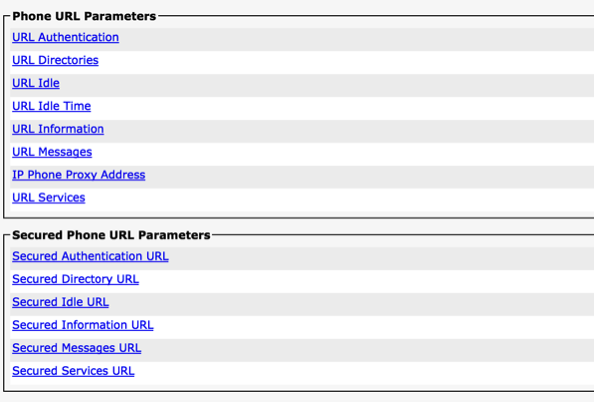
Go to System –> Enterprise Parameters
Make sure you change these to use the new IP address
 Go to System –> DHCP –> DHCP Subnet
Change references to the old IP address to the new **Yes there are companies that actually use DHCP on CUCM, don’t ask me why :)
Go to Device –> Device Settings –> Phone Services
Change any reference to your old IP address to the new IP address, some hints are Extension Mobility and others you may have
Now let’s go under the hood of CUCM –> Connect using SSH
Go to System –> DHCP –> DHCP Subnet
Change references to the old IP address to the new **Yes there are companies that actually use DHCP on CUCM, don’t ask me why :)
Go to Device –> Device Settings –> Phone Services
Change any reference to your old IP address to the new IP address, some hints are Extension Mobility and others you may have
Now let’s go under the hood of CUCM –> Connect using SSH
Change the Default Gateway and the IP address like this
Here is the syntax
admin:set network ip eth0 ?
Syntax:
set network ip eth0 addr mask
addr    mandatory   IP addr to be assigned
mask    mandatory   IP mask to be assigned
gw      mandatory   IP default gw to be assigned

The final command:
set network ip eth0 11.11.11.50 255.255.255.0 11.11.11.1
There are some Cisco documents that say to change the Default Gateway first and then the IP address, this makes sense but did not work for me, so I had to run the previous command. This will send a message to the SUBs telling them about the change Make sure the server is restarted
CUCM Related Steps (Production environment)
Follow the same steps and after you send the restart to make sure you never turn it back on :) ** I just made sure I made the NIC disconnected from ESXI
Change the SUBS to point to the new IP address of the PUB after all changes have been completed
set network cluster publisher ip xx.xx.xx.xx
Replication
Make sure replication is reset by running on the PUB and SUBs
utils dbreplication reset all
Make sure replication is back to normal after the Reset
Peripherals
Change DHCP Scopes on CUCM to new IP Change IP Helper on Subnets to the new IP Change the MGCP and CCM to reflect new IP on all Voice Gateways ***This will be done automatically at least for MGCP configuration Change the Dial-peers on H.323 Gateways Change the IP address from Call Recording Servers Change the IP address from the Fax Servers Change the IP address of the SIP trunks referencing CUCM by IP
Change CUCM integration with UCCX **This will take a while after entering Username and Password on UCCX Admin screen, if only if, your Publisher is the primary AXL server
What to look forward to?
Nothing special really, I followed this
About the Author:
Andres Sarmiento, CCIE # 53520 (Collaboration) With more than 13 years of experience, Andres is specialized in the Unified Communications and Collaboration technologies. Consulted for several companies in South Florida, also Financial Institutions on behalf of Cisco Systems. Andres has been involved in high-profile implementations including Cisco technologies; such as Data Center, UC & Collaboration, Contact Center Express, Routing & Switching, Security and Hosted IPT Service provider infrastructures.