Call recording is an interesting topic for me and it’s sometimes hard to understand, but It’s easy when you break it down to get what it is all about.
My experience varies from different vendors and most of it comes to the same place, at least when preparing CUCM for Recording services. This post is just to go over what is involved form CUCM’s preparation and a bit of an explanation when possible :)
Preparing CUCM for Call Recording Server
- Decide with your vendor how you will be recording the calls
SPAN Recording (All recording services I’ve used use this as one of their methods)
Switched Port Analyzer, is a technology based on sniffing the packets. So what happens here is that the Phones, Voice Gateways, and CUCM servers need to be able to send all sniffed packets to the recording server. At this point, the recording server gets all RTP or Voice packets and decodes them to be stored as Audio files to certain destination.
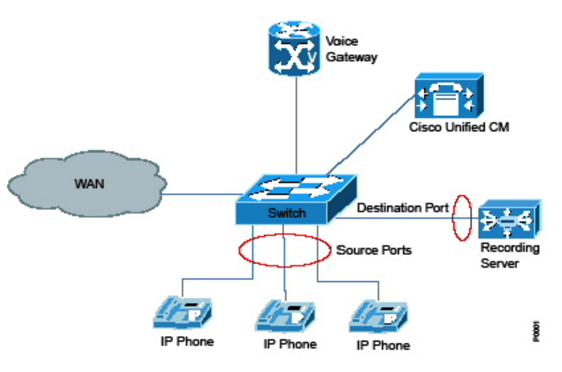
There are few requirements for this to work in case you are in a Virtual Environment like VMware, but I will not spoil the fun for you, so (https://www.cisco.com/c/en/us/td/docs/voice_ip_comm/cucm/srnd/collab09/clb09/recordng.html)
Automatic Call Recording (Your CUCM server sends the call to be recorded to an IP destination)
In automatic call recording, after a call becomes active, two server calls get made to the built-in bridge (BIB) of the agent phone. The agent phone automatically answers. Two server calls then get redirected to the recorder.
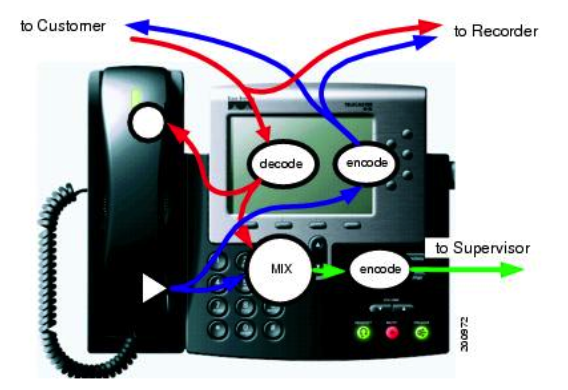
Here is what needs to be done to get it ready on CUCM
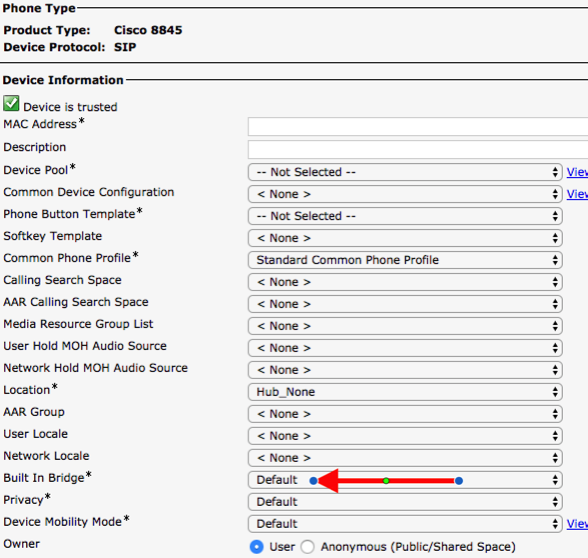
Turn on IP phone BIB to allow monitoring or recording
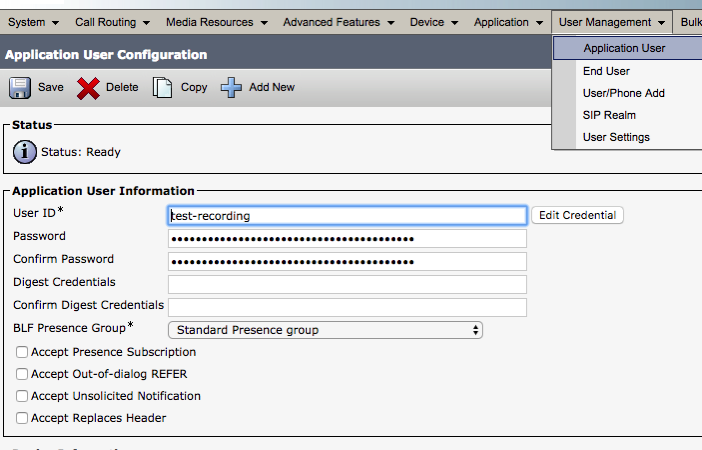
Add user for monitoring or recording application
Add user to groups that allow monitoring and recording
Here are the groups you may need, depending on the vendor you are using they will recommend a different set of Permissions, Personally I’d like to create an Group
Standard CTI Allow Call Standard CTI Allow Call Standard CTI Allow Call Standard CTI Allow Control of All Devices Standard CTI Allow Control of Phones supporting Connected Xfer and conf Standard CTI Allow Control of Phones supporting Rollover Mode Standard CTI Enabled Standard CTI Secure Connection
Add SEP or UDP Profiles
Add the phones/Devices that need recording to the Controlled Devices on the Application User you just created
Configure DN for a monitoring calling search space
Nothing new here, I would create a New CSS called Recording and a Partition called Recording
Enable recording for a line appearance
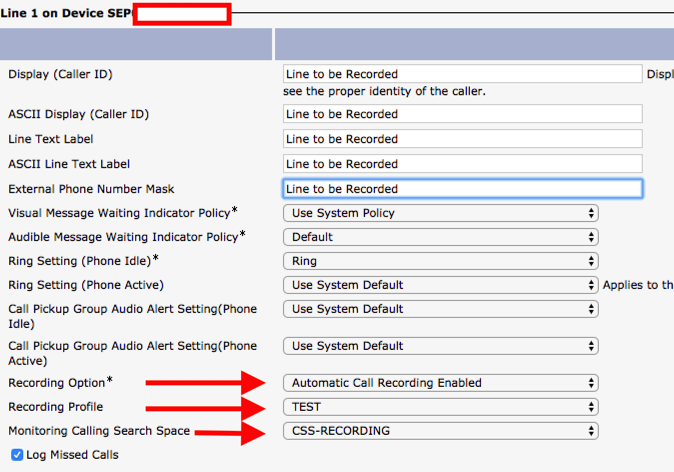
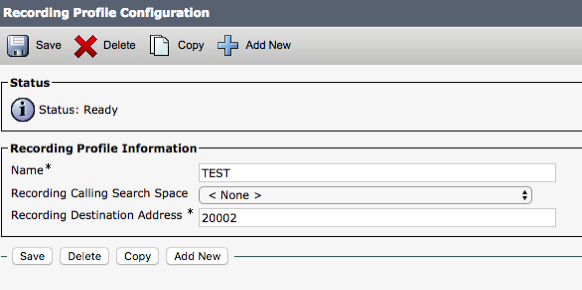
Create a recording profile
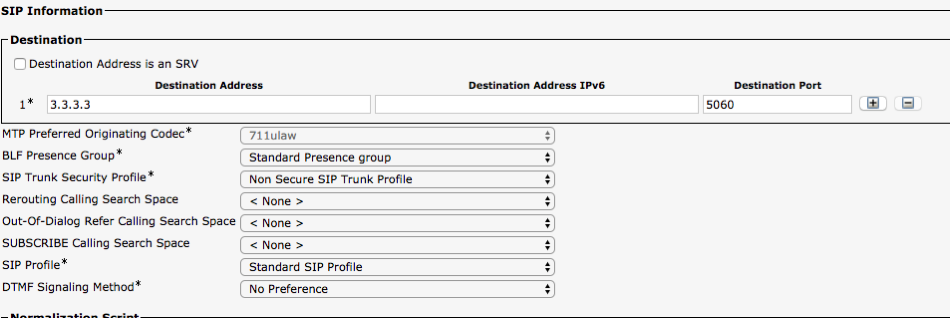
Create a SIP trunk that points to the recorder
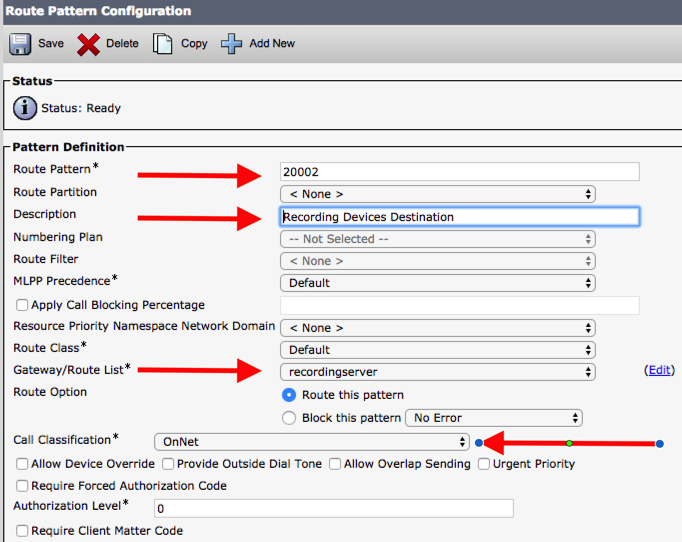
Create a route pattern for the recorder
If you feel like going to the Official Documentation, click the link
And/Or the Illustrated Steps I just created, or the one created by Cisco here is the link
The rest of the configuration needs to take place at the Recording software, but the above referenced gives you a good idea of what needs to be configured at the CUCM interface to make sure Call Recording works.
What to look forward to?
If you got this far, thank you for hanging to the end of the post, this is a Blog post that I should have written long time ago :)
About the Author:
Andres Sarmiento, CCIE # 53520 (Collaboration) With more than 13 years of experience, Andres is specialized in the Unified Communications and Collaboration technologies. Consulted for several companies in South Florida, also Financial Institutions on behalf of Cisco Systems. Andres has been involved in high-profile implementations including Cisco technologies; such as Data Center, UC & Collaboration, Contact Center Express, Routing & Switching, Security and Hosted IPT Service provider infrastructures.
You can follow Andres using Twitter, LinkedIn or Facebook