Let’s see, it has been a while since the last time you heard from me, but this time I will spare you the excuse!
What is a Zero Downtime Upgrade?
This is an upgrade where no matter from which version of VOS (CUCM, UNITY, and UCCX) you are coming from can be done with very little or zero downtime
The Reasoning behind
Look I have always worked with companies that like their stuff done quickly, efficiently and with minimal downtime. I’m also very lazy, or very practical, so if I don’t have to spend all night doing an upgrade, I simply don’t do it. Now, like everything else, there are a lot of exceptions to the scenario I will be going over on this Post, so keep reading!
The technology is there, why not use it?
There are various technologies out there that help you have an easier life. In our example we are going to make use of the following technologies:
- VMWare (vSwitches)
- VLANs
- Static Routing
- Dynamic Routing
- GRE Tunnels
- Transport VRFs (Front Door VRFs)
The Scenario
We are looking to upgrade a CUCM, UNITY Connection and UCCX Servers from version 9.x to Version 11.x - This client relies heavily on UCCX to provide close to 24/7 support to its clients, there is only a small Maintenance Window allowed for this upgrade to happen. The client also has 2 Sites where the UC/Collaboration Servers are located.
The Physical Environment
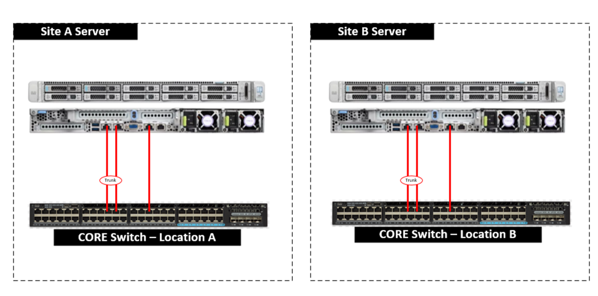
This image is just a quick representation of the Physical environment
The logical Infrastructure
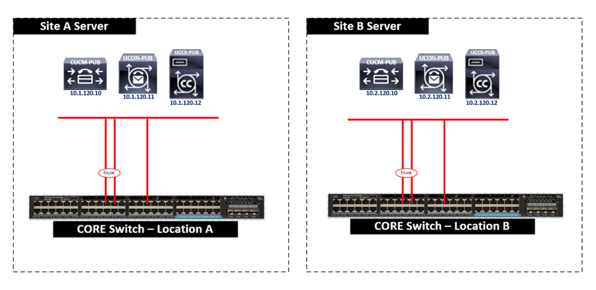
This is how the UC/Collaboration servers are distributed
Specifically what we are doing?
Time to go to the whiteboard and draw this one out
- Create a Parallel Network where we can Install Version 9.x (Same IP, same Network, same Name and I think same NTP server)
- Load DRS Restore to the newly installed 9.x Version
- Upgrade server to 11.x
- Build Subscribers (My Cisco friends will debate on this one and ask why I did not restore the SUBs with the DRS restore, there are good reasons to do it, but for brevity, we will rebuild the SUB like if it was the first time, with no restore)
- Build the other VOS applications just like we did the CUCM server
- There should be a point where you have all the current infrastructure completely up and running like the Production but upgraded to the latest version.
What are things to really consider with this approach?
The fact that you are doing this upgrade in a “vacuum” at some point you have to declare a Changes Freeze on the Collaboration Environment you are working with. You have to build a Windows VM, I always carry my WIN7 ISO, or you can do it with a Windows Server, or even Linux, you pick your poison on this one :) | Make sure this VM has 2 NICs, so 1 NIC can be used on the Production Network and the other NIC could be used with the Upgrade Network, or “BlackHole” as I like to call it **This network should not be routable by any of your production Network devices. Need to leverage a Cisco CSR1000v Router at both locations to create a parallel network with the same IP address as your Production environment, I like to use GRE Tunnels to reach both places
Let’s look at how to create the Parallel Network
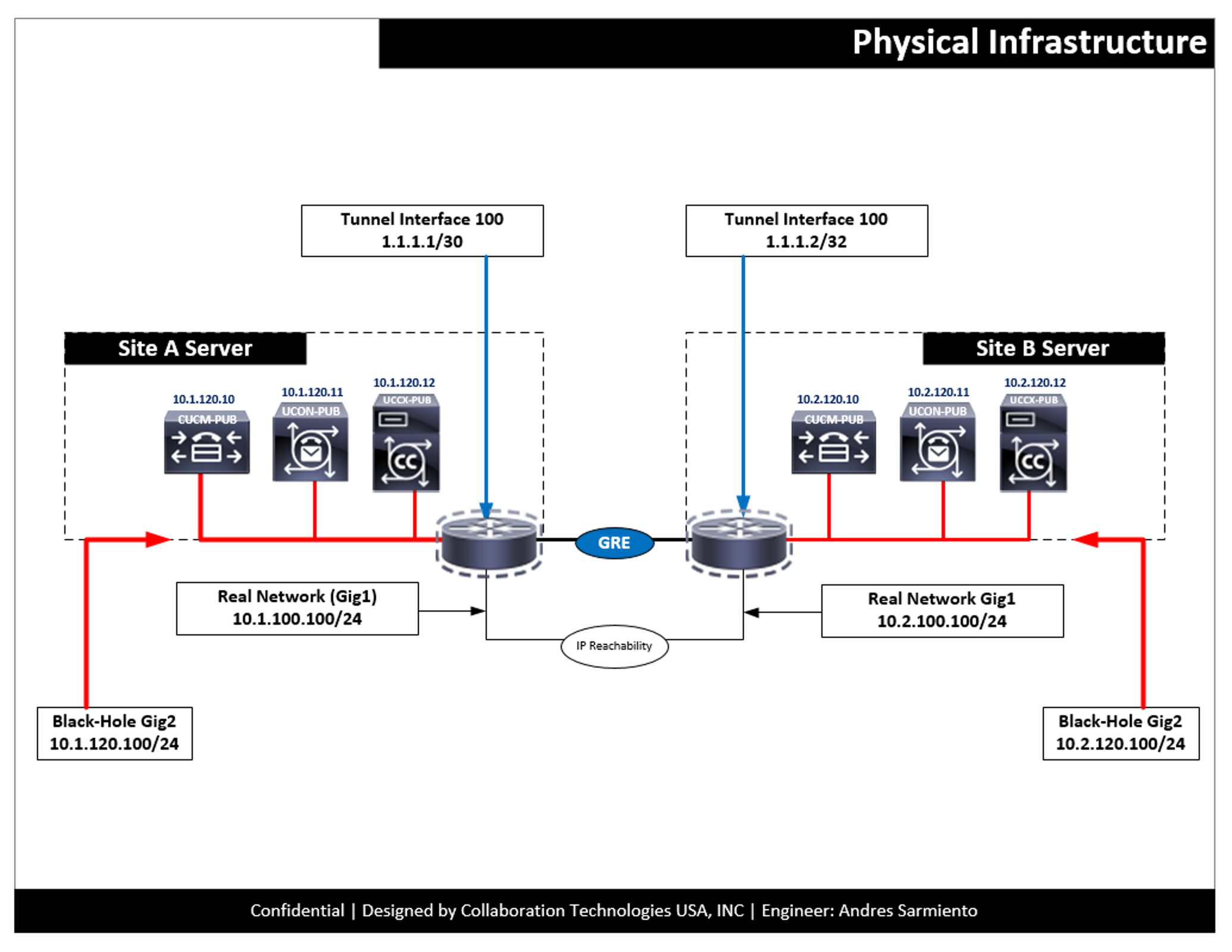
The following helps represent how to create such environment, this is a high level, but I will dive deep into the process in a second post
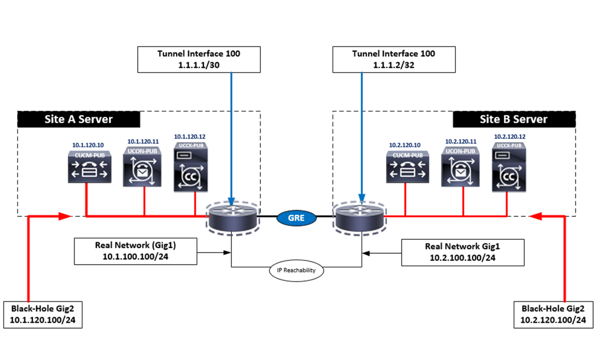
Now you understand the craziness, and how everything is laid from the beginning, now let’s jump to the configuration
The CLI, and the configuration
I created this quick image to represent how this is supposed to look as well as the code snippets
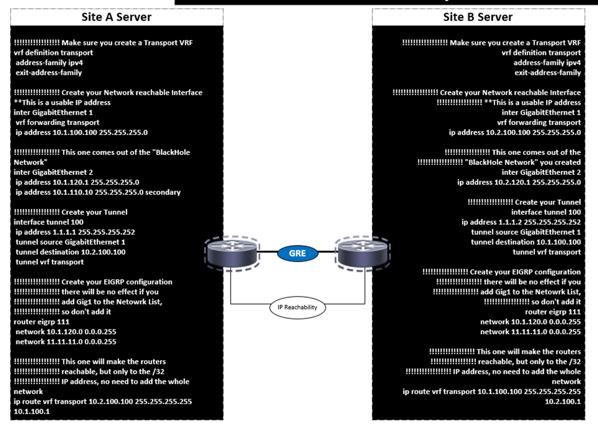
Site A Configuration
!!!!!!!!!!!!!!!!! Make sure you create a Transport VRF
vrf definition transport
 address-family ipv4
 exit-address-family

!!!!!!!!!!!!!!!!! Create your Network reachable Interface **This is a usable IP address
inter GigabitEthernet 1
 vrf forwarding transport
 ip address 10.1.100.100 255.255.255.0

!!!!!!!!!!!!!!!!! This one comes out of the "BlackHole Network"
inter GigabitEthernet 2
 ip address 10.1.120.1 255.255.255.0
 ip address 10.1.110.10 255.255.255.0 secondary

!!!!!!!!!!!!!!!!! Create your Tunnel
interface tunnel 100
 ip address 1.1.1.1 255.255.255.252
 tunnel source GigabitEthernet 1
 tunnel destination 10.2.100.100
 tunnel vrf transport

!!!!!!!!!!!!!!!!! Create your EIGRP configuration
!!!!!!!!!!!!!!!!! there will be no effect if you
!!!!!!!!!!!!!!!!! add Gig1 to the Netowrk List,
!!!!!!!!!!!!!!!!! so don't add it
router eigrp 111
 network 10.1.120.0 0.0.0.255
 network 11.11.11.0 0.0.0.255

!!!!!!!!!!!!!!!!! This one will make the routers
!!!!!!!!!!!!!!!!! reachable, but only to the /32
!!!!!!!!!!!!!!!!! IP address, no need to add the whole network
ip route vrf transport 10.2.100.100 255.255.255.255 10.1.100.1
Site B Configuration
!!!!!!!!!!!!!!!!! Make sure you create a Transport VRF
vrf definition transport
 address-family ipv4
 exit-address-family

!!!!!!!!!!!!!!!!! Create your Network reachable Interface
!!!!!!!!!!!!!!!!! **This is a usable IP address
inter GigabitEthernet 1
 vrf forwarding transport
 ip address 10.2.100.100 255.255.255.0

!!!!!!!!!!!!!!!!! This one comes out of the
!!!!!!!!!!!!!!!!! "BlackHole Network" you created
inter GigabitEthernet 2
 ip address 10.2.120.1 255.255.255.0

!!!!!!!!!!!!!!!!! Create your Tunnel
interface tunnel 100
 ip address 1.1.1.2 255.255.255.252
 tunnel source GigabitEthernet 1
 tunnel destination 10.1.100.100
 tunnel vrf transport

!!!!!!!!!!!!!!!!! Create your EIGRP configuration
!!!!!!!!!!!!!!!!! there will be no effect if you
!!!!!!!!!!!!!!!!! add Gig1 to the Netowrk List,
!!!!!!!!!!!!!!!!! so don't add it
router eigrp 111
 network 10.1.120.0 0.0.0.255
 network 11.11.11.0 0.0.0.255

!!!!!!!!!!!!!!!!! This one will make the routers
!!!!!!!!!!!!!!!!! reachable, but only to the /32
!!!!!!!!!!!!!!!!! IP address, no need to add the whole network
ip route vrf transport 10.2.100.100 255.255.255.255 10.1.100.1
What to look forward to?
Hoping to get back to the blog a bit more and as possible in the next few days, so stay alert for new posts
About the Author:
Andres Sarmiento, CCIE # 53520 (Collaboration) With more than 13 years of experience, Andres is specialized in the Unified Communications and Collaboration technologies. Consulted for several companies in South Florida, also Financial Institutions on behalf of Cisco Systems. Andres has been involved in high-profile implementations including Cisco technologies; such as Data Center, UC & Collaboration, Contact Center Express, Routing & Switching, Security and Hosted IPT Service provider infrastructures.
You can follow Andres using Twitter, LinkedIn or Facebook