
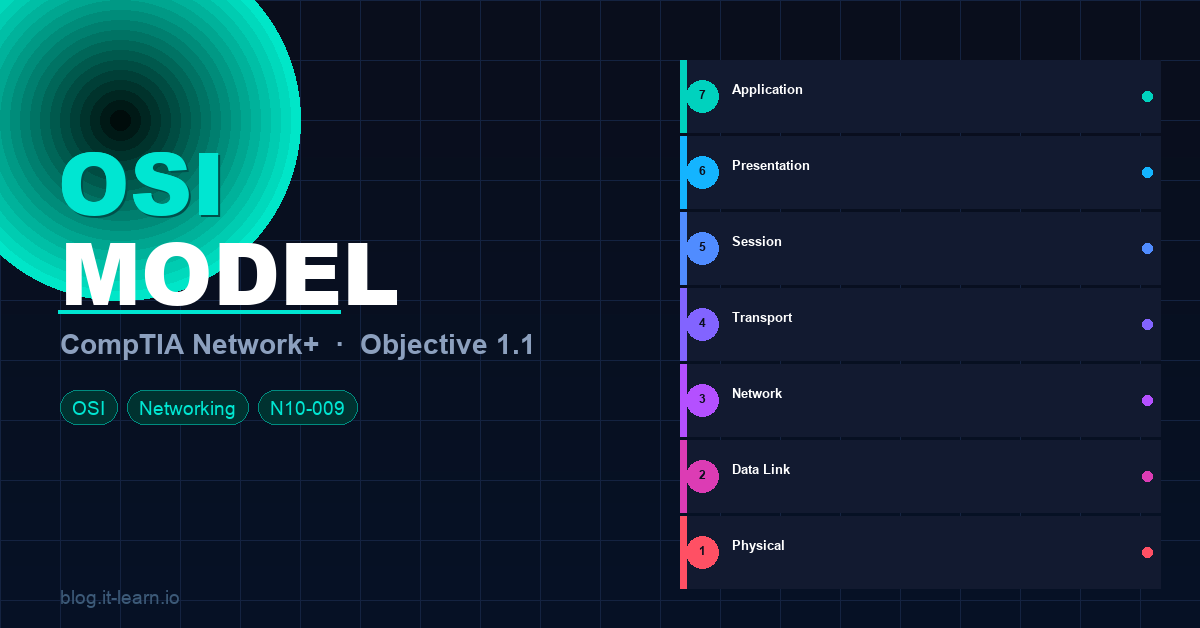
If you are studying for the CompTIA Network+ (N10-009) exam, Objective 1.1 is where it all begins. The OSI (Open Systems Interconnection) model is the foundation every other networking concept builds on. Nail this and the rest of the exam gets easier.
In the video above I walk through all 7 layers visually. In this post I’m going to go deeper — covering each layer, the encapsulation process, TCP flags, MTU, and the exam tips that actually matter.
What Is the OSI Model?
The OSI model is a conceptual framework that standardizes how different networking systems communicate. It was developed by the International Organization for Standardization (ISO) in 1984 and divides network communication into 7 distinct layers, each with a specific role.
Think of it as a set of rules that every device on a network agrees to follow — even if they’re made by different manufacturers running different operating systems.
🧠 Exam tip: The OSI model itself doesn’t exist as actual software or hardware — it’s a reference model. The protocols and technologies you use (TCP/IP, Ethernet, etc.) are what’s real. The OSI model just gives us a common language to describe what’s happening.
The 7 Layers — Top to Bottom
Layer 7 — Application
What it does: This is the layer closest to the end user. It provides the interface between the network and the applications you use every day. It does NOT mean the application itself (like Chrome or Outlook) — it means the network services those apps rely on.
Key protocols: HTTP, HTTPS, FTP, SMTP, POP3, IMAP, DNS, DHCP, SNMP, Telnet, SSH, RDP
Real-world example: When you type a URL in your browser, the Application layer (HTTP/HTTPS) is what formats your request.
🧠 Exam tip: DNS, DHCP, HTTP, FTP, SSH — if you see these on the exam, they live at Layer 7.
Layer 6 — Presentation
What it does: Translates data between the Application layer and the network. It handles encoding, encryption, and compression. This is where data gets formatted into something both sides can understand.
Key functions:
- Encryption/Decryption — SSL/TLS operates here
- Compression — JPEG, MP3, MPEG formats
- Character encoding — ASCII, Unicode, EBCDIC
Real-world example: When your browser establishes an HTTPS connection, the TLS handshake and encryption happen at Layer 6.
🧠 Exam tip: Layer 6 is the “translator.” Think: encryption (SSL/TLS), file formats (JPEG, GIF, MP3), and character sets.
Layer 5 — Session
What it does: Manages the setup, maintenance, and teardown of communication sessions between two devices. It keeps track of which data belongs to which conversation (session).
Key functions:
- Session establishment, maintenance, and termination
- Dialog control (who sends when — simplex, half-duplex, full-duplex)
- Synchronization checkpoints (for resuming broken transfers)
Key protocols: NetBIOS, RPC (Remote Procedure Call), PPTP, SMB (at this layer for session management)
Real-world example: When you log into a website and stay logged in across multiple page requests, that’s a session being maintained at Layer 5.
🧠 Exam tip: Layer 5 is about conversations — starting them, keeping them alive, and ending them cleanly.
Layer 4 — Transport
What it does: Responsible for end-to-end communication, error detection, flow control, and segmentation. This is where TCP and UDP live — and this is one of the most important layers for the Network+ exam.
The two big protocols:
| Feature | TCP | UDP |
|---|---|---|
| Connection | Connection-oriented (3-way handshake) | Connectionless |
| Reliability | Guaranteed delivery | Best-effort delivery |
| Speed | Slower (overhead) | Faster (less overhead) |
| Error checking | Yes — retransmits lost packets | Minimal |
| Use cases | HTTP, FTP, SSH, email | DNS, DHCP, streaming, VoIP, gaming |
Key concepts:
- Segmentation — breaks large data into smaller segments
- Port numbers — Layer 4 uses ports to identify applications (e.g., HTTP = port 80, HTTPS = 443, SSH = 22)
- Flow control — prevents the sender from overwhelming the receiver
- Windowing — TCP uses sliding windows to manage how much data can be in transit at once
🧠 Exam tip: Know your well-known ports cold. TCP vs UDP differences are a guaranteed question. The TCP 3-way handshake is SYN → SYN-ACK → ACK.
Layer 3 — Network
What it does: Handles logical addressing and routing — determining the best path for data to travel between networks. This is where IP addresses and routers live.
Key protocols: IP (IPv4 / IPv6), ICMP, OSPF, BGP, EIGRP, RIP
Key concepts:
- IP addressing — logical addresses that identify devices across networks
- Routing — routers operate at Layer 3 and forward packets based on IP addresses
- Packet — the Layer 3 PDU (Protocol Data Unit)
- Fragmentation — Layer 3 can fragment packets if they exceed the MTU of the next hop
Real-world example: When you ping google.com, ICMP (Layer 3) is what’s being used. Your router reads the destination IP and decides where to send the packet.
🧠 Exam tip: Routers = Layer 3. IP addresses = Layer 3. If a question mentions routing, subnetting, or ping — think Layer 3.
Layer 2 — Data Link
What it does: Handles physical addressing (MAC addresses) and controls how data is placed on and retrieved from the physical medium. It also provides error detection (not correction) for the physical layer.
Two sub-layers:
- LLC (Logical Link Control) — communicates with the Network layer above
- MAC (Media Access Control) — communicates with the Physical layer below; controls access to the shared medium
Key protocols/technologies: Ethernet, Wi-Fi (802.11), PPP, VLAN (802.1Q), STP (Spanning Tree Protocol), ARP
Key concepts:
- MAC addresses — 48-bit hardware addresses burned into NICs (e.g.,
00:1A:2B:3C:4D:5E) - Frame — the Layer 2 PDU
- Switches — operate at Layer 2, use MAC address tables to forward frames
- ARP — maps IP addresses (Layer 3) to MAC addresses (Layer 2)
🧠 Exam tip: Switches = Layer 2. MAC addresses = Layer 2. ARP = Layer 2/3 boundary. VLANs (802.1Q) = Layer 2.
Layer 1 — Physical
What it does: The physical transmission of raw bits (0s and 1s) over a medium — whether that’s copper cable, fiber optic, or radio waves. It defines the electrical, mechanical, and procedural specifications.
Key components:
- Cables (Cat5e, Cat6, Cat6a, fiber — single-mode, multi-mode)
- Hubs and repeaters (Layer 1 devices)
- Connectors (RJ-45, LC, SC, ST)
- Signals (voltage levels, frequencies, light pulses)
- Standards (10BASE-T, 100BASE-TX, 1000BASE-T, 10GBASE-T)
🧠 Exam tip: Hubs = Layer 1 (they repeat signals to all ports, no intelligence). Physical layer questions often involve cable types, maximum distances, and transmission speeds.
The Memory Trick
There are two popular mnemonics for remembering the layers:
Top-down (Layer 7 → Layer 1):
All People Seem To Need Data Processing Application → Presentation → Session → Transport → Network → Data Link → Physical
Bottom-up (Layer 1 → Layer 7):
Please Do Not Throw Sausage Pizza Away Physical → Data Link → Network → Transport → Session → Presentation → Application
Pick one and stick with it.
Data Encapsulation and Decapsulation
This is the second major component of Objective 1.1 and one where a lot of people lose points on the exam.
Encapsulation is the process of adding header (and sometimes trailer) information as data travels down the OSI stack from sender to receiver.
Decapsulation is the reverse — stripping those headers as data travels up the stack on the receiving end.
The PDU at Each Layer
| Layer | PDU Name | What gets added |
|---|---|---|
| 7 – Application | Data | Application-level data |
| 6 – Presentation | Data | Encoding/encryption |
| 5 – Session | Data | Session info |
| 4 – Transport | Segment (TCP) / Datagram (UDP) | Source/destination port, sequence numbers |
| 3 – Network | Packet | Source/destination IP address |
| 2 – Data Link | Frame | Source/destination MAC address, FCS trailer |
| 1 – Physical | Bits | Electrical/optical signals |
The Ethernet Frame
When data reaches Layer 2, it gets wrapped in an Ethernet frame. Here’s what that frame looks like:
| Preamble | Dest MAC | Src MAC | EtherType | Payload (IP Packet) | FCS |
|  8 bytes |  6 bytes | 6 bytes |  2 bytes  |     46–1500 bytes   | 4B |
- Preamble — synchronizes the receiver’s clock
- Destination MAC — where the frame is going
- Source MAC — where it came from
- EtherType — identifies the Layer 3 protocol (0x0800 = IPv4, 0x86DD = IPv6)
- Payload — the IP packet (46 to 1500 bytes)
- FCS (Frame Check Sequence) — CRC error detection
The IP Header (IPv4)
Inside the Ethernet payload sits the IP packet. The IPv4 header includes:
- Version (4 bits) — IPv4 = 4
- IHL — header length
- TTL (Time to Live) — decremented at each router hop; prevents infinite loops
- Protocol — identifies Layer 4 protocol (6 = TCP, 17 = UDP, 1 = ICMP)
- Source IP / Destination IP — 32-bit addresses each
- Flags + Fragment Offset — used for packet fragmentation
🧠 Exam tip: TTL is key for troubleshooting. When TTL hits 0, the router drops the packet and sends an ICMP “Time Exceeded” message back to the source — that’s how
tracerouteworks.
TCP vs UDP Headers
TCP Header (20 bytes minimum):
- Source Port / Destination Port
- Sequence Number — tracks order of segments
- Acknowledgment Number — confirms received data
- TCP Flags (more on these below)
- Window Size — flow control
- Checksum
UDP Header (only 8 bytes):
- Source Port / Destination Port
- Length
- Checksum
UDP’s simplicity is why it’s faster — no sequence numbers, no acknowledgments, no session setup.
TCP Flags
TCP flags control the state of a connection. You need to know these for the exam:
| Flag | Name | What it does |
|---|---|---|
| SYN | Synchronize | Initiates a connection |
| ACK | Acknowledge | Confirms receipt of data |
| FIN | Finish | Gracefully closes a connection |
| RST | Reset | Immediately terminates a connection |
| PSH | Push | Tells receiver to deliver data to app immediately |
| URG | Urgent | Marks data as urgent, process out of order |
The TCP 3-Way Handshake:
Client → Server: SYN
Server → Client: SYN-ACK
Client → Server: ACK
[Connection Established]
The TCP 4-Way Teardown:
Client → Server: FIN
Server → Client: ACK
Server → Client: FIN
Client → Server: ACK
[Connection Closed]
🧠 Exam tip: RST is the “emergency hangup” — it immediately kills the connection without the normal FIN handshake. You’ll see RST in firewall blocks and port scans.
Maximum Transmission Unit (MTU)
MTU is the largest size (in bytes) a packet can be before it needs to be fragmented at Layer 3.
- Standard Ethernet MTU: 1500 bytes (this is the most important number to remember)
- If a packet is larger than the MTU, IPv4 will fragment it into smaller pieces
- IPv6 does not fragment at routers — the source device handles it (using Path MTU Discovery)
- Jumbo frames — some networks support MTUs up to 9000 bytes for high-throughput environments (iSCSI, storage networks)
Why does MTU matter?
- MTU mismatch is a common cause of mysterious connectivity issues where small packets work but large ones don’t (like a VPN that passes pings but breaks web browsing)
- Black hole routing — packets silently dropped because the DF (Don’t Fragment) bit is set and the packet is too large
🧠 Exam tip: 1500 bytes = standard Ethernet MTU. PMTUD = Path MTU Discovery. Jumbo frames = 9000 bytes. MTU mismatches = fragmentation or dropped packets.
Quick Reference Cheat Sheet
| Layer | # | PDU | Devices | Key Protocols |
|---|---|---|---|---|
| Application | 7 | Data | Firewalls (L7), Proxies | HTTP, HTTPS, DNS, DHCP, FTP, SSH, SMTP |
| Presentation | 6 | Data | — | SSL/TLS, JPEG, MPEG, ASCII |
| Session | 5 | Data | — | NetBIOS, RPC, SMB |
| Transport | 4 | Segment/Datagram | Firewalls (L4) | TCP, UDP |
| Network | 3 | Packet | Routers, L3 Switches | IP, ICMP, OSPF, BGP |
| Data Link | 2 | Frame | Switches, Bridges | Ethernet, Wi-Fi, ARP, STP, VLANs |
| Physical | 1 | Bits | Hubs, Repeaters, NICs | Cables, connectors, signals |
Practice Questions
Test yourself before the exam:
1. A network administrator uses ping to test connectivity to a remote host. Which layer of the OSI model does ICMP operate at?
Answer: Layer 3 — Network
2. Which TCP flag is used to immediately terminate a connection without a graceful shutdown?
Answer: RST (Reset)
3. What is the standard MTU size for Ethernet?
Answer: 1500 bytes
4. A switch receives a frame and forwards it based on the destination address. Which address type does it use?
Answer: MAC address (Layer 2)
5. Which layer is responsible for establishing, maintaining, and terminating sessions between applications?
Answer: Layer 5 — Session
6. Data at Layer 4 using TCP is called what?
Answer: A segment
7. Which protocol maps IP addresses to MAC addresses?
Answer: ARP (Address Resolution Protocol) — operates at the Layer 2/3 boundary
What’s Next?
Objective 1.1 is just the beginning. Once you’ve got the OSI model locked in, the next objectives build directly on it:
- Objective 1.2 — TCP/IP model and how it maps to OSI
- Objective 1.3 — Network ports and protocols (you already started this with TCP/UDP)
- Objective 1.4 — IP addressing and subnetting
Subscribe to the it-learn YouTube channel for the full video series — every objective gets a dedicated video, just like this one.
Got questions? Drop them in the comments below. Good luck on the exam! 💪