If you’ve got multiple ISE Policy Service Nodes and you’re trying to distribute RADIUS traffic across them without breaking 802.1X, CoA, or session tracking — this guide is for you.
RADIUS load balancing is one of those topics that looks straightforward on paper but has a handful of sharp edges that bite you in production. We’re going to cover every major concept: PSN architecture, load balancing methods, session persistence, the SNAT trap, health probes, ISE-side config requirements, and what to watch for in cloud environments.
Key Concepts & Terminology
Before diving into configs, let’s lock down the vocabulary — Cisco uses specific terms throughout this topic and you’ll need them to follow along.
PSN — Policy Service Node The ISE persona that actually handles RADIUS requests and makes policy decisions. In a load-balanced setup, you’ll have multiple PSNs behind a single virtual IP.
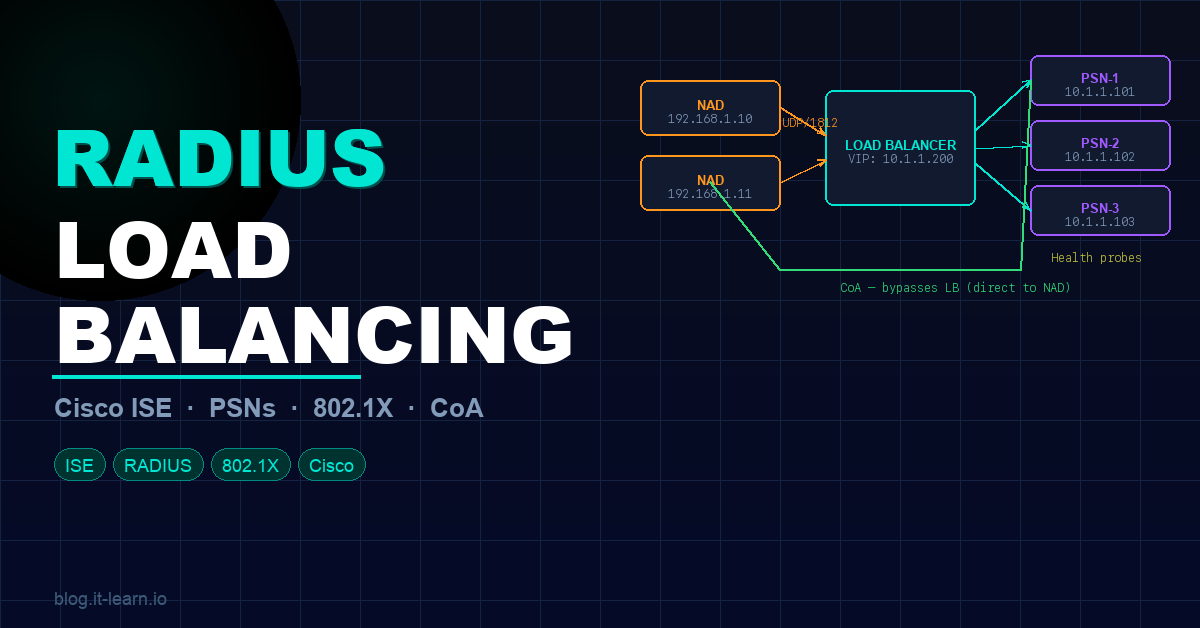
VIP — Virtual IP Address The IP address that the load balancer listens on. Your NADs — switches, WLCs, firewalls — point to the VIP as their RADIUS server. The load balancer forwards those packets to the real PSN IPs in the backend pool.
NAD — Network Access Device Your access-layer gear — switches, wireless LAN controllers, firewalls — anything that enforces network access and sends RADIUS authentication requests.
Backend Pool / Server Farm The grouping of real PSN IPs that receive traffic forwarded from the VIP. Think of it as a cluster of servers sitting behind a single front-end address.
🧠 Pro tip: Group PSNs geographically — the same way you’d configure ISE Node Groups. Cisco recommends using your node group structure as the basis for your backend pools. This keeps session data shared between nodes in the same location.
Protocol Basics — Why UDP Matters
Here’s something that catches people off guard: RADIUS runs over UDP — not TCP. And that matters a lot when choosing a load balancer.
| Protocol | Port | Transport |
|---|---|---|
| RADIUS Authentication / Authorization | 1812 | UDP |
| RADIUS Accounting | 1813 | UDP |
| TACACS+ | 49 | TCP |
Most cloud load balancers come in two flavors: Application Load Balancers and Network Load Balancers. Application Load Balancers don’t process UDP at all — so they’re out immediately. You need a Network Load Balancer that explicitly supports UDP traffic.
Listeners
A listener tells the load balancer which port to watch and where to route traffic. If your VIP is 192.168.100.100, a listener on UDP/1812 means any RADIUS auth packet hitting that IP gets forwarded to your backend PSN pool. Traffic with no matching listener gets dropped — full stop.
Configure listeners for:
- UDP/1812 — RADIUS authentication and authorization
- UDP/1813 — RADIUS accounting
- TCP/49 — TACACS+ (if applicable)
Load Balancing Methods & Session Persistence
With RADIUS, you need to be careful — UDP is connectionless, so any method that relies on tracking an ongoing TCP connection is off the table.
Why Session Persistence Is Non-Negotiable
ISE requires that all RADIUS packets for a given session go to the same PSN — authentication, authorization, accounting, and any follow-up transactions like reauthentication after a Change of Authorization (CoA).
If packets from the same device hit two different PSNs, ISE can’t manage the session lifecycle properly and authentication breaks.
Calling-Station-ID (RADIUS Attribute 31)
Most guides recommend using the Calling-Station-ID — the client’s MAC address — as your persistence key. For standard 802.1X, this works great because attribute 31 is almost always present.
NAS-IP Fallback — The Gotcha You Need to Know
Some RADIUS packets don’t include attribute 31 at all. The most common example: TrustSec PAC provisioning. The fix is compound persistence: key on both attribute 31 (Calling-Station-ID) AND attribute 4 (NAS-IP-Address). F5’s iRule implementation handles this with built-in fallback logic.
🧠 For TACACS+ (TCP), you can use source IP persistence since it’s a connection-oriented protocol.
Persistence Timeout The timeout on your persistence rules needs to be long enough to cover your full reauthentication cycle. The default two minutes is way too short. Cisco recommends setting it at least one hour beyond your highest reauthentication timer.
Health Monitoring — Don’t Just Check a Port
Your load balancer needs to know which PSNs are actually healthy before forwarding traffic to them. Checking for an open UDP socket won’t tell you if RADIUS is actually responding.
Use real RADIUS health probes. F5 BIG-IP LTM has a built-in RADIUS health monitor that acts as a simulated RADIUS client — it sends an auth request with a test username and password and checks the response.
For this to work:
Add the load balancer as a Network Access Device in ISE so ISE will respond to probe authentications:
- Navigate to Administration → Network Resources → Network Devices → Add
- Enter the LB’s IP address and RADIUS shared secret
Create a dedicated test account in ISE that the health probes authenticate as.
Configure the LB monitor to send RADIUS auth requests to UDP/1812 on each PSN using that test account.
What happens on failure: When a PSN fails its health check, the LB automatically pulls it from the pool, and a CoA reauthentication is triggered from another node in the same node group — forcing affected sessions to renegotiate to a healthy PSN.
The SNAT Problem — This Will Break Your Deployment
This is the concept that trips up almost everyone.
SNAT (Source NAT) is great in many load balancing scenarios — it simplifies return path routing. But with ISE, never use SNAT on the NAD-to-PSN path.
Why SNAT Breaks ISE
ISE identifies NADs by their Layer 3 source IP address. If you SNAT traffic from a switch through the load balancer, the PSN sees the load balancer’s IP as the source — not the switch’s real IP. This breaks:
- NAD identification
- Policy lookups
- Change of Authorization (CoA)
❌ With SNAT:
  Switch (192.168.1.10) → LB → PSN sees source: 10.0.0.1 (LB IP)
  ISE can't find 10.0.0.1 in its NAD list → policy lookup fails

✅ Without SNAT (routed/transparent mode):
  Switch (192.168.1.10) → LB → PSN sees source: 192.168.1.10
  ISE finds the switch in its NAD list → policy lookup succeeds
The correct mode is routed mode — also called transparent mode or pass-through mode depending on your vendor. The LB forwards the packet while preserving the original source IP.
🧠 Exception: Some vendors (like Citrix NetScaler) support RNAT — Reverse NAT for CoA traffic going from PSN back to the NAD. This can simplify NAD config by letting CoA use the VIP. But NEVER configure RNAT in the NAD-to-PSN direction.
ISE Configuration Requirements
Here’s what needs to be configured on the ISE side of the deployment.
NAD Configuration
On every NAD — every switch and WLC — point the RADIUS server config at the VIP. But for CoA, configure each PSN’s real IP address individually on the NAD. CoA traffic bypasses the load balancer entirely.
Example AAA config on a Cisco switch:
aaa new-model
!
radius server ISE-PSN1
 address ipv4 10.1.1.101 auth-port 1812 acct-port 1813
 key Str0ngS3cr3t!
!
radius server ISE-PSN2
 address ipv4 10.1.1.102 auth-port 1812 acct-port 1813
 key Str0ngS3cr3t!
!
radius server ISE-VIP
 address ipv4 10.1.1.200 auth-port 1812 acct-port 1813
 key Str0ngS3cr3t!
!
aaa group server radius ISE-AUTH
 server name ISE-VIP
!
aaa group server radius ISE-COA
 server name ISE-PSN1
 server name ISE-PSN2
!
ip radius source-interface Vlan10
!
aaa authentication dot1x default group ISE-AUTH
aaa authorization network default group ISE-AUTH
aaa accounting dot1x default start-stop group ISE-AUTH
PSN Direct Reachability
Every PSN must be directly reachable (no NAT) from:
- PAN and MNT nodes — for administration and logging
- Endpoints — for web redirects, Central Web Auth (CWA), and posture assessment
- NADs — accounting messages must reach PSNs directly
Certificates
Include the VIP’s FQDN in the Subject Alternative Name (SAN) field of PSN certificates. When a client is redirected from the VIP to a specific PSN, the cert needs to validate correctly for both the VIP hostname and the PSN hostname.
Node Groups
Map your ISE node groups to your LB backend pools — same geographic grouping, same set of nodes. If a PSN fails and another node in the group initiates a CoA reauthentication, the LB routes that new request to a healthy node in the same pool.
Cloud Load Balancers
As organizations move to the cloud, RADIUS load balancing concepts remain exactly the same — you still need UDP support, session persistence, and routed mode.
Key validation checklist for any cloud load balancer:
| Requirement | Why It Matters |
|---|---|
| UDP protocol support | RADIUS uses UDP/1812-1813 — app LBs don’t support UDP |
| Routed / transparent mode | Preserve NAD source IP — no SNAT |
| Session persistence | Key on Calling-Station-ID + NAS-IP fallback |
| Health probes | Must send real RADIUS auth requests, not just port checks |
| Persistence timeout | At least 1 hour beyond your highest reauth timer |
Most cloud providers’ Network Load Balancer tier supports UDP. Always confirm before designing your architecture — this is the most common cause of failed PoCs.
Key Takeaways
| # | What to Remember |
|---|---|
| 1 | Use a Network Load Balancer with UDP support — Application LBs won’t work |
| 2 | Configure listeners on UDP/1812 and UDP/1813 (add TCP/49 for TACACS+) |
| 3 | Enable session persistence — key on Calling-Station-ID with NAS-IP as fallback |
| 4 | Set persistence timeout at least 1 hour beyond your highest reauth timer |
| 5 | Never SNAT the NAD-to-PSN path — use transparent/routed mode |
| 6 | Configure CoA using real PSN IPs on NADs, not the VIP |
| 7 | Set up real RADIUS health probes — add the LB as a NAD in ISE |
| 8 | Align backend pools with ISE node groups — same geography, same failover |
| 9 | Test TrustSec PAC provisioning specifically — it drops attribute 31 |
Practice Questions
1. A network engineer is deploying a load balancer for Cisco ISE. Which type of load balancer must be used for RADIUS traffic and why?
2. What is the recommended session persistence key for RADIUS load balancing, and what should be configured as the fallback?
3. Why should SNAT never be used on the NAD-to-PSN path in a RADIUS load balancing deployment?
4. A PSN fails its health check on the load balancer. What two things happen automatically?
- The LB removes the failed PSN from the backend pool and stops forwarding new sessions to it. 2. A CoA reauthentication is triggered from another node in the same ISE node group, forcing affected sessions to renegotiate to a healthy PSN.