

Every Solutions Engineer in cybersecurity will eventually sit across from a customer who says some version of this: “Show me how your product maps to MITRE ATT&CK.” If you stumble through that moment, you lose credibility that is very hard to recover. If you handle it well, you establish yourself as someone who understands threats at a technical level - not just someone who demos software.
MITRE ATT&CK has become the de facto common language between security vendors, SOC teams, threat intelligence analysts, and CISOs. It is referenced in RFPs, used in product evaluations, and increasingly required in compliance frameworks. As an SE, you do not need to be a threat researcher. But you do need to understand the framework well enough to use it naturally in conversation, map it to your product’s capabilities, and leverage it to differentiate your solution.
This post breaks down ATT&CK from the SE’s perspective - what it is, how it is structured, and most importantly, how to use it in the field.
What MITRE ATT&CK Actually Is
ATT&CK stands for Adversarial Tactics, Techniques, and Common Knowledge. It is a knowledge base maintained by MITRE Corporation that catalogs real-world adversary behaviors observed in cyberattacks. It is not a compliance framework, not a maturity model, and not a product evaluation tool - although it is used for all three.
The key differentiator: ATT&CK is based on observed behavior. Every technique in the matrix was documented because a threat actor actually used it in the wild. This is what gives it credibility with technical buyers.
ATT&CK is organized into three layers:
- Tactics - The adversary’s objective (the “why”). There are 14 tactics representing the stages of an attack.
- Techniques - How the adversary achieves the objective (the “how”). There are currently over 200 techniques.
- Sub-techniques - Granular variations of a technique. For example, Phishing (T1566) has sub-techniques for Spearphishing Attachment (T1566.001), Spearphishing Link (T1566.002), and Spearphishing via Service (T1566.003).
There are also separate matrices for Enterprise, Mobile, and ICS (Industrial Control Systems). As an SE, you will work primarily with the Enterprise matrix unless you sell into OT/ICS environments.
The 14 Tactics: SE Talking Points
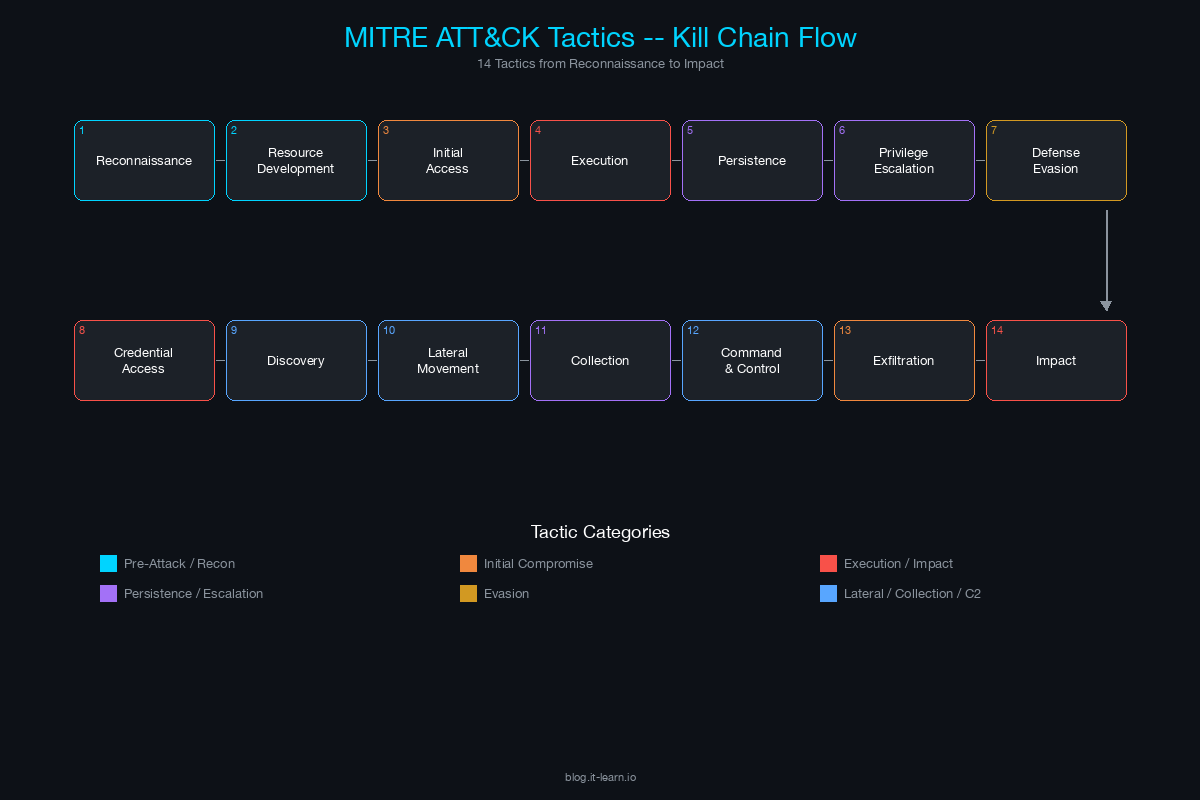
This table gives you a one-sentence talking point for each tactic - something you can say naturally in a customer conversation to demonstrate you understand the attacker’s perspective.
| # | Tactic | What It Means | SE Talking Point |
|---|---|---|---|
| 1 | Reconnaissance | Attacker gathers information about the target before engaging | “Before an attacker ever touches your network, they’re scraping LinkedIn for your tech stack and scanning your external IPs - that’s the recon phase we need to disrupt.” |
| 2 | Resource Development | Attacker sets up infrastructure (domains, accounts, tools) for the attack | “Attackers don’t just show up - they register lookalike domains and stage C2 infrastructure weeks before the attack, which is why external threat intelligence matters.” |
| 3 | Initial Access | How the attacker gets in - phishing, exploiting public-facing apps, supply chain | “The question isn’t whether someone will click a phishing link - it’s whether your stack can detect and contain the compromise in the first 60 seconds after they do.” |
| 4 | Execution | Running malicious code on the target system | “PowerShell, WMI, scheduled tasks - attackers use your own admin tools against you, which is why behavioral detection matters more than signature matching.” |
| 5 | Persistence | Maintaining access across reboots and credential changes | “Persistence is where attackers plant their flag - registry run keys, scheduled tasks, implants in startup folders. If you can’t detect persistence mechanisms, you’ll be remediating the same incident repeatedly.” |
| 6 | Privilege Escalation | Gaining higher-level permissions | “An attacker who lands as a standard user and escalates to domain admin in under 4 hours - that’s not a theoretical scenario, that’s what we see in breach reports every quarter.” |
| 7 | Defense Evasion | Avoiding detection by security tools | “The most dangerous attackers don’t trigger your alerts - they disable your logging, clear event logs, and use living-off-the-land techniques specifically designed to blend in.” |
| 8 | Credential Access | Stealing credentials - dumping hashes, keylogging, brute force | “If an attacker gets one set of domain admin credentials, the game is essentially over unless you have detection at the credential access layer.” |
| 9 | Discovery | Learning about the environment - network shares, domain trust, system info | “After initial access, attackers run the same discovery commands your admins do - net group, nltest, BloodHound. The difference is context and timing.” |
| 10 | Lateral Movement | Moving between systems within the network | “Lateral movement is where dwell time explodes. An attacker pivoting from a workstation to a file server to a domain controller - each hop increases the blast radius.” |
| 11 | Collection | Gathering data the attacker wants to steal | “Before exfiltration, there’s collection - staging files, archiving data, searching for keywords in email. This is a detection opportunity most organizations miss.” |
| 12 | Command and Control | Communication channel between attacker and compromised systems | “Modern C2 uses HTTPS on port 443, DNS tunneling, or legitimate cloud services - it looks like normal traffic unless you’re doing deep inspection or behavioral analysis.” |
| 13 | Exfiltration | Stealing data out of the network | “Data leaving your network over encrypted channels to a cloud storage provider at 2 AM - that’s exfiltration, and it’s the event that turns a security incident into a data breach.” |
| 14 | Impact | Disrupting, destroying, or manipulating systems and data | “Ransomware is the most visible impact technique, but attackers also wipe data, deface systems, and manipulate business logic - the damage goes beyond encryption.” |
Print this table. Keep it in your notebook. When a customer describes a problem, mentally map it to the tactic and respond with the right language.
How to Reference ATT&CK Without Sounding Rehearsed
The biggest mistake SEs make with ATT&CK is treating it like a checklist to recite. Customers can tell when you are performing knowledge rather than applying it. Here are the rules:
Rule 1: Never lead with the framework. Lead with the customer’s problem. If they say “We had an incident where someone moved laterally from a compromised workstation to our file servers,” your response should be: “That’s a classic lateral movement scenario - specifically, it sounds like techniques T1021 (Remote Services) or T1550 (Use Alternate Authentication Material). How did you detect it?” The framework supports your response; it does not drive it.
Rule 2: Use tactic names conversationally. Instead of saying “MITRE ATT&CK tactic TA0008, Lateral Movement,” just say “lateral movement.” Technical buyers know the framework. Using the tactic names naturally signals fluency. Only cite specific technique IDs when you are drilling into a specific detection use case.
Rule 3: Tie it to their environment. “In healthcare environments, we see initial access heavily weighted toward phishing with malicious attachments targeting clinical staff - that’s T1566.001. Your EDR coverage on clinical workstations is what determines whether that phishing email becomes a ransomware event.”
Rule 4: Acknowledge gaps honestly. No single product covers all 14 tactics. If a customer asks about a tactic your product does not address, say so. “We don’t cover Reconnaissance - that’s external threat intelligence territory. What we do is detect the moment reconnaissance transitions to Initial Access, which is where the attacker first touches your perimeter.”
Mapping Customer Pain to ATT&CK Tactics
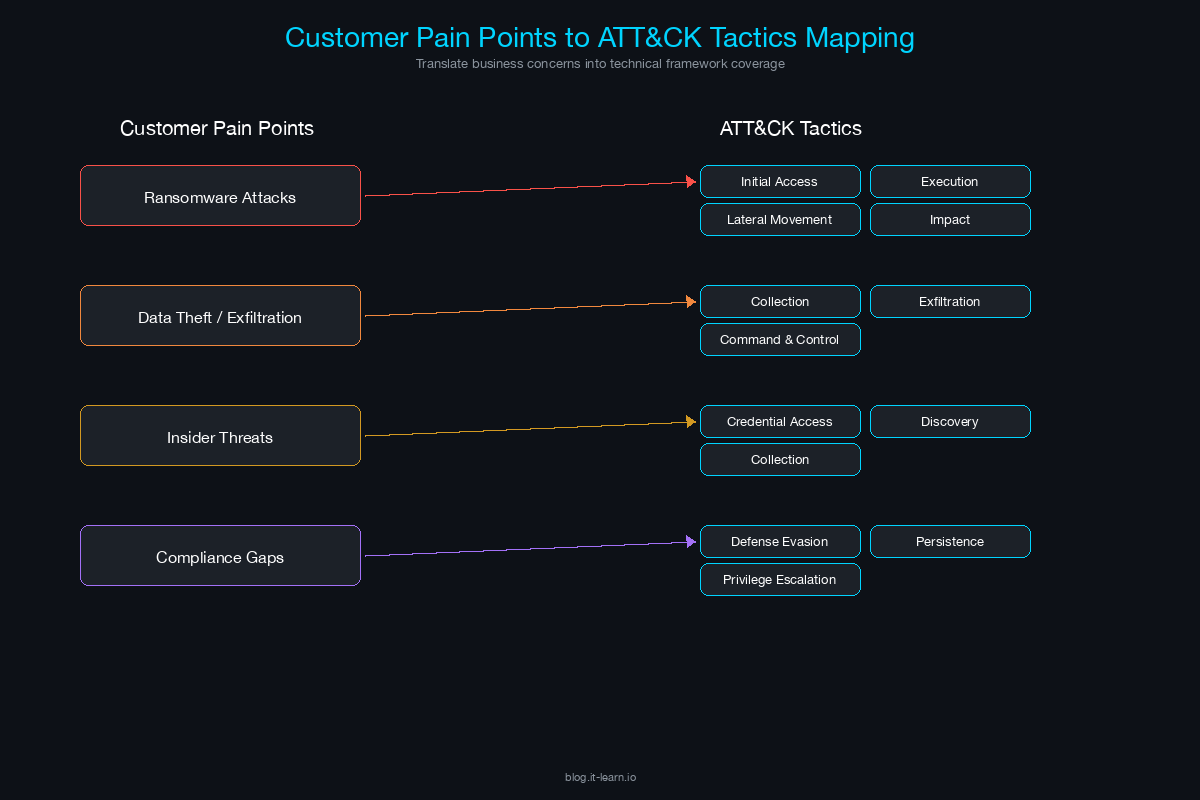
When a customer describes a security challenge, train yourself to translate it into ATT&CK language. This table maps common customer statements to tactics and follow-up questions:
| Customer Says | Maps To | Follow-Up Question |
|---|---|---|
| “We keep getting phished” | Initial Access (T1566) | “What happens after the click? Where does your detection pick up - at the email gateway, the endpoint, or the network?” |
| “We had ransomware last year” | Impact (T1486) + multiple preceding tactics | “How far did the attacker get before deploying ransomware? Did they move laterally first? That tells us where the detection gap was.” |
| “We’re worried about insider threats” | Collection, Exfiltration | “Are you more concerned about malicious insiders or negligent ones? The detection strategy is completely different.” |
| “Our credentials keep getting compromised” | Credential Access (T1003, T1110) | “Are you seeing credential stuffing from external sources, or credential dumping on compromised endpoints? That determines whether we focus on the perimeter or the endpoint.” |
| “We can’t see what’s happening in our cloud” | Discovery, Lateral Movement in cloud | “Which cloud? AWS, Azure, GCP? The ATT&CK cloud matrix has specific techniques for each provider - the detection approach is different for each.” |
| “Our SOC has too many alerts” | Defense Evasion (attackers bypassing noisy tools) | “Are they false positives from signature-based rules, or are real threats getting lost in the noise? ATT&CK-based detections tied to specific techniques tend to have higher fidelity.” |
Using ATT&CK to Position Security Products
ATT&CK gives you a structured way to articulate exactly what your product does - and does not do - in terms of adversary behavior coverage.
Building Your ATT&CK Coverage Map
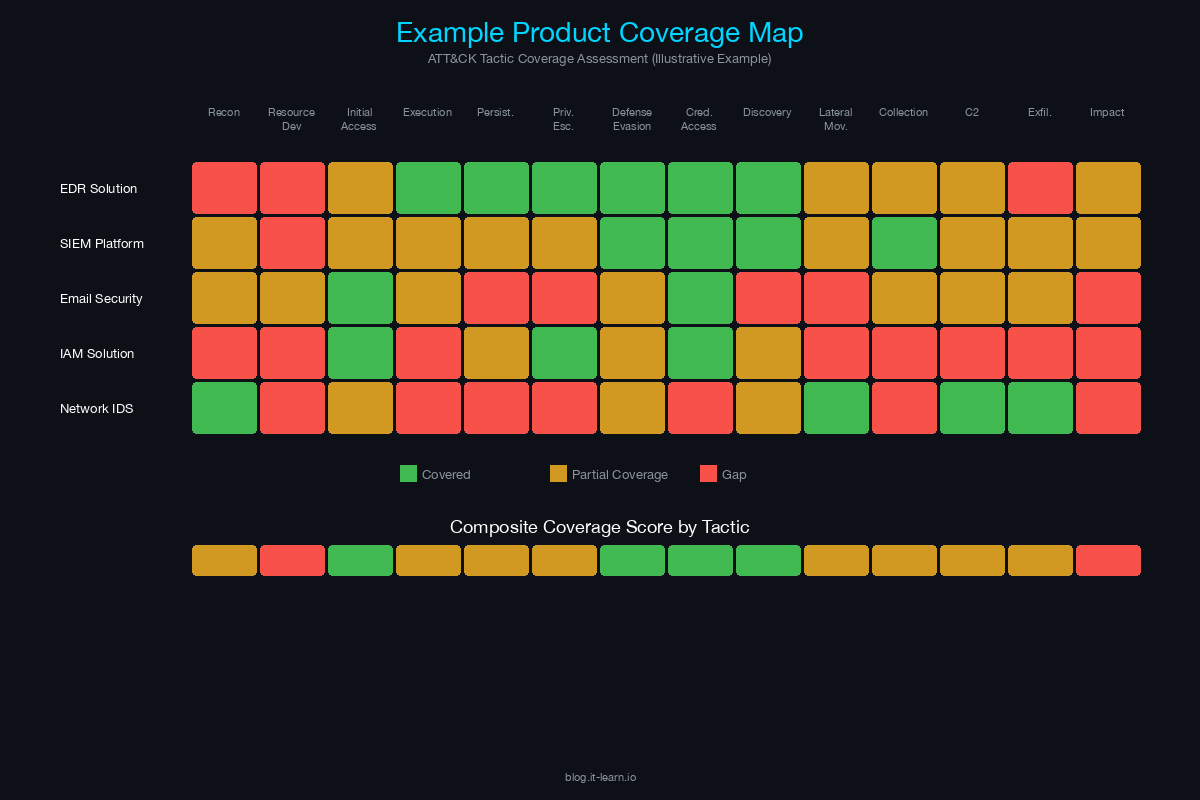
Before you walk into any customer meeting, you should have a clear understanding of which ATT&CK techniques your product detects, prevents, or responds to. Here is how to build that map:
Start with your product’s core capabilities. If you sell an EDR, your coverage will be strongest in Execution, Persistence, Privilege Escalation, Defense Evasion, Credential Access, and Lateral Movement on endpoints.
Map each capability to specific techniques. Not “we detect lateral movement” but “we detect T1021.001 (Remote Desktop Protocol), T1021.002 (SMB/Windows Admin Shares), T1550.002 (Pass the Hash), and T1550.003 (Pass the Ticket).”
Rate your coverage honestly. For each technique, classify your detection as: Detects (alerts on the behavior), Prevents (blocks the behavior), Logs (records telemetry that an analyst can query), or No Coverage.
Identify complementary products. For gaps in your coverage, know which partner or ecosystem products fill them. “We don’t do network-level detection for C2 traffic - that’s where an NDR solution like X integrates with our platform.”
In an RFP Response
Many RFPs now include a section asking vendors to map their capabilities to ATT&CK. Here is how to handle it:
- Include a table with technique IDs, technique names, your detection/prevention capability, and the specific data source your product uses.
- Do not claim coverage you cannot demonstrate. Evaluators will test it.
- Reference MITRE Engenuity ATT&CK Evaluations if your product has participated. These are independent tests that run real-world attack simulations against security products and publish the results publicly.
In a Live Presentation
When presenting to a technical audience, pull up the ATT&CK Navigator (a web-based tool from MITRE) and show your product’s coverage as a heat map. Color-code techniques by detection confidence. This visual immediately communicates breadth and depth in a way that slide decks cannot.
Real-World Application: ATT&CK in Customer Engagements
Scenario 1: The Post-Breach Customer
A financial services company had a ransomware incident 6 months ago. They are evaluating new security tools. In discovery, you learn the attacker used spearphishing (T1566.001) to gain initial access, deployed a PowerShell-based loader (T1059.001), escalated privileges via Kerberoasting (T1558.003), moved laterally using PsExec (T1569.002), and deployed ransomware (T1486).
How to use ATT&CK: Walk through the attack chain with the customer using ATT&CK language. For each technique, show how your product would have detected or prevented it. “At the Kerberoasting step - T1558.003 - our platform monitors for anomalous Kerberos TGS requests targeting service accounts with weak encryption types. We would have flagged this within minutes of the first Kerberoasting attempt.”
This approach is powerful because it ties your product to their actual experience, not a hypothetical scenario.
Scenario 2: The Compliance-Driven Customer
A healthcare organization needs to demonstrate compliance with NIST CSF and wants to show their board that they have detection capabilities across the ATT&CK matrix. They are not responding to an incident - they are trying to prove coverage.
How to use ATT&CK: Position your product’s ATT&CK coverage map as a compliance artifact. “When your auditor asks how you detect credential theft, you can point to our detection of T1003.001 (LSASS Memory), T1003.003 (NTDS), and T1558.003 (Kerberoasting), and show the actual alert data. That’s a much stronger answer than ‘we have an EDR.’”
Scenario 3: The Competitive Bake-Off
You are in a proof-of-concept against two other vendors. The customer wants to compare detection coverage objectively.
How to use ATT&CK: Suggest using ATT&CK as the evaluation framework. Propose a set of techniques to test - say, 20 techniques spanning 6 tactics - and ask all vendors to demonstrate detection against each one. This levels the playing field and shifts the conversation from marketing claims to measurable outcomes. If your product has participated in MITRE Engenuity ATT&CK Evaluations, point to the public results as independent validation.
ATT&CK Resources Every SE Should Bookmark
- ATT&CK Matrix (Enterprise): attack.mitre.org - The primary reference. Use this during customer calls.
- ATT&CK Navigator: mitre-attack.github.io/attack-navigator - Build and share heat maps of your product’s coverage.
- MITRE Engenuity ATT&CK Evaluations: attackevals.mitre-engenuity.org - Independent product evaluations using ATT&CK-based attack simulations.
- Threat Group Profiles: Each ATT&CK group page lists the techniques used by that threat actor. Use these to build industry-specific threat narratives. Example: “APT41 targets healthcare and uses these 15 techniques - here’s our coverage against them.”
Key Takeaways for the Field
- ATT&CK is a shared language. Use it to sound credible, not to lecture.
- Know your product’s coverage map by tactic and technique. Practice articulating it.
- Lead with the customer’s problem, then map it to ATT&CK. Never the other way around.
- Be honest about gaps. Use them to position ecosystem integrations and defense-in-depth.
- In competitive situations, suggest ATT&CK-based evaluations. If your product is strong, objective testing favors you.
The SE who can fluently connect customer pain to adversary behavior to product capability - using ATT&CK as the connective tissue - is the SE who wins technical credibility in the room. That credibility is what turns a demo into a decision.
Related Posts in This Series
- The SE’s Guide to Reading a Vulnerability Report - Learn how to parse CVEs, CVSS scores, and EPSS data to prioritize risk in customer conversations
- How to Run a Technical Discovery Call for Security Deals - Use ATT&CK-informed questions to uncover gaps during discovery
- XDR: Cortex vs CrowdStrike vs Sentinel - Map detection and response platforms to ATT&CK techniques they cover
- Using Threat Intelligence in Customer Presentations - Turn ATT&CK-based threat intel into compelling customer-facing content
- Handling the 5 Most Common Security Objections - Overcome pushback when positioning threat-informed defense strategies
Practice with free flashcards, quizzes, and hands-on lab scenarios at cciesec.it-learn.io — built specifically for the CCIE Security v6.1 written (350-701 SCOR) and lab exam.


