

A customer sends you a Slack message at 3 PM: “Hey, have you seen CVE-2025-XXXXX? Our CISO is asking how your product handles this. Can you get back to me by EOD?”
You have two options. Option one: panic, forward it to your product team, and wait hours for a response while the customer’s confidence in you erodes. Option two: open the CVE, read it in 5 minutes, assess the severity, understand the attack vector, and respond with a clear, informed answer within 30 minutes.
The difference between those two options is not deep security research expertise. It is knowing how to read a vulnerability report - understanding what a CVE entry contains, what CVSS scores actually tell you (and what they do not), and how to use EPSS to cut through the noise. These are learnable skills, and every SE in cybersecurity needs them.
This post teaches you how to read a vulnerability advisory like a professional, assess its relevance to your customers, and turn it into a clear talking point you can deliver in 30 seconds.
Anatomy of a CVE Entry
Every publicly disclosed vulnerability gets a CVE identifier - a standardized ID in the format CVE-YYYY-NNNNN (year followed by a sequence number). The CVE system is managed by MITRE Corporation and coordinated through CVE Numbering Authorities (CNAs) - organizations authorized to assign CVE IDs.
When you look up a CVE (on cve.org, nvd.nist.gov, or vendor advisory pages), here is what you will find:
| Field | What It Contains | What You Care About as an SE |
|---|---|---|
| CVE ID | Unique identifier (e.g., CVE-2024-3094) | Use this when communicating with customers - it is the universal reference |
| Description | Technical summary of the vulnerability | Read this first - it tells you what the vulnerability is and how it can be exploited |
| Affected Products | Software, versions, and configurations impacted | Check if your product or your customer’s environment is affected |
| CVSS Score | Severity rating (0.0-10.0) with vector string | Understand the severity - but do not stop here |
| References | Links to vendor advisories, patches, and research | The vendor advisory usually has the most actionable information |
| CWE | Common Weakness Enumeration - the category of vulnerability (e.g., CWE-787: Out-of-bounds Write) | Tells you the class of bug - useful for explaining the technical root cause |
Reading the Description
The description is a plain-language summary written by the CNA. It typically follows this pattern:
“[Product] [version range] contains a [vulnerability type] in [component] that allows [attacker type] to [impact] via [attack vector].”
Example: “Apache HTTP Server versions 2.4.49 and 2.4.50 contain a path traversal vulnerability in the core module that allows a remote attacker to read arbitrary files or achieve remote code execution via crafted URI paths.”
From this single sentence, you can extract:
- Product: Apache HTTP Server
- Versions: 2.4.49 and 2.4.50
- Vulnerability type: Path traversal
- Component: Core module
- Attacker type: Remote (no authentication required)
- Impact: File read or remote code execution
- Attack vector: Crafted URI paths (network-based)
That is enough to start a customer conversation.
CVSS v4.0 Scoring: What the Numbers Mean
CVSS (Common Vulnerability Scoring System) is the standard for rating vulnerability severity. Version 4.0 was released in November 2023 and is now the current standard. As an SE, you need to understand the base score and the key metrics that drive it.
The Score Ranges
| CVSS Score | Severity | What It Means for Customer Conversations |
|---|---|---|
| 0.0 | None | Informational - no security impact |
| 0.1-3.9 | Low | Minor issue, low priority for remediation |
| 4.0-6.9 | Medium | Moderate risk, should be remediated in normal patch cycle |
| 7.0-8.9 | High | Significant risk, prioritize remediation |
| 9.0-10.0 | Critical | Severe risk, immediate action required |
CVSS v4.0 Base Metrics
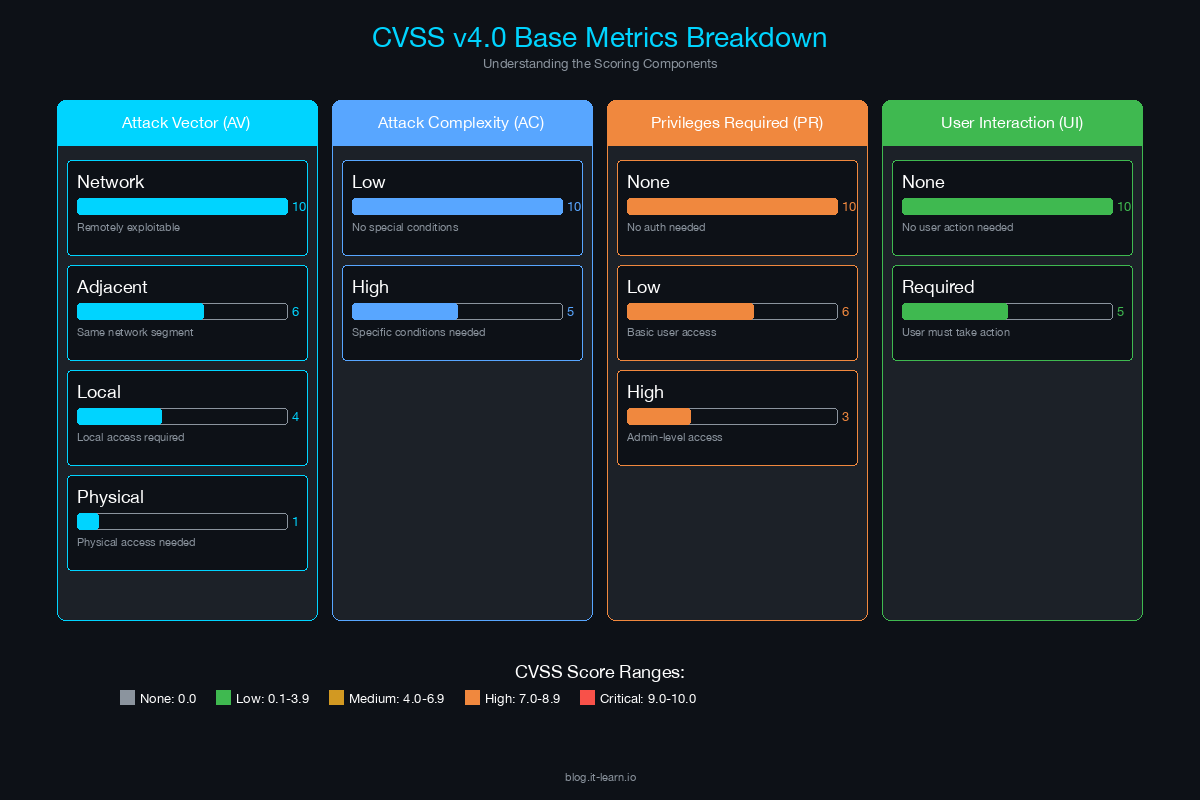
CVSS v4.0 reorganized the scoring metrics. Here are the ones that matter most for SE conversations:
Attack Vector (AV): How the attacker reaches the vulnerable component.
- Network (N): Exploitable remotely over the network. This is the most dangerous.
- Adjacent (A): Requires access to the same network segment (e.g., same Wi-Fi, same VLAN).
- Local (L): Requires local access to the system (logged-in user, local process).
- Physical (P): Requires physical access to the hardware.
Attack Complexity (AC): How difficult the attack is to execute.
- Low (L): Straightforward, reliable exploitation. No special conditions needed.
- High (H): Exploitation requires specific conditions, race conditions, or specialized knowledge.
Privileges Required (PR): What access level the attacker needs before exploitation.
- None (N): No prior authentication needed. Most dangerous.
- Low (L): Requires basic user privileges.
- High (H): Requires admin or privileged access.
User Interaction (UI): Whether a user must take action for exploitation to succeed.
- None (N): No user interaction required. Fully automated exploitation.
- Passive (P): User must view or interact with something (e.g., opening a file, visiting a page) but does not need to actively cooperate.
- Active (A): User must actively participate (e.g., installing software, changing settings).
Reading the CVSS Vector String
CVSS scores come with a vector string that encodes the metrics. For example:
CVSS:4.0/AV:N/AC:L/AT:N/PR:N/UI:N/VC:H/VI:H/VA:H/SC:N/SI:N/SA:N
Breaking this down:
- AV:N - Attack Vector: Network (remotely exploitable)
- AC:L - Attack Complexity: Low (easy to exploit)
- AT:N - Attack Requirements: None
- PR:N - Privileges Required: None (unauthenticated)
- UI:N - User Interaction: None (automated)
- VC:H - Vulnerable System Confidentiality Impact: High
- VI:H - Vulnerable System Integrity Impact: High
- VA:H - Vulnerable System Availability Impact: High
This combination - network-accessible, low complexity, no privileges, no user interaction, full impact - is the recipe for a CVSS 9.8-10.0 critical vulnerability. When you see this vector, tell your customer: “This is as bad as it gets - remotely exploitable, easy to exploit, no authentication required, and full system compromise.”
CVSS Supplemental Metrics (New in v4.0)
CVSS v4.0 introduced supplemental metrics that provide additional context:
- Automatable (A): Can this vulnerability be exploited at scale with automation? Yes/No.
- Recovery (R): Can the system recover after exploitation? Automatic/User/Irrecoverable.
- Provider Urgency: Vendor’s assessment of urgency for remediation.
These metrics help differentiate between two vulnerabilities with the same base score. A CVSS 9.8 that is automatable and irrecoverable is worse than a CVSS 9.8 that requires manual exploitation and allows automatic recovery.
EPSS: Why It Matters More Than CVSS for Prioritization
EPSS (Exploit Prediction Scoring System) is a model developed by FIRST (Forum of Incident Response and Security Teams) that predicts the probability that a vulnerability will be exploited in the wild within the next 30 days. It produces a score between 0 and 1 (0% to 100%).
Why EPSS Changes the Conversation
Here is the problem with CVSS alone: in any given year, approximately 25,000-30,000 CVEs are published. Roughly 40-50% of those are rated High or Critical (CVSS 7.0+). No organization can patch 12,000+ high/critical vulnerabilities per year across their entire environment. They need to prioritize.
CVSS tells you how bad a vulnerability could be. EPSS tells you how likely it will be exploited. Together, they give you a risk-based prioritization framework.
The EPSS Score Ranges
| EPSS Score | Interpretation | Recommended Action |
|---|---|---|
| 0.0-0.05 (0-5%) | Very low probability of exploitation | Include in normal patch cycle |
| 0.05-0.20 (5-20%) | Low-moderate probability | Monitor for changes, patch within 30 days |
| 0.20-0.50 (20-50%) | Moderate probability | Prioritize remediation within 14 days |
| 0.50-0.80 (50-80%) | High probability | Urgent remediation, apply compensating controls immediately |
| 0.80-1.0 (80-100%) | Near-certain exploitation | Emergency patching, assume exploitation is occurring |
The Prioritization Matrix: CVSS + EPSS
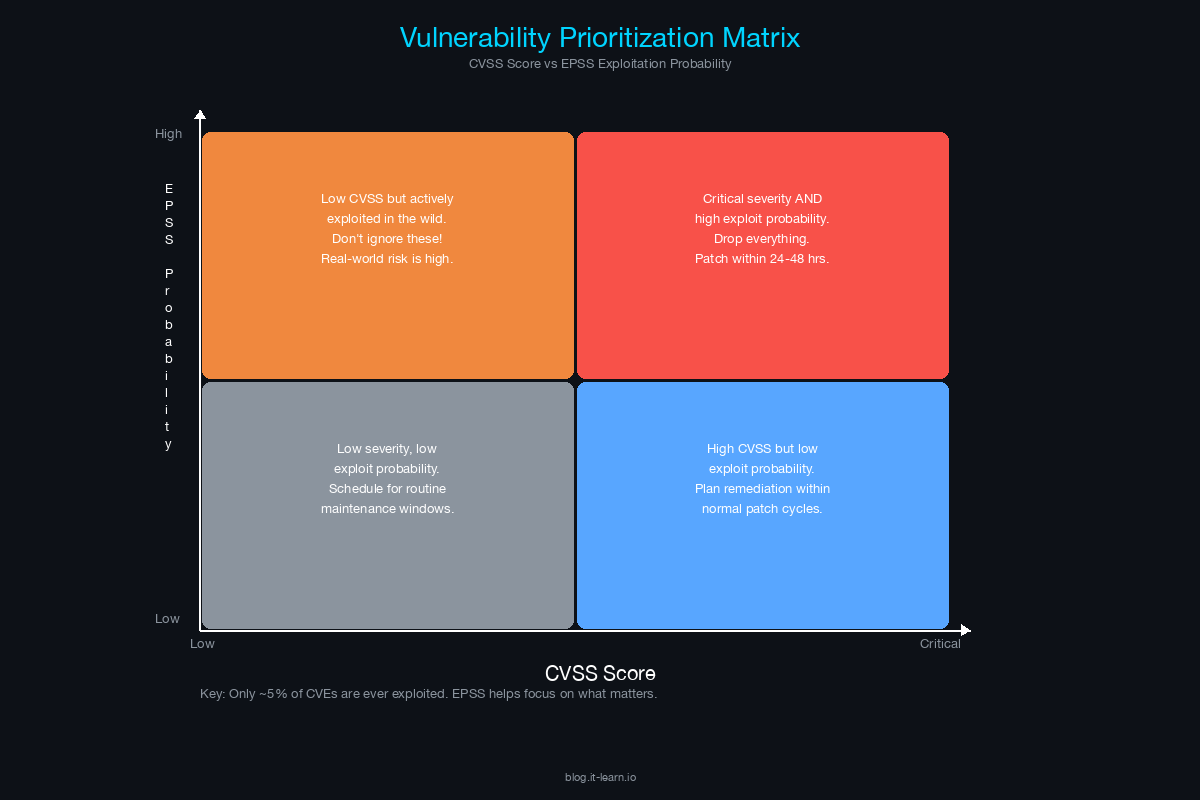
The real power is combining both scores:
| Low EPSS (<0.1) | Medium EPSS (0.1-0.5) | High EPSS (>0.5) | |
|---|---|---|---|
| Critical CVSS (9.0+) | Patch in normal cycle - severe but unlikely to be exploited | Prioritize - severe and moderately likely | Emergency - severe and highly likely |
| High CVSS (7.0-8.9) | Normal patch cycle | Monitor and accelerate if EPSS rises | Prioritize urgently |
| Medium CVSS (4.0-6.9) | Low priority | Monitor | Investigate - lower severity but high exploitation probability may indicate specific targeting |
The key insight for customers: “A CVSS 9.8 with an EPSS of 0.01 is less urgent than a CVSS 7.5 with an EPSS of 0.85. The second one is actually being exploited in the wild right now - that’s where your team’s time should go.”
Real-World CVEs Dissected
Let me walk through three high-profile CVEs and show you how to read them and turn them into customer talking points.
Example 1: Log4Shell (CVE-2021-44228)
What it was: A remote code execution vulnerability in Apache Log4j, a ubiquitous Java logging library. An attacker could achieve full system compromise by sending a specially crafted log message containing a JNDI lookup string.
CVSS: 10.0 (AV:N/AC:L/PR:N/UI:N - network, low complexity, no privileges, no interaction)
EPSS: Peaked above 0.97 (97% probability of exploitation within 30 days)
Why it mattered: Log4j is embedded in virtually every Java application. The attack surface was enormous and the vulnerability was trivially exploitable. Exploitation began within hours of public disclosure.
SE talking point: “Log4Shell showed why asset inventory and software composition analysis are critical. Organizations that could not answer ‘Where is Log4j in my environment?’ within 24 hours were blind to their exposure. If your customer cannot produce a software bill of materials for their critical applications, they will face the same problem with the next Log4Shell.”
Example 2: MOVEit (CVE-2023-34362)
What it was: A SQL injection vulnerability in Progress Software’s MOVEit Transfer, a managed file transfer product. The Cl0p ransomware group exploited it to steal data from hundreds of organizations.
CVSS: 9.8 (AV:N/AC:L/PR:N/UI:N)
EPSS: Rose rapidly after Cl0p exploitation began
Why it mattered: MOVEit is used for secure file transfers, often containing sensitive data (payroll, PII, financial records). The Cl0p group did not deploy ransomware - they stole data and used extortion. Over 2,500 organizations and 60 million individuals were affected.
SE talking point: “MOVEit demonstrated that secure file transfer products are high-value targets precisely because they handle sensitive data. The lesson for customers: any internet-facing application that processes sensitive data needs web application security, not just network-level protection. And the Cl0p campaign showed that data theft without encryption is now a primary extortion model.”
Example 3: Citrix Bleed (CVE-2023-4966)
What it was: An information disclosure vulnerability in Citrix NetScaler ADC and Gateway. It allowed an attacker to hijack authenticated sessions by extracting session tokens from device memory.
CVSS: 9.4 (AV:N/AC:L/PR:N/UI:N)
EPSS: Extremely high - actively exploited by LockBit and other ransomware groups
Why it mattered: Citrix NetScaler is deployed as a front-end to many enterprise applications. Session hijacking meant attackers could bypass MFA - they did not need to authenticate, they stole an already-authenticated session. Patching alone was not sufficient; organizations also needed to invalidate all active sessions after patching.
SE talking point: “Citrix Bleed is the perfect example of why patching is not always enough. Even after applying the patch, organizations that did not invalidate their active sessions remained compromised. For your customer, the question is: does your vulnerability management program include post-patch verification, or does it end at ‘patch deployed’?”
The CVE-to-Talking-Point Template
Use this template every time a new vulnerability hits the news and a customer asks about it. Fill it out in 5 minutes and you have a clear, informed response.
VULNERABILITY QUICK BRIEF
==========================
CVE ID: [CVE-YYYY-NNNNN]
Published: [Date]
Product: [Affected product and versions]
Severity: [CVSS score and qualitative rating]
EPSS: [Score and percentile if available]
CISA KEV: [Yes/No — is it on the Known Exploited Vulnerabilities list?]

WHAT IT IS (1 sentence):
[Plain language description of the vulnerability]

HOW IT IS EXPLOITED (1 sentence):
[Attack vector — remote/local, authenticated/unauthenticated, complexity]

BUSINESS IMPACT (1 sentence):
[What can an attacker do — RCE, data theft, denial of service, privilege escalation]

IS OUR PRODUCT AFFECTED?
[Yes/No — if yes, what version and what is the fix]

DOES OUR PRODUCT DETECT/PREVENT THIS?
[How your product addresses this vulnerability — detection rule, prevention capability, or N/A]

CUSTOMER TALKING POINT (30 seconds):
"[1-2 sentences you can say to a customer that demonstrate awareness, assess relevance, and recommend action]"

REMEDIATION:
- Patch: [Version/link]
- Workaround: [If patch is not immediately available]
- Post-patch actions: [Session invalidation, key rotation, etc.]
Example: Filled-Out Template
VULNERABILITY QUICK BRIEF
==========================
CVE ID: CVE-2023-4966
Published: October 10, 2023
Product: Citrix NetScaler ADC and Gateway (multiple versions)
Severity: CVSS 9.4 Critical
EPSS: 0.95 (95th percentile)
CISA KEV: Yes (added October 18, 2023)

WHAT IT IS:
A buffer overflow in Citrix NetScaler that leaks session tokens from device memory.

HOW IT IS EXPLOITED:
Remote, unauthenticated attacker sends crafted HTTP requests to extract session tokens.

BUSINESS IMPACT:
Full session hijacking — attacker bypasses MFA and acts as the authenticated user.

IS OUR PRODUCT AFFECTED?
No — our product does not use Citrix NetScaler components.

DOES OUR PRODUCT DETECT/PREVENT THIS?
Yes — our NDR component detects anomalous session reuse patterns indicative of session hijacking.

CUSTOMER TALKING POINT:
"Citrix Bleed is critical because it lets attackers bypass MFA by stealing active sessions.
If you're running NetScaler, patch immediately and invalidate all active sessions —
patching alone doesn't close the window. Our platform detects the session hijacking
behavior that follows successful exploitation."

REMEDIATION:
- Patch: Citrix advisory CTX579459
- Workaround: Restrict access to management interfaces
- Post-patch: Kill all active sessions, rotate credentials, review access logs for anomalies
Putting It All Together: Your Vulnerability Response Workflow
When a significant CVE drops, here is the workflow:
Read the CVE description (2 minutes). Understand what it is, what is affected, and how it is exploited.
Check the CVSS vector (1 minute). Is it network-exploitable? Does it require authentication? What is the impact?
Check EPSS (1 minute). Is this vulnerability likely to be exploited? Check first.epss.cyentia.com or your threat intelligence platform.
Check CISA KEV (30 seconds). Is it on the Known Exploited Vulnerabilities list? If yes, it is being actively exploited.
Fill out the talking-point template (5 minutes). This becomes your response document for customer inquiries.
Check your product (variable). Is your product affected? Does your product detect or prevent exploitation? Get this from your product security team.
Proactively reach out to at-risk customers (5 minutes). If the vulnerability affects products your customers are running, do not wait for them to ask. Send a brief message: “You may have seen CVE-XXXX-XXXX. Based on what I know about your environment, here’s my assessment and what I recommend.”
The SE who reaches out proactively about a vulnerability - before the customer asks - is the SE who earns trusted advisor status. That is the difference between a vendor and a partner.
Key Takeaways
Learn to read CVE descriptions quickly. Product, versions, vulnerability type, attack vector, impact - you can extract all of this in 60 seconds.
CVSS tells you severity. EPSS tells you likelihood. Use both for prioritization. EPSS is the more actionable metric for real-world risk.
CISA KEV is the strongest signal. If a vulnerability is on the KEV list, it is being actively exploited. Treat it as urgent regardless of CVSS score.
Use the talking-point template. Fill it out in 5 minutes and you have a ready response for any customer inquiry.
Be proactive. Do not wait for customers to ask. When a significant CVE drops, reach out first. That is what trusted advisors do.
Related Posts in This Series
- MITRE ATT&CK Framework Explained for Solutions Engineers - Connect CVE findings to the ATT&CK techniques adversaries use to exploit them
- Translate a Pen Test Report Into a Sales Opportunity - Turn vulnerability findings into funded remediation projects
- XDR: Cortex vs CrowdStrike vs Sentinel - Understand how XDR platforms detect and respond to exploited vulnerabilities
- Using Threat Intelligence in Customer Presentations - Incorporate CVE and EPSS data into customer-facing threat briefings
- How to Run a Technical Discovery Call for Security Deals - Use vulnerability data to drive deeper technical discovery
Practice with free flashcards, quizzes, and hands-on lab scenarios at cciesec.it-learn.io — built specifically for the CCIE Security v6.1 written (350-701 SCOR) and lab exam.


