

The conversation usually starts the same way. A network manager says their MPLS contract is up for renewal, branch users are complaining about application performance, and the CFO wants to cut WAN costs. The question lands on your desk: should we stick with our current VPN setup or move to SD-WAN?
This guide gives you the architectural comparison, performance data, security analysis, cost framework, and customer conversation structure to answer that question with confidence.
Architecture Comparison
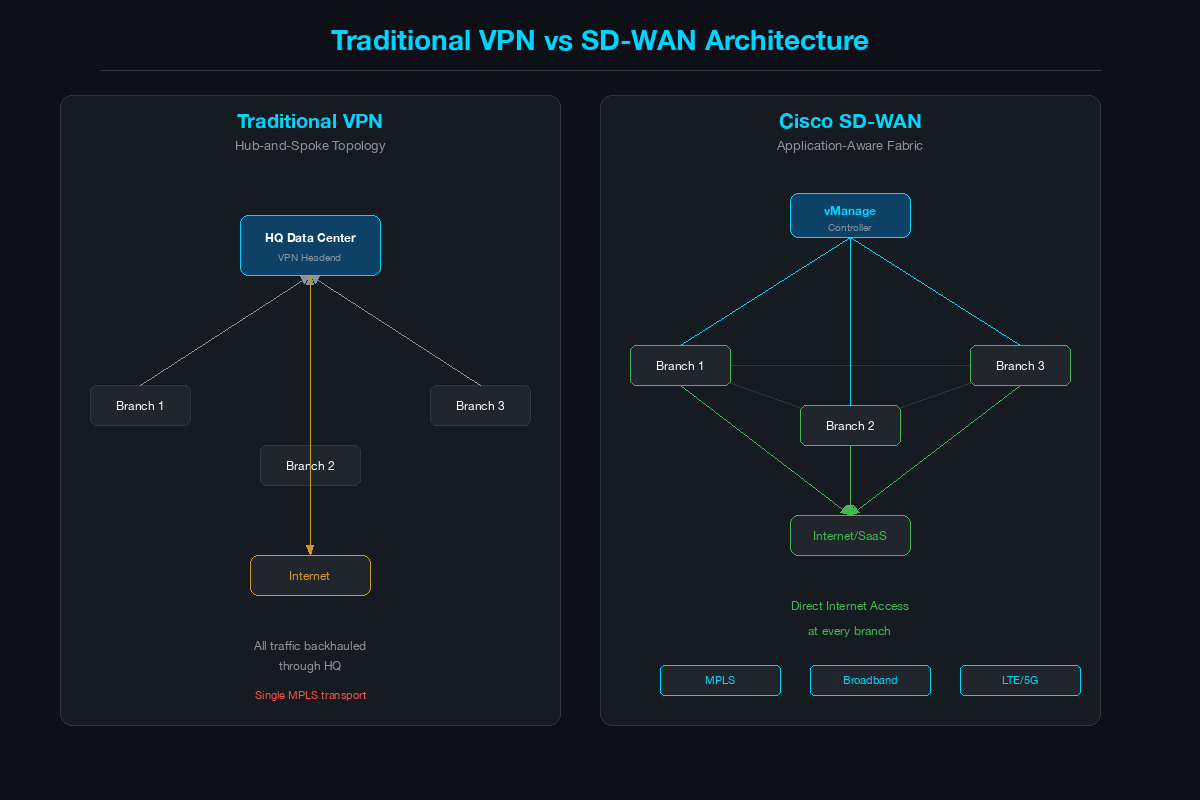
Traditional VPN: Hub-and-Spoke
The classic enterprise WAN uses MPLS as the primary transport with IPsec VPN tunnels providing encryption. The architecture is typically hub-and-spoke: branch sites connect to a central data center (or two for redundancy), and all traffic - including internet-bound traffic - backhauled through the hub for security inspection.
Key characteristics:
- Transport: MPLS (primary), sometimes with broadband backup via DMVPN or FlexVPN
- Encryption: IPsec tunnels between routers (IKEv2, ESP)
- Topology: Hub-and-spoke; full mesh requires manual tunnel configuration or DMVPN
- Routing: OSPF, EIGRP, or BGP over tunnels
- Provisioning: CLI-based, per-device configuration
- Application awareness: None - all traffic treated equally unless QoS is manually configured
- Management: Per-device (CLI or Cisco Prime Infrastructure)
Cisco SD-WAN: Application-Aware Fabric
Cisco SD-WAN (built on the Viptela architecture) creates an encrypted overlay fabric across any transport - MPLS, broadband, LTE, 5G, or satellite. The architecture separates the control plane (vSmart controllers), orchestration plane (vBond, vManage), and data plane (Catalyst 8000 or vEdge routers at each site).
Key characteristics:
- Transport: Any combination of MPLS, broadband, LTE/5G, satellite - simultaneously
- Encryption: IPsec (AES-256-GCM) with automatic key rotation via OMP (Overlay Management Protocol)
- Topology: Automatic full mesh or hub-and-spoke - configurable per VPN/segment
- Routing: OMP for overlay, BFD for path health monitoring
- Provisioning: Zero-touch provisioning (ZTP) - plug in the router, it bootstraps from vBond
- Application awareness: Deep packet inspection identifies 3,000+ applications; policy steers traffic per app
- Management: Centralized via vManage (single pane of glass for all sites)
Architecture Comparison Table
| Aspect | Traditional VPN | Cisco SD-WAN |
|---|---|---|
| Transport | Single (MPLS) or dual (MPLS + broadband backup) | Multi-transport active-active (MPLS + broadband + LTE simultaneously) |
| Topology | Hub-and-spoke; full mesh is complex | Automatic full mesh or any topology via policy |
| Encryption | IPsec (manual key management or IKEv2) | IPsec with automatic OMP-based key rotation |
| Application Visibility | None natively; requires separate NBAR/NetFlow | Built-in DPI for 3,000+ applications |
| Traffic Steering | Static routing or PBR | Application-aware routing based on real-time SLA metrics |
| Failover | Minutes (routing convergence) | Sub-second (BFD-based detection, per-packet failover) |
| Provisioning | CLI per device | Zero-touch provisioning (ZTP) |
| Policy Management | Per-device configuration | Centralized templates pushed from vManage |
| Security Stack | External firewall/IPS at hub | Integrated firewall, IPS, URL filtering, malware, Umbrella |
| Cloud Access | Backhauled through data center | Direct Internet Access (DIA) + Cloud OnRamp |
| Scalability | Complex beyond 50-100 sites | Designed for 1,000+ sites |
| Operational Model | CLI expertise required | GUI-driven with API automation |
Performance: Why SD-WAN Wins on User Experience
Traditional VPN treats all traffic equally. A Webex video call and a file backup compete for the same MPLS bandwidth with no differentiation unless manual QoS is configured - and even then, QoS only prioritizes within a single link. If that link degrades, all traffic suffers.
SD-WAN changes this with three capabilities:
1. Application-Aware Routing (AAR)
SD-WAN continuously monitors each transport link using BFD (Bidirectional Forwarding Detection) probes. Every 10 milliseconds (configurable), it measures latency, jitter, and packet loss on every path. When an application policy says “Webex requires less than 150ms latency, less than 30ms jitter, and less than 1% loss,” SD-WAN automatically steers Webex to the best-performing path - and moves it to another path in real time if conditions change.
Traditional VPN has no equivalent. If the MPLS link has a latency spike, Webex quality degrades until the link recovers or an operator manually reroutes traffic.
2. Forward Error Correction (FEC) and Packet Duplication
When a link is experiencing loss but is still the best available path, SD-WAN can apply FEC - sending redundant data so the remote side can reconstruct lost packets without retransmission. For critical applications, SD-WAN can also duplicate packets across two links simultaneously, guaranteeing delivery even if one link drops packets entirely.
Traditional VPN relies on TCP retransmission or accepts UDP loss. There is no transport-layer recovery.
3. Direct Internet Access (DIA) and Cloud OnRamp
In a traditional VPN architecture, a branch user accessing Salesforce or Microsoft 365 sends traffic to the data center over MPLS, through the firewall, out to the internet, across the cloud provider’s network, and back. This adds 50-150ms of unnecessary latency.
SD-WAN enables DIA - internet-bound traffic breaks out locally at the branch through the integrated security stack (firewall + IPS + URL filter + DNS security). Cloud OnRamp optimizes connectivity to specific SaaS and IaaS providers by probing multiple paths and selecting the one with the best application performance metrics.
Security Stack Comparison
Traditional VPN Security Model
In a hub-and-spoke VPN, security is centralized at the data center. Branch traffic backhauled to the hub passes through the corporate firewall (ASA, Firepower, Palo Alto), IPS, web proxy, and email gateway. This model works but creates several problems:
- All traffic must traverse the hub, creating a bottleneck and adding latency
- Branch sites have no local security - if the MPLS link to the hub is down, the branch has no internet access (or must allow unfiltered direct access)
- Adding a new security service (e.g., CASB) requires deploying it at the hub and ensuring all branch traffic flows through it
SD-WAN Integrated Security
Cisco SD-WAN embeds security services directly into the edge router (Catalyst 8300/8500):
- Application-aware firewall - zone-based firewall with application-level policies
- IPS/IDS - Snort-based intrusion prevention with automatic signature updates
- URL filtering - category-based web filtering with Cisco Talos threat intelligence
- DNS-layer security - Cisco Umbrella integration for DNS-based threat prevention
- Malware protection - AMP (Advanced Malware Protection) file inspection
- TLS/SSL decryption - inspect encrypted traffic at the branch
This stack runs on the branch router, enabling secure DIA without backhauling. For customers who want cloud-delivered security, Cisco SD-WAN integrates with Umbrella SIG (Secure Internet Gateway) and Zscaler - steering branch internet traffic to cloud security PoPs via IPsec or GRE tunnels.
Security Comparison Table
| Security Feature | Traditional VPN | Cisco SD-WAN |
|---|---|---|
| Tunnel Encryption | IPsec AES-256 | IPsec AES-256-GCM |
| Firewall | Centralized at hub (ASA/FTD) | Distributed at each branch (integrated) |
| IPS/IDS | Centralized at hub | Distributed at each branch (Snort) |
| URL Filtering | Centralized proxy at hub | Distributed at each branch |
| DNS Security | Umbrella via PAC file or DNS redirect | Native Umbrella integration |
| Malware Protection | Centralized AMP at hub | Distributed AMP at branch |
| Cloud Security Integration | Manual (GRE/IPsec to cloud proxy) | Native (Umbrella SIG, Zscaler connector) |
| Segmentation | VRF-based (manual per device) | VPN segmentation (centralized policy) |
| Policy Deployment | Per-device | Centralized push from vManage |
Cost Analysis Framework
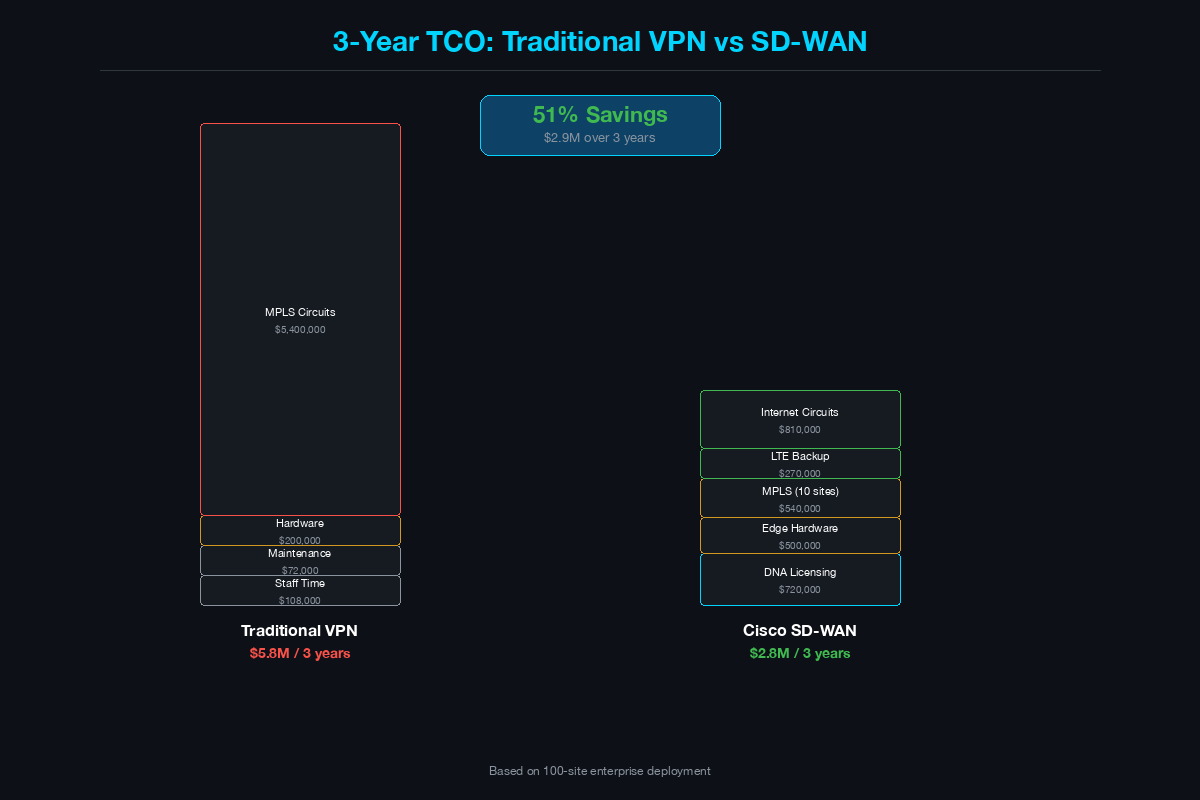
This is the framework you walk through with the customer. Do not guess at numbers - use their actual circuit costs and site count to build a credible comparison.
Current WAN Cost (Traditional VPN)
| Cost Category | Example (100-site enterprise) |
|---|---|
| MPLS circuits (primary) | 100 sites x $1,500/month = $150,000/month |
| Backup broadband (where deployed) | 30 sites x $200/month = $6,000/month |
| Hub router/firewall hardware (amortized) | $200,000 / 60 months = $3,333/month |
| VPN headend maintenance (SmartNet) | $2,000/month |
| Network engineer time (config changes) | 20 hours/month x $150/hour = $3,000/month |
| Total monthly | ~$164,333/month ($1.97M/year) |
SD-WAN Cost
| Cost Category | Example (100-site enterprise) |
|---|---|
| Broadband circuits (primary) | 100 sites x $200/month = $20,000/month |
| LTE backup (where deployed) | 100 sites x $75/month = $7,500/month |
| MPLS retained (critical sites only) | 10 sites x $1,500/month = $15,000/month |
| Catalyst 8300 edge routers (amortized) | $500,000 / 60 months = $8,333/month |
| Cisco DNA SD-WAN licensing | 100 sites x $200/month = $20,000/month |
| vManage/vSmart controllers | Included in DNA license |
| Total monthly | ~$70,833/month ($850K/year) |
Net Savings
In this example, SD-WAN reduces annual WAN spend from $1.97M to $850K - a 57% reduction - while delivering 10x more bandwidth per site and adding application-level intelligence.
Adjust these numbers for the customer’s actual environment. The key variables are: current MPLS cost per site, number of sites, broadband availability, and required SD-WAN license tier (Essentials vs. Advantage vs. Premier).
Migration Path: From VPN to SD-WAN
Phase 1: Controllers and Pilot (Weeks 1-4)
Deploy the SD-WAN controller infrastructure:
- vManage - management and orchestration (VM or cloud-hosted)
- vSmart - control plane (route policy, topology)
- vBond - orchestration and authentication (NAT traversal, ZTP)
Select 5-10 pilot sites. Ideal pilot sites have both MPLS and broadband already in place, host business-critical applications (to validate AAR), and have cooperative local IT staff.
Phase 2: Parallel Operation (Weeks 4-8)
Deploy Catalyst 8000 routers at pilot sites alongside existing VPN routers. Run both in parallel:
- SD-WAN handles a subset of traffic (e.g., internet-bound and SaaS)
- Existing VPN handles site-to-site and data center traffic
- Monitor application performance via vManage analytics
This phase validates that SD-WAN performs as expected before migrating production traffic.
Phase 3: Production Migration (Weeks 8-24)
Roll out to remaining sites in waves (10-20 sites per wave). For each site:
- Install Catalyst 8000 router with ZTP
- Verify WAN connectivity and overlay tunnel formation
- Migrate traffic from VPN to SD-WAN overlay
- Decommission old VPN router
- Enable DIA, Cloud OnRamp, and security policies
Phase 4: Optimization (Ongoing)
After all sites are migrated:
- Fine-tune AAR policies based on application performance data
- Enable advanced features: multi-region fabric, cloud gateway, ThousandEyes integration
- Evaluate MPLS circuit decommissioning at sites where broadband + LTE provides sufficient reliability
- Implement SD-WAN security stack to reduce dependency on data center security appliances
When VPN Is Still the Right Answer
SD-WAN is not always the answer. Recommend staying with traditional VPN when:
- The customer has fewer than 5 sites with simple connectivity requirements. SD-WAN’s value scales with site count - for 2-3 sites with static traffic patterns, the operational overhead of an SD-WAN platform is not justified
- No broadband availability. SD-WAN’s cost advantage comes from augmenting MPLS with broadband. If sites are in remote locations with only MPLS or satellite, SD-WAN adds complexity without cost savings
- Regulatory requirements mandate private transport only. Some government and financial environments prohibit internet-facing traffic from branch sites. If the customer cannot use broadband for WAN traffic, the transport cost savings disappear
- The existing VPN hardware has 3+ years of life remaining and the customer has no application performance complaints. If it is not broken and the MPLS contract is favorable, the business case for migration weakens
- The customer lacks operational readiness. SD-WAN shifts operations from CLI to a centralized platform. If the network team is small, undertrained, or resistant to change, the migration risk outweighs the benefit
Customer Conversation Framework
Opening Question
“Walk me through how traffic flows from your branch offices to the applications your users depend on - Webex, Microsoft 365, Salesforce, and your internal ERP. How many hops does that traffic take, and where are your users complaining about performance?”
This question reveals whether they are backhauling internet traffic, how many transport links they have, and where the pain points are.
ROI Talking Points
- Transport cost reduction: “What do you pay per month for MPLS at a typical branch? What broadband options are available at those locations?” Build the savings calculation in front of them
- Bandwidth upgrade: “Your MPLS link is 50 Mbps. For the same cost as one MPLS circuit, you could have two 500 Mbps broadband links with automatic failover”
- Application performance: “With SD-WAN, Webex traffic automatically moves to the best-performing link in real time - your users stop experiencing frozen video and dropped calls”
- Operational efficiency: “How many hours per month does your team spend on WAN change requests? SD-WAN templates let you push policy changes to 500 sites in minutes”
- Security consolidation: “You are paying for branch firewalls and a centralized web proxy. SD-WAN integrates firewall, IPS, URL filtering, and DNS security at the edge - reducing your security appliance count”
Handling “SD-WAN Seems Complex”
“SD-WAN replaces complexity - it does not add it. Today you manage 100 routers individually via CLI, maintain static tunnels, and manually reroute traffic during outages. SD-WAN gives you a single dashboard to manage all sites, zero-touch deployment for new branches, and automatic failover. The first week requires learning vManage. After that, day-two operations are simpler than what you have today.”
Handling “We Just Renewed Our MPLS Contract”
“That is fine - SD-WAN does not require you to drop MPLS immediately. Most customers start by adding a broadband link at each site and running both in parallel. SD-WAN treats MPLS as one transport and broadband as another, steering traffic intelligently across both. When the MPLS contract comes up again, you will have 12 months of data showing which sites can drop MPLS entirely and which need to retain it.”
Summary
| Decision Factor | Traditional VPN | Cisco SD-WAN |
|---|---|---|
| Best for | Small, static environments (2-5 sites) | Dynamic, multi-site environments (10-1,000+ sites) |
| Transport flexibility | Single or dual link (active/backup) | Multi-link active-active with app-aware steering |
| Application intelligence | None | DPI-based per-app routing and SLA enforcement |
| Security | Centralized at hub | Distributed at edge + cloud integration |
| Provisioning | CLI per device (hours) | Zero-touch (minutes) |
| Failover | Minutes (routing convergence) | Sub-second (BFD + per-packet steering) |
| Cost trajectory | Rising (MPLS renewals) | Declining (broadband + optimization) |
| Operational model | CLI expertise, per-device | GUI + API, centralized policy |
The customer’s decision comes down to three questions: How many sites do you have? Are your users unhappy with application performance? Is your MPLS bill growing? If the answer to any two of those is yes, SD-WAN is the conversation worth having.
Related Posts in This Series
- How to Position SASE to a CISO - Extend the SD-WAN conversation into the full SASE stack
- Secure Remote Access: VPN vs ZTNA vs SASE - Compare SD-WAN-based access with ZTNA and traditional VPN alternatives
- How to Whiteboard a Zero Trust Architecture in 10 Minutes - Position SD-WAN within a broader Zero Trust architecture discussion
- Umbrella vs Zscaler vs Prisma Access SSE - Pair the SD-WAN underlay with the right SSE overlay
- How to Demo a Firewall Without Boring the Room - Deliver compelling demos of SD-WAN alongside firewall and security features
Practice with free flashcards, quizzes, and hands-on lab scenarios at cciesec.it-learn.io — built specifically for the CCIE Security v6.1 written (350-701 SCOR) and lab exam.


