

You are on a call with a customer. The IT director mentions they are evaluating SASE solutions because their current VPN cannot support their ZTNA initiative, and they need a CASB to address shadow IT before their SOC 2 audit. Your response in that moment determines whether the customer sees you as a partner or a person who just forwards emails to the SE.
You do not need to be a cybersecurity engineer. But you do need to understand enough terminology to follow the conversation, ask intelligent questions, and recognize when a customer is describing a problem your company can solve.
This guide covers 50 essential cybersecurity terms organized by category. For each term, you get three things: what it means, why the customer cares, and one sentence you can use in a meeting.
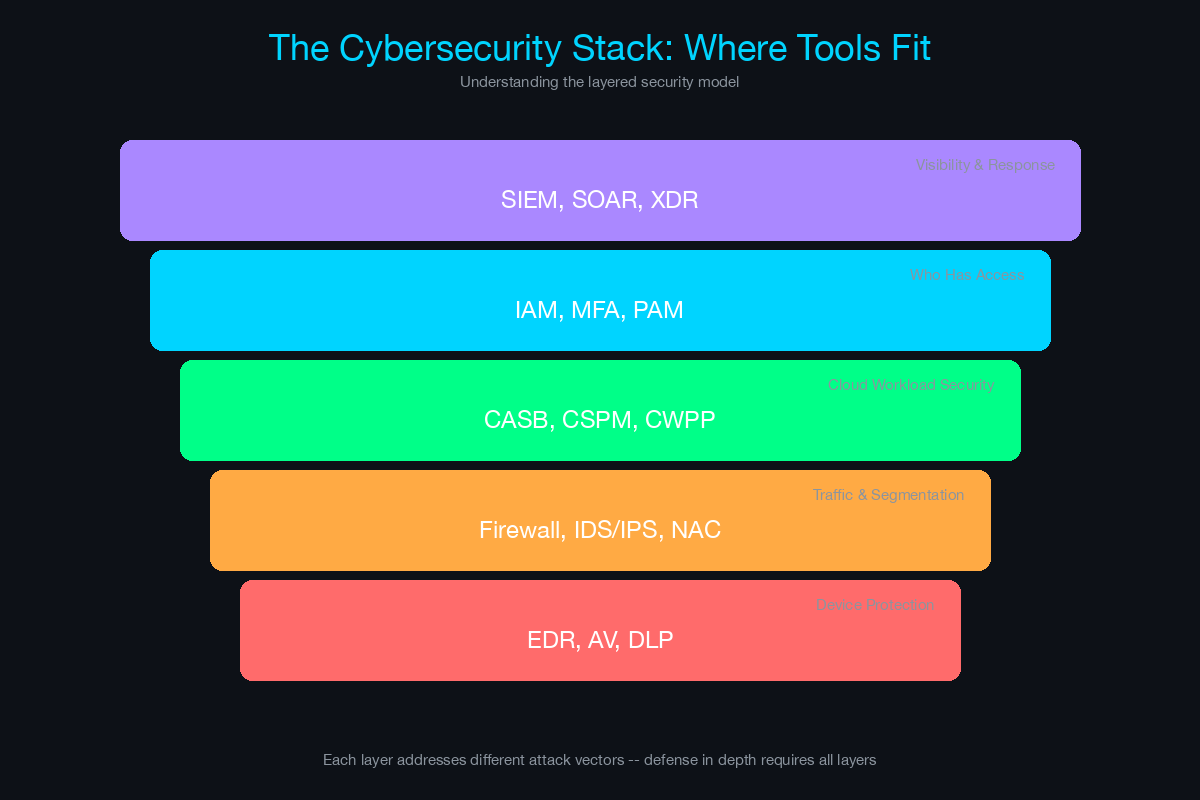
Category 1: Threat Landscape
These terms describe the threats and attack methods customers face. Understanding them helps you recognize when a customer is dealing with a security incident or concern.
1. APT (Advanced Persistent Threat)
What it means: A sophisticated, long-term cyberattack - typically state-sponsored or organized crime - where attackers gain access to a network and remain undetected for months or years, slowly exfiltrating data.
Why the customer cares: APTs target high-value organizations: government, defense, healthcare, financial services, and critical infrastructure. If your customer is in these verticals, they are a potential target.
Say in a meeting: “Are you seeing any indicators that your current tools would catch an APT-style attack, or is that a gap you are looking to address?”
2. Zero-Day
What it means: A vulnerability in software that is unknown to the vendor and has no patch available. Attackers exploit it before anyone knows it exists - hence “zero days” of protection.
Why the customer cares: Zero-days cannot be stopped by traditional patching. Customers need behavioral detection (EDR/XDR) and network segmentation to limit the blast radius when a zero-day is exploited.
Say in a meeting: “How is your team handling zero-day exposure today - are you relying on signature-based detection, or do you have behavioral analytics in place?”
3. Ransomware
What it means: Malware that encrypts a victim’s files and demands payment (usually cryptocurrency) for the decryption key. Modern ransomware uses double extortion - encrypting data AND threatening to publish it publicly.
Why the customer cares: Ransomware is the most financially damaging attack type for most organizations. Average recovery costs exceed $1.5 million, not including reputational damage, lost business, and regulatory fines.
Say in a meeting: “Has your team modeled what a ransomware event would cost in terms of downtime and recovery? That analysis often drives the business case for the controls we are discussing.”
4. Phishing
What it means: Social engineering attacks delivered via email (or SMS - called smishing, or voice - called vishing) that trick users into clicking malicious links, opening infected attachments, or providing credentials.
Why the customer cares: Phishing is the number one initial access vector for cyberattacks. No amount of perimeter security helps if an employee clicks a link and enters their credentials on a fake login page.
Say in a meeting: “What is your current phishing simulation and training program? That is usually the first layer of defense we look at.”
5. Social Engineering
What it means: The broader category of manipulation techniques that exploit human psychology to gain access to systems, data, or physical spaces. Phishing is one type. Others include pretexting (fabricating a scenario), baiting (leaving infected USB drives), and tailgating (following someone through a secure door).
Why the customer cares: Technology cannot fully solve human vulnerability. Social engineering bypasses firewalls and encryption by targeting the person, not the system.
Say in a meeting: “Beyond email filtering, do you have a security awareness program that covers social engineering tactics beyond just phishing?”
6. Supply Chain Attack
What it means: An attack that compromises a trusted vendor, software provider, or service provider to gain access to their customers. The attacker does not attack the target directly - they attack a supplier the target trusts.
Why the customer cares: Customers cannot control their vendors’ security. A compromised software update from a trusted vendor can bypass all internal security controls.
Say in a meeting: “How are you evaluating the security posture of your critical vendors? Third-party risk management is increasingly part of compliance requirements.”
7. Insider Threat
What it means: A security risk originating from within the organization - an employee, contractor, or partner who intentionally or accidentally causes a breach. This includes malicious insiders (stealing data) and negligent insiders (clicking phishing links or misconfiguring systems).
Why the customer cares: Insider threats are difficult to detect because the attacker already has legitimate access. Traditional perimeter defenses are irrelevant when the threat is inside the network.
Say in a meeting: “Do you have visibility into anomalous user behavior - like an employee downloading an unusual volume of files or accessing systems outside their normal pattern?”
Category 2: Security Controls and Tools
These are the products and technologies customers deploy to protect their environments. Understanding these helps you map customer needs to your portfolio.
8. Firewall / NGFW (Next-Generation Firewall)
What it means: A network security device that monitors and controls incoming and outgoing traffic based on rules. NGFWs add application awareness, intrusion prevention, and threat intelligence beyond basic port/protocol filtering.
Why the customer cares: Firewalls are the foundational security control. Every organization has one. The conversation is usually about upgrading from legacy firewalls to NGFWs or consolidating firewall vendors.
Say in a meeting: “When was the last time you reviewed your firewall rule base? We find that organizations accumulate thousands of rules over time, and many become obsolete.”
9. EDR (Endpoint Detection and Response)
What it means: Software installed on endpoints (laptops, desktops, servers) that continuously monitors for suspicious behavior, detects threats, and enables response actions like isolating a compromised device.
Why the customer cares: Antivirus catches known malware using signatures. EDR catches unknown threats using behavioral analysis. As attacks become more sophisticated, EDR is becoming a baseline requirement rather than an advanced capability.
Say in a meeting: “Are you running traditional antivirus or have you moved to an EDR solution? That distinction matters for how we architect the rest of the security stack.”
10. SIEM (Security Information and Event Management)
What it means: A platform that collects, correlates, and analyzes log data from across the IT environment - firewalls, servers, endpoints, applications, cloud services - to detect threats and support incident investigation.
Why the customer cares: Without a SIEM, security events from different tools are siloed. A SIEM provides the single pane of glass that security analysts need to connect the dots between a phishing email, a compromised credential, and lateral movement.
Say in a meeting: “What is your current approach to log management and correlation? Most compliance frameworks require centralized logging, and a SIEM is typically how organizations meet that requirement.”
11. SOAR (Security Orchestration, Automation, and Response)
What it means: A platform that automates repetitive security tasks and orchestrates workflows across multiple security tools. When a SIEM generates an alert, SOAR can automatically enrich it with threat intelligence, check affected endpoints, and execute a response playbook - reducing analyst workload.
Why the customer cares: Security teams are understaffed. SOAR reduces the manual effort per incident from minutes to seconds, allowing the team to handle more alerts with fewer people.
Say in a meeting: “How much of your incident response process is automated today? Most teams we work with are spending significant analyst time on tasks that SOAR can handle automatically.”
12. NAC (Network Access Control)
What it means: A solution that controls which devices can connect to the network based on identity, device type, health status, and policy. NAC authenticates devices, checks their compliance posture, and assigns them to appropriate network segments.
Why the customer cares: Without NAC, any device that physically connects to the network or joins the Wi-Fi gets access. NAC ensures that only authorized, compliant devices get on the network, and unauthorized devices are blocked or quarantined.
Say in a meeting: “Do you have visibility into every device connecting to your network? Most organizations are surprised by the number of unmanaged and IoT devices when they first deploy NAC.”
13. DLP (Data Loss Prevention)
What it means: Technology that monitors, detects, and prevents the unauthorized transmission of sensitive data outside the organization - through email, cloud uploads, USB devices, or printing.
Why the customer cares: Regulatory requirements (GDPR, HIPAA, PCI DSS) mandate that organizations protect sensitive data. DLP provides the technical control to enforce data handling policies and demonstrate compliance.
Say in a meeting: “What is your current approach to preventing sensitive data from leaving the organization? DLP is often a compliance requirement, especially if you handle PII or financial data.”
14. CASB (Cloud Access Security Broker)
What it means: A security policy enforcement point between cloud service users and cloud applications. A CASB provides visibility into cloud app usage (sanctioned and unsanctioned), enforces data security policies, and detects anomalous behavior in SaaS environments.
Why the customer cares: Shadow IT is rampant. Employees use hundreds of SaaS applications that IT does not manage or even know about. A CASB gives the security team visibility and control over cloud usage.
Say in a meeting: “How many SaaS applications are your employees using? Most organizations estimate 50 but discover over 500 when they deploy a CASB.”
15. WAF (Web Application Firewall)
What it means: A security control that sits in front of web applications and filters malicious HTTP/HTTPS traffic - blocking attacks like SQL injection, cross-site scripting (XSS), and bot traffic.
Why the customer cares: Any organization with public-facing web applications or APIs needs a WAF. Web application attacks are the number one vector for data breaches in e-commerce, financial services, and SaaS companies.
Say in a meeting: “Are your public-facing applications behind a WAF? With the volume of automated attack traffic targeting web apps, it is a baseline requirement for most organizations.”
Category 3: Identity and Access Management
Identity is the new perimeter. These terms describe how organizations manage who can access what - and are central to zero trust architectures.
16. MFA (Multi-Factor Authentication)
What it means: Requiring two or more verification factors to authenticate - something you know (password), something you have (phone, token), something you are (biometric). MFA prevents attackers from gaining access with stolen passwords alone.
Why the customer cares: MFA blocks over 99% of credential-based attacks according to Microsoft. Cyber insurance carriers now require MFA as a condition for coverage. It is the single highest-impact security control per dollar spent.
Say in a meeting: “Is MFA deployed across all critical systems including VPN, email, and administrative access? Most insurance carriers are requiring it across the board now.”
17. SSO (Single Sign-On)
What it means: An authentication method that allows users to log in once and gain access to multiple applications without re-entering credentials. Protocols like SAML and OIDC enable SSO across cloud and on-premises applications.
Why the customer cares: SSO improves user experience (fewer passwords to remember) and security (centralized authentication means centralized visibility and control). It is foundational for identity-centric security.
Say in a meeting: “How many separate logins do your employees manage today? SSO simplifies the user experience while giving your security team centralized visibility into access.”
18. PAM (Privileged Access Management)
What it means: A solution that secures, manages, and monitors privileged accounts - administrator credentials, service accounts, root access, and API keys. PAM typically includes credential vaulting, session recording, just-in-time access, and automatic password rotation.
Why the customer cares: Privileged accounts are the primary target in most breaches. If an attacker compromises an admin credential, they have the keys to the kingdom. PAM limits exposure by controlling and auditing every privileged session.
Say in a meeting: “How are your admin and service account credentials managed today? Are they in a vault with automatic rotation, or are they static and shared?”
19. IAM (Identity and Access Management)
What it means: The broad discipline of managing digital identities and their access permissions across the organization. IAM includes user provisioning, authentication, authorization, access reviews, and deprovisioning.
Why the customer cares: Orphaned accounts (former employees who still have access), excessive permissions, and manual access provisioning are common audit findings. IAM automation reduces risk and administrative overhead.
Say in a meeting: “When an employee leaves, how quickly is their access revoked across all systems? Most organizations find that manual deprovisioning leaves gaps.”
20. RBAC (Role-Based Access Control)
What it means: An access control model where permissions are assigned to roles (e.g., “Finance Analyst,” “Network Admin”) rather than individual users. Users are assigned to roles, and the role determines what they can access.
Why the customer cares: RBAC enforces least privilege at scale. Instead of managing individual permissions for thousands of users, the IT team manages a set of roles. This simplifies access reviews and audit compliance.
Say in a meeting: “Are access permissions tied to roles, or are they managed on an individual basis? Role-based access is usually the first step toward scalable least-privilege enforcement.”
21. Zero Trust
What it means: A security model based on the principle “never trust, always verify.” Instead of trusting users and devices because they are inside the network perimeter, zero trust requires continuous verification of identity, device health, and behavior for every access request.
Why the customer cares: Zero trust is the dominant security architecture strategy for 2024 and beyond. Most CISOs have a zero trust initiative, and it influences purchasing decisions across identity, network, endpoint, and cloud security.
Say in a meeting: “Where are you in your zero trust journey? Most organizations start with identity and MFA, then expand to network segmentation and continuous device posture assessment.”
Category 4: Compliance and Frameworks
These terms describe the regulatory requirements and industry standards that drive cybersecurity spending. Compliance is often the catalyst for security projects.
22. SOC 2
What it means: A compliance framework developed by the AICPA that evaluates an organization’s controls across five trust service criteria: security, availability, processing integrity, confidentiality, and privacy. SOC 2 Type II requires demonstrating that controls are effective over a period of time (usually 6-12 months).
Why the customer cares: SaaS companies and service providers need SOC 2 to win enterprise customers. If your customer is a B2B SaaS company, their prospects are asking for SOC 2 reports before signing contracts.
Say in a meeting: “Are your enterprise customers requesting a SOC 2 report during procurement? That requirement is becoming standard and often drives the timeline for security investments.”
23. NIST CSF (Cybersecurity Framework)
What it means: A voluntary framework published by the National Institute of Standards and Technology that provides guidelines for managing cybersecurity risk. Organized into five core functions: Identify, Protect, Detect, Respond, and Recover. NIST CSF 2.0 (released in 2024) added Govern as a sixth function.
Why the customer cares: NIST CSF is the most widely adopted cybersecurity framework in the United States. Many organizations use it as the foundation for their security program, and regulators increasingly reference it.
Say in a meeting: “Is your security program aligned to NIST CSF? It is a helpful framework for identifying gaps and prioritizing investments.”
24. ISO 27001
What it means: An international standard for information security management systems (ISMS). ISO 27001 certification requires implementing a comprehensive set of security controls and passing an external audit.
Why the customer cares: ISO 27001 is the global equivalent of SOC 2. International customers, especially in Europe and Asia, often require ISO 27001 certification from their vendors.
Say in a meeting: “Are you pursuing ISO 27001 certification, or is it a requirement from any of your customers? The control requirements overlap significantly with other frameworks we can help address.”
25. PCI DSS (Payment Card Industry Data Security Standard)
What it means: A set of security requirements for any organization that stores, processes, or transmits credit card data. PCI DSS 4.0 (effective March 2025) introduced new requirements including stronger authentication and continuous monitoring.
Why the customer cares: Non-compliance results in fines, increased transaction fees, and potential loss of the ability to process credit cards. PCI DSS requirements directly drive technology purchases in retail, hospitality, and financial services.
Say in a meeting: “Are you aligned to PCI DSS 4.0 yet? The new requirements around authentication and continuous monitoring are driving a lot of project activity.”
26. HIPAA (Health Insurance Portability and Accountability Act)
What it means: US federal law requiring healthcare organizations and their business associates to protect patient health information (PHI). The Security Rule mandates administrative, physical, and technical safeguards.
Why the customer cares: HIPAA violations carry significant fines - up to $1.5 million per violation category per year. Healthcare organizations invest heavily in security to protect PHI and avoid regulatory penalties.
Say in a meeting: “Given that you handle PHI, how are you addressing the HIPAA Security Rule requirements around access controls and audit logging?”
27. CMMC (Cybersecurity Maturity Model Certification)
What it means: A cybersecurity framework required for US Department of Defense contractors. CMMC 2.0 defines three levels of cybersecurity maturity and requires third-party assessment for certain levels.
Why the customer cares: Defense contractors cannot bid on DoD contracts without meeting the required CMMC level. This creates an urgent, compliance-driven buying trigger for security solutions.
Say in a meeting: “What CMMC level are you targeting for your DoD contracts? The requirements map closely to the capabilities we offer.”
Category 5: Cloud Security
As workloads move to the cloud, a new set of security challenges and tools has emerged. These terms are essential for conversations with customers in cloud migration or hybrid environments.
28. CSPM (Cloud Security Posture Management)
What it means: A tool that continuously monitors cloud infrastructure (AWS, Azure, GCP) for misconfigurations, compliance violations, and security risks. CSPM identifies issues like publicly exposed S3 buckets, overly permissive IAM policies, and unencrypted databases.
Why the customer cares: Cloud misconfigurations are the leading cause of cloud data breaches. Customers moving to the cloud often lack the expertise to configure security controls correctly across hundreds of cloud services.
Say in a meeting: “How are you monitoring for misconfigurations across your cloud environments? CSPM is typically the first cloud security investment after the initial migration.”
29. CWPP (Cloud Workload Protection Platform)
What it means: Security for cloud workloads - virtual machines, containers, and serverless functions. CWPP provides vulnerability management, runtime protection, and integrity monitoring for workloads running in the cloud.
Why the customer cares: Traditional endpoint security does not translate directly to cloud workloads, especially containers and serverless. Customers running Kubernetes or containerized applications need workload-specific security.
Say in a meeting: “Are you running containerized workloads in production? The security model for containers is fundamentally different from traditional VMs, and that is where CWPP comes in.”
30. CNAPP (Cloud-Native Application Protection Platform)
What it means: A unified platform that combines CSPM, CWPP, and application security into a single solution for protecting cloud-native applications across the entire lifecycle - from development to runtime.
Why the customer cares: Customers are tired of buying separate tools for cloud posture, workload protection, and application security. CNAPP consolidates these into a single platform with unified visibility.
Say in a meeting: “Are you looking at individual cloud security tools, or are you evaluating a platform approach? The industry is consolidating toward CNAPP as a way to reduce tool sprawl.”
31. IaC Security (Infrastructure as Code Security)
What it means: Scanning infrastructure-as-code templates (Terraform, CloudFormation, Kubernetes manifests) for security misconfigurations before they are deployed. This shifts security left into the development pipeline.
Why the customer cares: Catching a misconfigured security group in a Terraform template before deployment is exponentially cheaper than finding it in production after a breach.
Say in a meeting: “Is your team scanning infrastructure-as-code for security issues before deployment? That is where most cloud misconfigurations originate.”
Category 6: Network Security
Network security terms come up frequently in conversations about architecture, segmentation, and remote access.
32. VPN (Virtual Private Network)
What it means: Encrypted tunnels that provide remote users secure access to the corporate network over the internet. Traditional VPNs connect users to the full network, while modern alternatives provide more granular access.
Why the customer cares: VPNs have been the default remote access technology for decades, but they have significant limitations: they grant broad network access, are performance bottlenecks, and are targets for exploitation.
Say in a meeting: “How are your remote users accessing internal applications today? If it is traditional VPN, we should discuss how ZTNA can improve both security and user experience.”
33. ZTNA (Zero Trust Network Access)
What it means: A technology that replaces VPN by providing users access to specific applications - not the entire network - based on identity, device posture, and context. ZTNA verifies every connection request individually.
Why the customer cares: ZTNA eliminates the “once you are on the VPN, you can reach everything” problem. It reduces the attack surface for remote access and improves performance by connecting users directly to applications.
Say in a meeting: “Are you looking to move from VPN to ZTNA as part of your zero trust initiative? Most organizations see immediate security and performance improvements.”
34. SD-WAN (Software-Defined Wide Area Network)
What it means: A technology that virtualizes WAN connectivity, allowing organizations to use a mix of MPLS, broadband, LTE, and 5G connections with centralized policy management, intelligent path selection, and application-aware routing.
Why the customer cares: SD-WAN reduces WAN costs (less reliance on expensive MPLS circuits), improves application performance, and simplifies branch office networking. It is a foundational component of SASE architecture.
Say in a meeting: “What does your current WAN architecture look like - MPLS, broadband, or a hybrid? SD-WAN can significantly reduce costs while improving performance.”
35. SASE (Secure Access Service Edge)
What it means: A cloud-delivered architecture that converges networking (SD-WAN) and security (firewall, SWG, CASB, ZTNA) into a single service. SASE eliminates the need to backhaul traffic through a central data center for security inspection.
Why the customer cares: SASE simplifies architecture for distributed organizations with remote workers, branch offices, and cloud applications. Instead of managing separate networking and security stacks, everything is delivered as a unified cloud service.
Say in a meeting: “Are you evaluating SASE as a way to consolidate your networking and security stack? Most organizations with significant remote or branch office populations see it as the architecture of the future.”
36. SSE (Security Service Edge)
What it means: The security half of SASE - without the SD-WAN networking component. SSE includes cloud firewall, secure web gateway, CASB, ZTNA, and DLP, all delivered as a cloud service.
Why the customer cares: Some organizations already have SD-WAN and only need the security services. SSE lets them adopt the security benefits of SASE without replacing their existing networking infrastructure.
Say in a meeting: “If you already have SD-WAN in place, SSE gives you the security stack without ripping out your existing network infrastructure.”
37. Microsegmentation
What it means: Dividing the network into very small segments - down to individual workloads or applications - and enforcing security policies between segments. Unlike traditional VLANs, microsegmentation works at the application layer and follows workloads across physical, virtual, and cloud environments.
Why the customer cares: Microsegmentation stops lateral movement. If an attacker compromises one workload, they cannot reach others. This is a core component of zero trust architecture.
Say in a meeting: “How granular is your current network segmentation? Microsegmentation takes it down to the workload level, which is essential for containing lateral movement.”
Category 7: Security Operations
These terms describe how security teams operate day-to-day. Understanding them helps you identify staffing pain points and operational challenges.
38. SOC (Security Operations Center)
What it means: The team (and often the physical or virtual facility) responsible for monitoring, detecting, and responding to security threats 24/7. The SOC is staffed by security analysts who triage alerts, investigate incidents, and coordinate response.
Why the customer cares: Running a SOC is expensive - 24/7 coverage requires a minimum of 5-7 analysts. Many organizations outsource SOC functions to managed security service providers (MSSPs) or MDR providers.
Say in a meeting: “Do you operate your own SOC, or are you working with a managed provider? That distinction shapes how we position the solution and what level of managed services you might need.”
39. MTTD / MTTR (Mean Time to Detect / Mean Time to Respond)
What it means: Key metrics for security operations. MTTD measures how long it takes to identify a threat. MTTR measures how long it takes to contain and remediate it. Lower numbers are better.
Why the customer cares: The faster you detect and respond, the less damage an attacker can do. Reducing MTTD from days to hours and MTTR from hours to minutes directly reduces breach impact and cost.
Say in a meeting: “What are your current MTTD and MTTR metrics? Those are the numbers that tell us how much value automation and better detection will deliver.”
40. Threat Intelligence
What it means: Information about current and emerging threats - indicators of compromise (IOCs), attacker tactics, techniques, and procedures (TTPs), vulnerability disclosures, and dark web activity. Threat intelligence feeds into SIEMs, firewalls, and EDR to improve detection.
Why the customer cares: Generic security tools miss targeted attacks. Threat intelligence customizes defenses to the specific threats relevant to the customer’s industry, geography, and technology stack.
Say in a meeting: “Are you consuming threat intelligence feeds today, and if so, are they integrated into your detection tools? The value of threat intel depends entirely on how it is operationalized.”
41. Incident Response (IR)
What it means: The structured process for handling a cybersecurity incident - from detection and containment to eradication, recovery, and post-incident review. Most organizations follow the NIST SP 800-61 framework.
Why the customer cares: Every organization will face an incident. Having a tested IR plan, a trained team, and pre-negotiated retainer with an IR provider reduces the impact and cost of a breach significantly.
Say in a meeting: “When was the last time your IR plan was tested through a tabletop exercise? Most compliance frameworks require annual testing.”
42. Vulnerability Management
What it means: The continuous process of identifying, prioritizing, and remediating vulnerabilities across the IT environment - servers, endpoints, network devices, applications, and cloud infrastructure.
Why the customer cares: Unpatched vulnerabilities are one of the top initial access vectors for attackers. A mature vulnerability management program reduces the attack surface and is a requirement in virtually every compliance framework.
Say in a meeting: “How are you prioritizing vulnerability remediation today - by CVSS score alone, or are you factoring in exploitability and business context?”
Category 8: Emerging Concepts
These terms represent newer trends that are increasingly appearing in customer conversations.
43. XDR (Extended Detection and Response)
What it means: A security platform that integrates data from endpoints, network, email, cloud, and identity into a single detection and response engine. XDR correlates signals across these sources to detect complex attacks that individual tools miss.
Why the customer cares: XDR addresses the tool sprawl problem by consolidating detection and response into a single platform. It reduces the number of consoles analysts need to monitor and improves detection accuracy through cross-domain correlation.
Say in a meeting: “Are you looking at XDR as a way to consolidate your detection capabilities, or are you building the integration layer yourself with SIEM and SOAR?”
44. DSPM (Data Security Posture Management)
What it means: A tool that discovers and classifies sensitive data across cloud environments, identifies who has access to it, and monitors for risky data flows. DSPM answers the question: “Where is our sensitive data, and is it protected?”
Why the customer cares: With data spread across multiple cloud providers, SaaS applications, and data stores, organizations often do not know where their sensitive data lives. DSPM provides that visibility.
Say in a meeting: “Do you have full visibility into where your sensitive data resides across cloud and SaaS environments? That is usually the starting point for a data security strategy.”
45. AISPM (AI Security Posture Management)
What it means: An emerging category of tools that monitor and secure AI/ML models, training data, and inference pipelines. AISPM addresses risks like model poisoning, data leakage through AI outputs, and unauthorized use of AI services.
Why the customer cares: As organizations adopt AI, they introduce new attack surfaces. Shadow AI (employees using unauthorized AI tools with company data) is a growing concern for CISOs.
Say in a meeting: “Has your security team started looking at AI-specific risks - things like employees putting sensitive data into public AI tools? That is a rapidly growing concern.”
46. Attack Surface Management (ASM)
What it means: Continuous discovery and monitoring of all internet-facing assets - domains, subdomains, IPs, cloud resources, APIs, and certificates - that an attacker could target. ASM identifies assets the organization may not even know about (shadow IT, forgotten infrastructure).
Why the customer cares: You cannot protect what you do not know about. ASM reveals the external attack surface from the attacker’s perspective, often uncovering forgotten test servers, expired certificates, and exposed APIs.
Say in a meeting: “Have you mapped your full external attack surface? Most organizations discover 30-40% more internet-facing assets than they expected.”
47. Cyber Insurance
What it means: Insurance policies that cover financial losses from cybersecurity incidents - breach response costs, legal fees, regulatory fines, business interruption, and ransomware payments. Carriers increasingly require specific security controls as conditions for coverage.
Why the customer cares: Cyber insurance premiums have increased dramatically, and carriers now require MFA, EDR, backups, and incident response plans. The security controls your customer needs to buy are often dictated by their insurance requirements.
Say in a meeting: “What security controls is your cyber insurance carrier requiring? We see a lot of projects driven by insurance requirements, and our solutions map directly to those controls.”
48. DORA (Digital Operational Resilience Act)
What it means: EU regulation (effective January 2025) requiring financial institutions to ensure they can withstand, respond to, and recover from ICT-related disruptions. DORA mandates specific requirements for risk management, incident reporting, resilience testing, and third-party risk management.
Why the customer cares: Financial services organizations operating in or serving the EU must comply with DORA. Non-compliance can result in significant fines and regulatory action.
Say in a meeting: “If you operate in the EU financial sector, DORA compliance is likely on your roadmap. The requirements around resilience testing and third-party risk map directly to solutions we provide.”
49. SecOps Automation
What it means: The use of automation, orchestration, and AI to streamline security operations - automating alert triage, incident investigation, threat hunting, and response actions that traditionally require manual analyst effort.
Why the customer cares: The cybersecurity talent shortage means organizations cannot hire enough analysts. Automation is the only way to scale security operations without proportionally scaling headcount.
Say in a meeting: “How much of your security operations workflow is automated today? Most teams are handling 70% of alerts manually, and that is not sustainable.”
50. Threat Exposure Management (TEM)
What it means: A continuous program that combines attack surface management, vulnerability management, and threat intelligence to provide a unified view of an organization’s security exposure - and prioritize remediation based on real-world exploitability and business impact.
Why the customer cares: Traditional vulnerability management generates thousands of findings. TEM helps organizations focus on the vulnerabilities that actually matter - the ones that attackers are actively exploiting in the wild.
Say in a meeting: “Are you able to prioritize your vulnerabilities based on active exploitation in the wild, or are you working through the backlog by CVSS score alone? Threat exposure management bridges that gap.”
Quick Reference Card
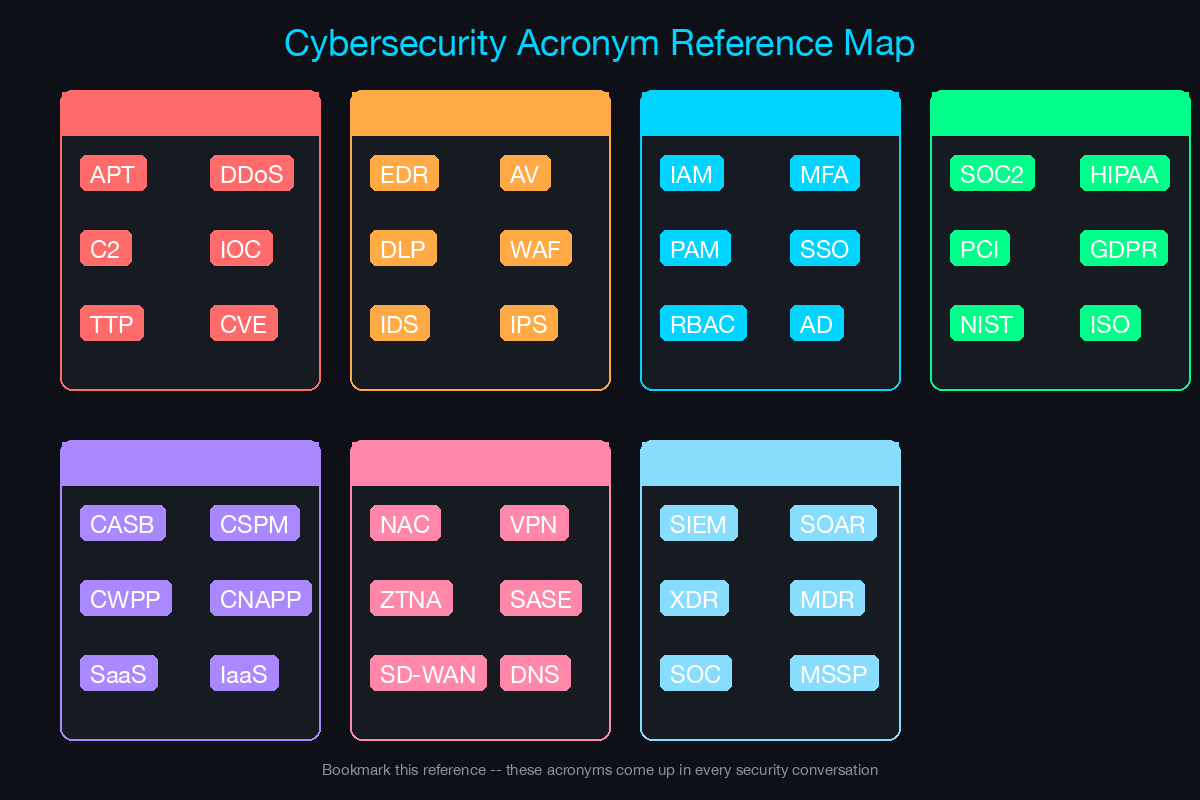
Print this or save it on your phone for meeting prep:
| Category | Key Terms to Know |
|---|---|
| Threats | APT, Zero-Day, Ransomware, Phishing, Supply Chain |
| Controls | Firewall/NGFW, EDR, SIEM, SOAR, NAC, DLP, CASB, WAF |
| Identity | MFA, SSO, PAM, IAM, RBAC, Zero Trust |
| Compliance | SOC 2, NIST CSF, ISO 27001, PCI DSS, HIPAA, CMMC |
| Cloud | CSPM, CWPP, CNAPP, IaC Security |
| Network | VPN, ZTNA, SD-WAN, SASE, SSE, Microsegmentation |
| Operations | SOC, MTTD/MTTR, Threat Intel, IR, Vuln Management |
| Emerging | XDR, DSPM, AISPM, ASM, Cyber Insurance, DORA, TEM |
How to Use This Guide
Before a meeting: Scan the relevant categories based on what you know about the customer’s industry and current initiatives. If they are in healthcare, review HIPAA. If they are evaluating cloud migration, review the cloud security terms. If you know they had a recent incident, review the threat landscape and incident response terms.
During a meeting: When a customer uses a term you recognize from this guide, use the suggested meeting sentence to demonstrate engagement and surface the business need behind the technical term.
After a meeting: Note any terms the customer used that you did not fully understand. Look them up, and if needed, bring in your SE for a deeper technical conversation. Your job is not to explain the technology - it is to identify the opportunity and bring the right resources to the table.
The account manager who speaks the customer’s language earns the right to bring in the technical team. The one who does not gets bypassed by competitors who do.
Related Posts in This Series
- How to Run a Technical Discovery Call for Security Deals - See how SEs use these terms in live discovery calls
- Handling the 5 Most Common Security Objections - Learn the objection patterns AMs encounter before SEs join the deal
- Security Compliance Cheat Sheet: NIST, ISO 27001, SOC 2, PCI DSS - Understand the compliance frameworks customers reference in meetings
- From AM to SE: Making the Technical Pivot - Take the next step from learning terminology to building technical depth
- How to Build a Business Case for NAC - See how technical terminology translates into business justification
Practice with free flashcards, quizzes, and hands-on lab scenarios at cciesec.it-learn.io — built specifically for the CCIE Security v6.1 written (350-701 SCOR) and lab exam.


