

The customer says they are “moving to the cloud.” What they mean is one of a dozen things: migrating a few workloads to AWS, running Microsoft 365 with Azure AD, maintaining an on-premises data center while experimenting with cloud-native services, or some combination of all of these that nobody has documented in an architecture diagram.
For Solutions Engineers, hybrid cloud is where most customer conversations happen. Pure cloud-native companies rarely need an SE to explain security architecture - they have cloud engineers who live in Terraform and IAM policies. The customers who need SE guidance are the ones straddling two worlds: on-premises infrastructure they understand and cloud environments they are still learning. These customers have security gaps they do not know about, and the SE’s job is to make those gaps visible and propose controls that bridge them.
This post covers the shared responsibility model, identity federation, network security controls across cloud providers, cloud-native vs third-party security tools, and CSPM/CWPP/CNAPP positioning - everything an SE needs to draw a hybrid cloud security architecture on a whiteboard and have a credible conversation.
The Shared Responsibility Model
The shared responsibility model is the single most important concept in cloud security, and it is the one most frequently misunderstood by customers.
The Split
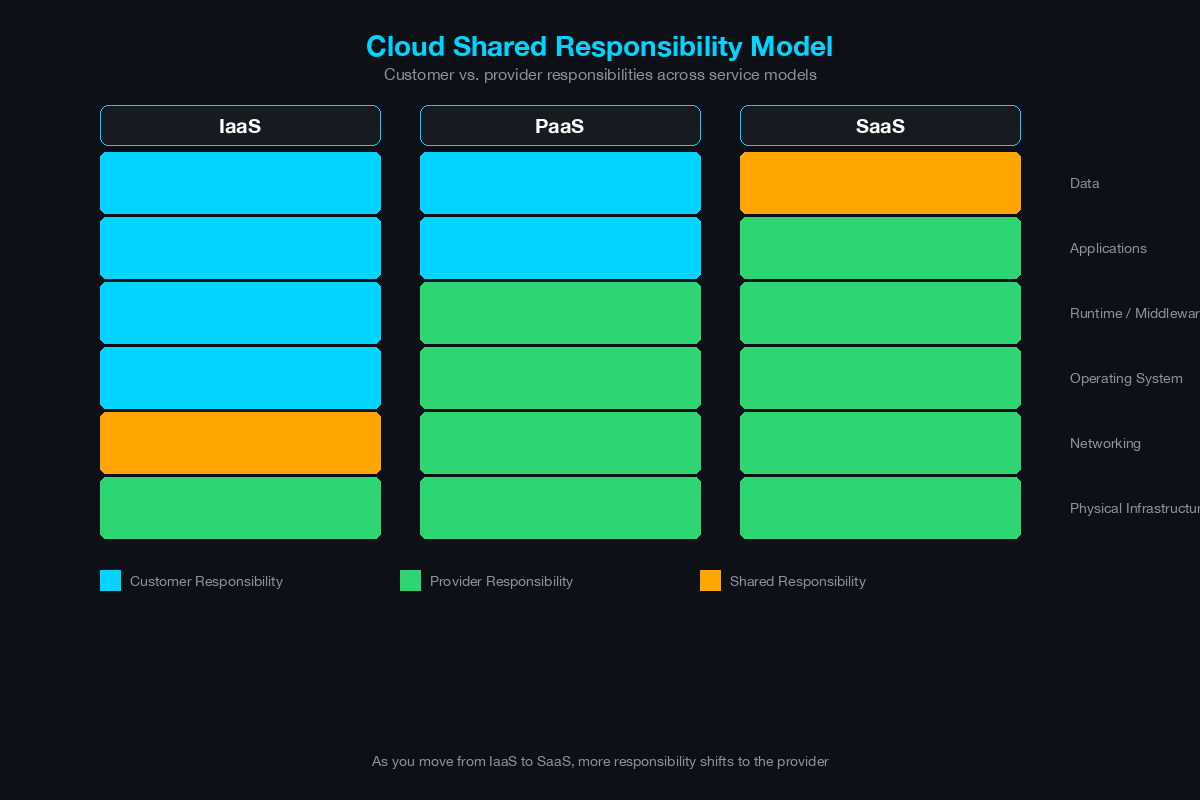
Every cloud provider publishes a version of this model. The core concept is identical across AWS, Azure, and GCP:
+----------------------------------------------------------+
|                  CUSTOMER RESPONSIBILITY                  |
|  +----------------------------------------------------+  |
|  | Data Classification & Encryption                   |  |
|  | Identity & Access Management (IAM policies)        |  |
|  | Application Security                               |  |
|  | OS Patching & Configuration                        |  |
|  | Network Configuration (SGs, NACLs, firewalls)      |  |
|  | Client-Side Encryption & Data Integrity            |  |
|  +----------------------------------------------------+  |
+----------------------------------------------------------+
|               SHARED (varies by service type)             |
+----------------------------------------------------------+
|               CLOUD PROVIDER RESPONSIBILITY               |
|  +----------------------------------------------------+  |
|  | Physical Data Center Security                      |  |
|  | Hypervisor & Host OS                               |  |
|  | Network Infrastructure (backbone, DDoS protection) |  |
|  | Hardware Maintenance & Replacement                 |  |
|  | Global Infrastructure (regions, AZs, edge)         |  |
|  +----------------------------------------------------+  |
+----------------------------------------------------------+
How the Split Shifts by Service Type
- IaaS (EC2, Azure VMs, GCE): Customer is responsible for everything from the OS up - patching, hardening, application security, network configuration, data encryption. The provider secures the physical infrastructure and hypervisor.
- PaaS (RDS, Azure SQL, Cloud SQL): The provider manages the OS and database engine patching. Customer is responsible for access control, data encryption, network exposure (is the database publicly accessible?), and backup configuration.
- SaaS (Microsoft 365, Salesforce): The provider manages the application stack. Customer is responsible for access control (who can access what), data classification, sharing settings, and integration security.
The SE Conversation
When a customer says “AWS handles security,” the correct response is: “AWS secures their infrastructure - the physical data centers, the hypervisors, the network backbone. But your IAM policies, your security group configurations, your S3 bucket permissions, your encryption keys, your OS patching - all of that is yours. Let me show you what that looks like in your environment.”
Pull up the customer’s cloud environment (or a representative diagram) and walk through each layer. Most customers have at least one of these misconfigurations: publicly accessible storage (S3, Blob), overly permissive IAM policies, unpatched VMs, or security groups with 0.0.0.0/0 inbound rules.
The Security Boundary Between On-Prem and Cloud
In a hybrid architecture, the boundary between on-premises and cloud is the most critical attack surface. Data, identities, and traffic cross this boundary constantly, and security controls must exist on both sides.
Hybrid Connectivity Architecture
[On-Premises Data Center]
        |
  [On-Prem Firewall]
        |
  [VPN Gateway / Router]
        |
        | ---- IPsec VPN Tunnel (over internet) ----
        |   or
        | ---- Dedicated Circuit (ExpressRoute/
        |      Direct Connect / Cloud Interconnect) --
        |
  [Cloud VPN Gateway / Virtual Network Gateway]
        |
  [Cloud VPC / VNet]
        |
  +--[Public Subnet]--+--[Private Subnet]--+--[Data Subnet]--+
  |  Load Balancers   |  App Servers       |  Databases       |
  |  Bastion Hosts    |  Internal Services |  Storage          |
  +-------------------+-------------------+-------------------+
VPN vs Dedicated Circuit: Site-to-site VPN runs over the public internet with IPsec encryption. It is cost-effective and quick to deploy but shares internet bandwidth and has variable latency. Dedicated circuits (AWS Direct Connect, Azure ExpressRoute, GCP Cloud Interconnect) provide private connectivity with consistent bandwidth and latency - required for production workloads, database replication, and environments with strict compliance requirements.
Security at the boundary: Traffic crossing the hybrid boundary should be inspected by firewalls on both sides. The on-premises firewall inspects traffic leaving the data center for the cloud. A cloud-native or virtual firewall in the VPC/VNet inspects traffic arriving from on-premises. This bidirectional inspection catches threats moving in either direction - a compromised on-premises server attempting to reach cloud resources, or a compromised cloud workload attempting to pivot back to on-premises.
Identity Federation: SAML and OIDC Across Environments
Identity is the perimeter in hybrid cloud. If an attacker compromises a credential, network-level controls are largely irrelevant - the attacker authenticates as a legitimate user and accesses whatever that user can access. Federation ensures that identity management is centralized, consistent, and revocable from a single point.
Federation Architecture
[User] --> [Cloud Application (AWS Console, Azure Portal, SaaS App)]
               |
               | (SAML/OIDC redirect)
               v
         [On-Premises IdP]
         (AD FS, Azure AD Connect,
          Okta, Ping Identity)
               |
               | (Authenticate against Active Directory)
               v
         [Active Directory]
               |
               | (MFA challenge)
               v
         [MFA Provider]
               |
               | (SAML assertion / OIDC token returned)
               v
         [Cloud Application] -- Access Granted with
                                  federated identity
Key Federation Decisions
Protocol choice: SAML 2.0 is the established standard for enterprise federation - supported by every major cloud provider and SaaS application. OIDC (OpenID Connect) is newer, built on OAuth 2.0, and better suited for modern web and mobile applications. Most enterprises use SAML for legacy applications and OIDC for new cloud-native applications.
IdP selection: For Microsoft-centric environments, Azure AD (now Entra ID) with Azure AD Connect provides seamless federation between on-premises AD and Azure/Microsoft 365. For multi-cloud environments, a third-party IdP (Okta, Ping Identity, OneLogin) provides vendor-neutral federation across AWS, Azure, and GCP.
MFA enforcement: Federation without MFA is insufficient. Enforce MFA at the IdP level so that every federated authentication - regardless of the destination cloud service - requires a second factor. This is the single highest-impact security control in any hybrid environment.
Conditional access: Modern IdPs support conditional access policies that evaluate context before granting access: device compliance, user location, risk score, application sensitivity. A user accessing email from a managed device on the corporate network gets seamless SSO. The same user accessing a financial application from an unknown device in an unusual location gets an MFA challenge plus limited session duration.
Network Security Controls by Cloud Provider
AWS
VPC (Virtual Private Cloud): The fundamental network boundary. All resources deploy inside a VPC. Best practice: one VPC per application or environment (dev, staging, prod), with VPC peering or Transit Gateway for controlled inter-VPC communication.
Security Groups: Stateful firewall rules applied per ENI (network interface). Default deny inbound, default allow outbound. Reference other security groups by ID for dynamic, IP-independent rules (e.g., “allow inbound 443 from the ALB security group”).
NACLs (Network ACLs): Stateless firewall rules applied at the subnet level. Both inbound and outbound rules required. Use as a coarse-grained backup to security groups - not as the primary control.
Transit Gateway: Central hub for connecting multiple VPCs, VPN connections, and Direct Connect circuits. Enables centralized inspection by routing all inter-VPC traffic through a security VPC with virtual firewalls.
AWS Network Firewall: Managed firewall service with IPS, stateful inspection, and domain filtering. Deploy in a dedicated security VPC for centralized traffic inspection.
Azure
VNet (Virtual Network): Equivalent to AWS VPC. Resources deploy inside VNets. VNet peering connects VNets within and across regions.
NSGs (Network Security Groups): Stateful firewall rules applied at the subnet or NIC level. Similar to AWS Security Groups but can be applied at the subnet level for broader control.
Azure Firewall: Managed firewall with L3–L7 filtering, threat intelligence integration, and TLS inspection. Deploy in a hub VNet in hub-and-spoke architectures.
ExpressRoute: Dedicated private connectivity from on-premises to Azure. Supports private peering (direct VNet access) and Microsoft peering (Microsoft 365 and Azure public services).
GCP
VPC: Global by default (unlike AWS and Azure, where VPCs/VNets are regional). Subnets are regional. Firewall rules are applied at the VPC level.
Firewall Rules: Applied at the VPC level with priority-based evaluation. Support target tags and service accounts for identity-based rules.
Cloud Interconnect: Dedicated or partner interconnect for private connectivity from on-premises to GCP.
Cross-Cloud Comparison for SEs
| Control | AWS | Azure | GCP |
|---|---|---|---|
| Network boundary | VPC (regional) | VNet (regional) | VPC (global) |
| Instance firewall | Security Groups | NSGs | Firewall Rules |
| Subnet firewall | NACLs | NSGs (subnet-level) | Firewall Rules (VPC-level) |
| Managed firewall | AWS Network Firewall | Azure Firewall | Cloud NGFW |
| Private connectivity | Direct Connect | ExpressRoute | Cloud Interconnect |
| Multi-VPC hub | Transit Gateway | Virtual WAN | VPC Peering / NCC |
Cloud-Native Security Tools vs Third-Party
Every cloud provider offers native security tools. Every security vendor offers cloud-compatible versions of their products. The SE needs to understand when to position each.
Cloud-Native Tools
Advantages: No deployment overhead, deep integration with the provider’s services, consumption-based pricing, automatic updates. AWS GuardDuty, Azure Defender for Cloud, and GCP Security Command Center provide built-in threat detection and posture management.
Limitations: Vendor lock-in (AWS GuardDuty does not monitor Azure), limited customization, varying maturity across providers, no cross-cloud correlation, and no on-premises coverage.
Third-Party Tools
Advantages: Multi-cloud and hybrid coverage from a single platform, deeper analysis capabilities, integration with existing on-premises security tools (SIEM, SOAR), customizable policies, and vendor-neutral reporting.
Limitations: Deployment complexity, additional licensing cost, potential latency from agent-based or API-based collection, and another vendor relationship to manage.
The SE Positioning Framework
- Customer is single-cloud, early stage: Start with cloud-native tools. They are free or low-cost and provide immediate value. Add third-party tools as the environment matures.
- Customer is multi-cloud: Third-party tools are essential. Managing separate native tools across AWS, Azure, and GCP creates visibility gaps and operational overhead.
- Customer has on-premises + cloud (hybrid): Third-party tools that span on-premises and cloud provide the unified visibility that neither cloud-native nor on-premises tools deliver alone.
- Customer has compliance requirements: Third-party tools typically provide better compliance reporting, evidence collection, and audit trails across hybrid environments.
CSPM, CWPP, and CNAPP: Positioning for Customers
These three categories represent the evolution of cloud security tooling. Understanding what each does and when to position it is essential for SE conversations.
CSPM - Cloud Security Posture Management
What it does: Continuously scans cloud configurations (IAM policies, storage permissions, network rules, encryption settings, logging configurations) against best practices and compliance frameworks. Identifies misconfigurations before they become breaches.
Example findings: S3 bucket with public read access, IAM user with no MFA enabled, security group allowing SSH from 0.0.0.0/0, CloudTrail logging disabled, EBS volumes not encrypted.
When to position: Every cloud customer needs CSPM. It is the first tool an SE should recommend because misconfigurations - not sophisticated attacks - cause most cloud breaches. Position it during the initial cloud adoption conversation.
CWPP - Cloud Workload Protection Platform
What it does: Protects the workloads running in the cloud - VMs, containers, serverless functions. Capabilities include vulnerability scanning, runtime protection, file integrity monitoring, network microsegmentation, and behavioral analytics.
When to position: When the customer has production workloads in the cloud, especially VMs or containers that they manage (IaaS). CWPP is less relevant for PaaS/SaaS environments where the provider manages the workload stack.
CNAPP - Cloud-Native Application Protection Platform
What it does: Combines CSPM and CWPP into a single platform and adds application-layer security: Infrastructure as Code (IaC) scanning, CI/CD pipeline security, API security, and software composition analysis. CNAPP covers the full lifecycle from code to cloud.
When to position: For mature cloud customers who are building cloud-native applications, using CI/CD pipelines, deploying containers and Kubernetes, and want to shift security left into the development process. CNAPP is the consolidation play - reducing the number of point tools.
The Whiteboard Diagram for Hybrid Environments
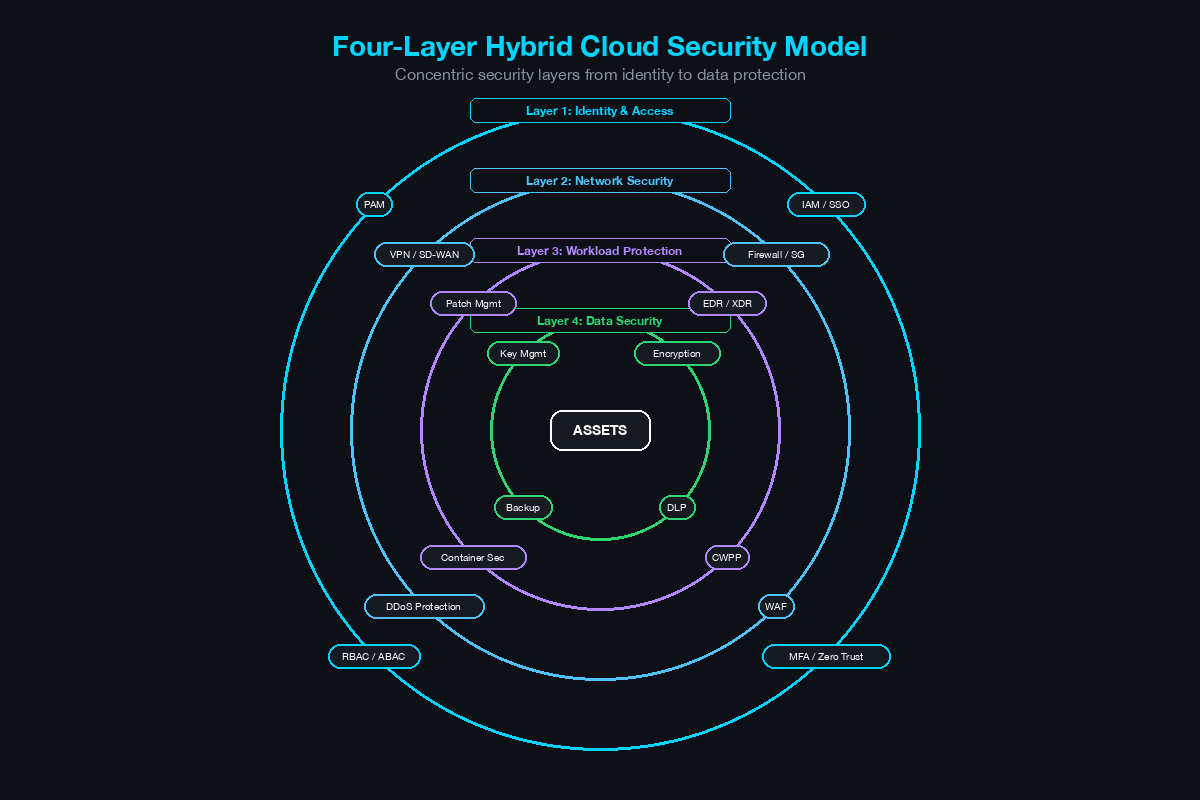
When drawing a hybrid cloud security architecture for a customer, use the four-layer model:
+=============================================================+
|                    LAYER 4: POSTURE (CSPM)                   |
|  Scans configurations across all clouds + on-prem           |
|  Detects: misconfigs, compliance violations, drift           |
+=============================================================+
|                    LAYER 3: WORKLOAD (CWPP)                  |
|  Agents on VMs/containers in cloud + on-prem                |
|  Detects: vulnerabilities, malware, anomalous behavior       |
+=============================================================+
|                    LAYER 2: NETWORK                          |
|  On-Prem: Firewall, IPS, NAC                                |
|  Cloud: Security Groups, NACLs, Cloud Firewall              |
|  Hybrid: VPN/ExpressRoute with bidirectional inspection      |
+=============================================================+
|                    LAYER 1: IDENTITY                         |
|  Federation (SAML/OIDC), MFA, Conditional Access            |
|  Centralized IdP spanning on-prem + all clouds              |
+=============================================================+
|                                                              |
|    [On-Premises]  <--- VPN/ExpressRoute --->  [Cloud]       |
|    AD, Servers,                                AWS/Azure/GCP |
|    Network, FW                                 VPC, VMs,     |
|                                                Containers    |
+=============================================================+
Layer 1 (Identity) is the foundation - if identity is compromised, all other layers are weakened. Start here.
Layer 2 (Network) provides the transport security and segmentation. This is where traditional network SEs are most comfortable and where the hybrid connectivity architecture lives.
Layer 3 (Workload) protects what runs on the infrastructure. This is the layer most customers skip in early cloud adoption because they assume the cloud provider handles it (see shared responsibility model).
Layer 4 (Posture) provides continuous validation that everything is configured correctly. This is the layer that catches configuration drift, new misconfigurations, and compliance violations.
Draw these four layers on the whiteboard, then map the customer’s existing tools and gaps to each layer. The gaps - the layers with no tools - become the basis for the solution proposal.
The hybrid cloud security conversation is not about selling a single product. It is about showing the customer their security posture across all four layers, in both on-premises and cloud environments, and proposing a coherent architecture that closes the gaps. The SE who can draw this on a whiteboard and explain each layer in business terms wins the deal.
Related Posts in This Series
- Secure Remote Access: VPN vs ZTNA vs SASE - Remote access architecture choices directly impact hybrid cloud connectivity
- Umbrella vs Zscaler vs Prisma Access SSE - SSE platforms that secure cloud access across hybrid environments
- Security Compliance Cheat Sheet: NIST, ISO 27001, SOC 2, PCI DSS - Compliance frameworks that shape hybrid cloud security requirements
- How to Position SASE to a CISO - SASE is a key architecture for securing hybrid cloud workloads
- How to Run a Technical Discovery Call for Security Deals - Discovery techniques for uncovering hybrid cloud security gaps
Practice with free flashcards, quizzes, and hands-on lab scenarios at cciesec.it-learn.io — built specifically for the CCIE Security v6.1 written (350-701 SCOR) and lab exam.


