
Ask a mid-market customer if they have an incident response plan. The most common answers:
“Our MSP handles that.” (The MSP handles monitoring and alerting. They do not make business decisions about whether to shut down production systems, who to notify, or when to call the lawyers.)
“We have cyber insurance.” (The insurance policy pays for breach costs after the fact. It does not tell the IT team what to do at 2 AM when ransomware is encrypting file shares and the CEO is calling.)
“We have something in a shared drive somewhere.” (It was written three years ago by someone who no longer works there. Nobody has read it. Nobody has tested it.)
Mid-market companies - typically 100 to 2,000 employees - operate in a difficult gap. They are large enough to be targeted by ransomware operators, business email compromise actors, and supply chain attacks, but small enough that they rarely have dedicated security staff, a SOC, or formal incident response procedures. When an incident occurs, the response is improvised.
This post provides a complete incident response plan template that SEs can offer to mid-market customers as a value-add during the sales process. It follows the NIST SP 800-61 six-phase lifecycle and includes a roles matrix, communication plan, and escalation procedures. The template is designed to be customized in 30 minutes and handed to the customer as a framework they can fill in with their specific details.
Why This Template Matters for SEs
Before diving into the template, here is why this matters commercially.
An SE who walks into a meeting and says “let me tell you about our firewall features” is a vendor. An SE who walks into a meeting and says “I noticed you may not have a formal incident response plan - here is a template based on NIST that I have customized for your industry” is a trusted advisor.
The template costs the SE 30 minutes of preparation. The customer would pay a consulting firm $5,000 to $15,000 for a comparable deliverable. The goodwill this generates is disproportionate to the effort.
More importantly, the template surfaces gaps. When the customer fills in the “Detection Tools” section of the Identification phase and writes “we check email alerts from our antivirus,” that is an organic opening for an EDR or SIEM conversation. When they fill in the “Containment Actions” section and realize they cannot isolate an endpoint remotely, that is an opening for an endpoint management or NAC conversation. The template does the discovery for you.
The NIST SP 800-61 Incident Response Lifecycle
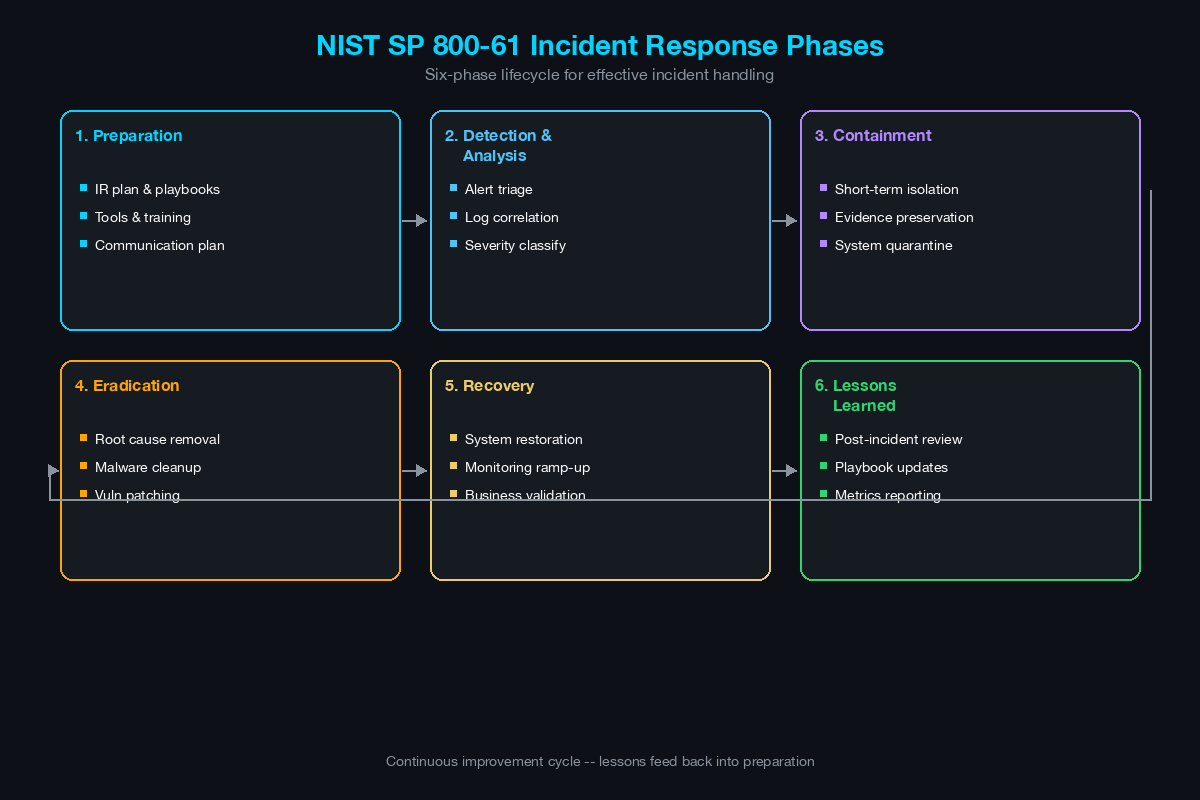
NIST Special Publication 800-61 (Computer Security Incident Handling Guide) defines six phases. The template below is organized around these phases.
+-------------+     +-----------------+     +---------------+
| Preparation | --> | Identification  | --> | Containment   |
+-------------+     +-----------------+     +---------------+
                                                    |
                                                    v
+------------------+     +------------+     +---------------+
| Lessons Learned  | <-- | Recovery   | <-- | Eradication   |
+------------------+     +------------+     +---------------+
        |
        v
  (Feed back into Preparation for continuous improvement)
The phases are not strictly sequential during a live incident. Identification continues throughout the incident as new indicators of compromise are discovered. Containment and eradication often overlap when the team isolates a system and removes malware simultaneously. The lifecycle is a framework for organizing activities, not a rigid process.
Phase 1: Preparation
Preparation is everything that happens before an incident. This phase determines whether the response will be coordinated or chaotic.
IR Team Roster
| Role | Primary | Backup | Contact Method |
|---|---|---|---|
| Incident Commander | [IT Director / CISO] | [Senior SysAdmin] | Cell + encrypted messaging |
| Technical Lead | [Senior SysAdmin / Network Admin] | [Jr. SysAdmin] | Cell + encrypted messaging |
| Communications Lead | [HR Director / Legal] | [Office Manager] | Cell + email |
| Executive Sponsor | [CEO / COO] | [CFO / VP Ops] | Cell |
| Legal Counsel | [Internal or external firm] | - | Office + cell |
| MSP/MSSP Contact | [Named contact at provider] | [Provider NOC number] | Phone + ticket portal |
| Cyber Insurance | [Carrier breach hotline] | - | Phone (policy number required) |
Instructions for the customer: Fill in names, direct cell phone numbers, and preferred encrypted messaging app (Signal, Teams, WhatsApp). Do not rely on corporate email as the sole contact method - if email is compromised (as in BEC or ransomware incidents), you need an out-of-band communication channel.
Tools Inventory
Document the tools available for incident response:
| Category | Tool | Location / Access | Owner |
|---|---|---|---|
| Endpoint Detection | [AV / EDR product] | [Management console URL] | [Name] |
| Network Monitoring | [Firewall / IDS / NetFlow] | [Console URL] | [Name] |
| Log Aggregation | [SIEM / syslog / cloud logs] | [Console URL] | [Name] |
| Backup System | [Backup product] | [Console URL] | [Name] |
| Email Security | [SEG / cloud email security] | [Console URL] | [Name] |
| Identity / Directory | [AD / Azure AD / Okta] | [Console URL] | [Name] |
| Forensic Tools | [Imaging tools, analysis tools] | [Location] | [Name] |
Note for SEs: This table is where gaps become visible. If the customer has no EDR, no SIEM, or no centralized logging, those gaps become natural conversation topics in the follow-up meeting.
Pre-Positioned Resources
- Incident response retainer contract with a forensics firm (if not, consider recommending one)
- Cyber insurance policy reviewed and breach hotline number documented
- Offline backup verified within the last 30 days
- Out-of-band communication channel tested (group chat in encrypted app)
- Printed copy of this IR plan stored in a known physical location (digital copies may be inaccessible during ransomware incidents)
- USB drive with forensic tools (bootable OS, imaging tools) stored in a known location
Phase 2: Identification
Identification is the process of detecting that an incident has occurred, validating that it is a true positive, and classifying its severity.
Detection Sources
List all sources that might generate initial alerts:
- EDR/antivirus alerts
- Firewall/IDS alerts
- SIEM correlation rules
- Email security alerts (phishing, BEC detection)
- User reports (“my files are encrypted,” “I got a strange email,” “my computer is slow”)
- MSP/MSSP alerts
- External notification (customer reports data breach, law enforcement contact, threat intelligence vendor)
Incident Classification
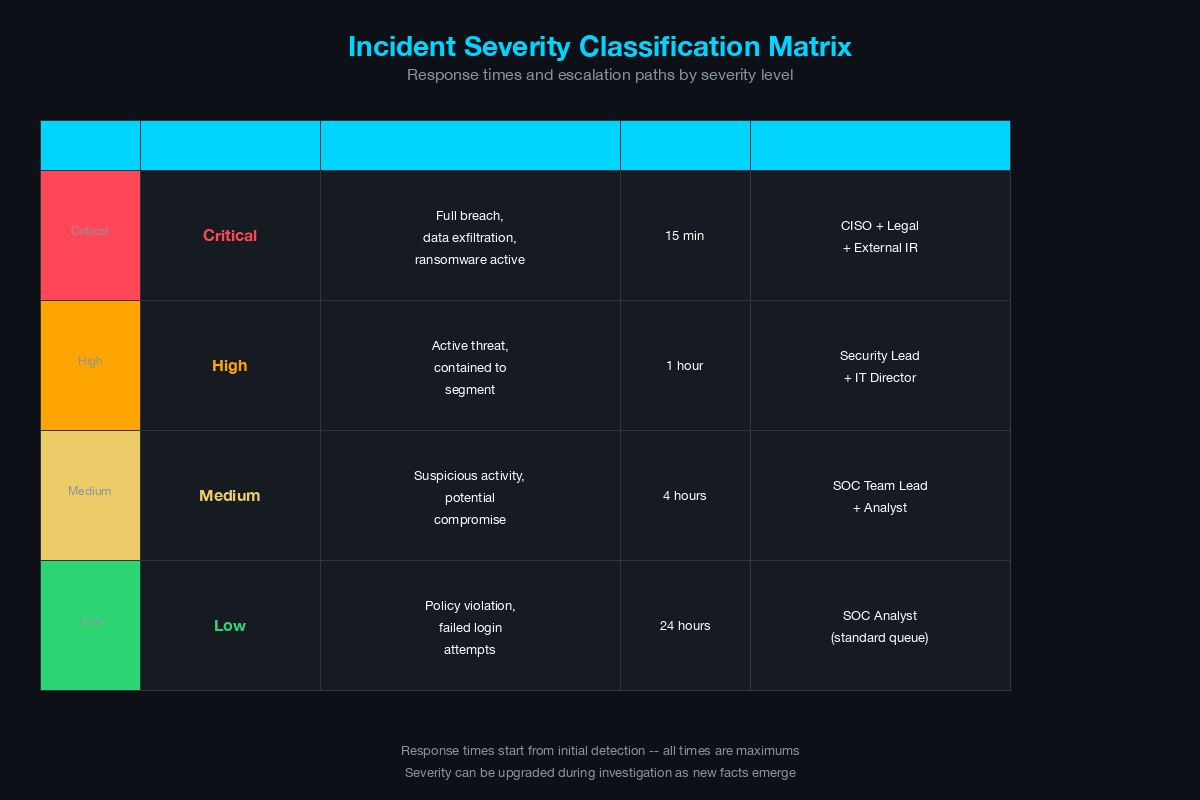
| Severity | Definition | Examples | Response Time |
|---|---|---|---|
| Critical (P1) | Active threat with business impact, data exfiltration confirmed or suspected, ransomware actively encrypting | Ransomware spreading across file shares, confirmed data exfiltration, active attacker in the network | Immediate (all-hands) |
| High (P2) | Confirmed compromise with containable scope, no active data loss | Single endpoint compromised with malware, compromised user credentials, phishing campaign actively targeting employees | Within 1 hour |
| Medium (P3) | Suspicious activity requiring investigation, no confirmed compromise | Unusual login patterns, suspicious email reported, vulnerability actively being scanned | Within 4 hours |
| Low (P4) | Security event requiring review, low probability of impact | Failed login attempts, blocked malware detection, policy violation | Within 24 hours (next business day) |
Initial Triage Checklist
When an alert or report is received:
- Who reported it and when?
- What systems are affected? (hostname, IP address, user account)
- What was observed? (error messages, file changes, unusual behavior)
- Is the activity still ongoing?
- Have any other users or systems reported similar symptoms?
- Classify severity using the table above
- Notify the Incident Commander if severity is P1 or P2
- Begin documenting in the incident log (timestamp every action from this point forward)
Phase 3: Containment
Containment limits the blast radius. The goal is to prevent the incident from spreading to additional systems while preserving evidence for investigation.
Short-Term Containment
Actions taken immediately to stop the spread:
| Action | When to Use | How to Execute |
|---|---|---|
| Isolate endpoint | Confirmed malware, active C2 | EDR isolation (preferred) or disconnect from network (physical last resort) |
| Disable user account | Compromised credentials, BEC | Disable in AD/Azure AD, revoke active sessions, reset password |
| Block IP/domain | Active C2 communication | Add to firewall blocklist, DNS sinkhole |
| Isolate network segment | Ransomware spreading via SMB | Disable inter-VLAN routing for affected VLAN, apply restrictive ACLs |
| Disable VPN access | Compromised remote user | Disable user in VPN / ISE, revoke certificate |
| Quarantine email | Active phishing campaign | Search and purge from all mailboxes, block sender domain |
Long-Term Containment
Actions taken to maintain containment while the investigation continues:
- Move affected systems to an isolated VLAN with no internet access and limited internal access (only to forensic tools and log collection)
- Apply temporary firewall rules to restrict lateral movement from affected segments
- Enable enhanced logging on adjacent systems (increase verbosity on endpoints and network devices near the compromised system)
- Deploy additional monitoring on systems adjacent to the compromised system
Evidence Preservation
Before eradicating the threat, preserve evidence:
- Take a forensic image of affected system(s) before wiping or rebuilding
- Export relevant logs (firewall, EDR, email, authentication) to an offline location
- Screenshot any ransom notes, phishing emails, or other artifacts
- Document the timeline of events with timestamps
- Preserve volatile data (running processes, network connections, memory) before shutting down systems if forensically feasible
Phase 4: Eradication
Eradication removes the threat from the environment. This phase only begins after containment is confirmed - the incident is no longer spreading.
Eradication Actions
| Threat Type | Eradication Steps |
|---|---|
| Malware / Ransomware | Reimage affected systems from known-good media. Do not attempt to “clean” malware from production systems - reimage is the only reliable eradication. Patch the vulnerability that allowed initial access. |
| Compromised Credentials | Reset passwords for all affected accounts. Reset service account passwords if lateral movement used service accounts. Revoke and reissue certificates if certificate-based authentication is in use. Review and revoke any OAuth tokens or API keys associated with compromised accounts. |
| Phishing / BEC | Remove all instances of the phishing email from all mailboxes. Block sender domain and any identified phishing infrastructure at the email gateway and DNS level. If credentials were harvested, treat as compromised credentials above. |
| Unauthorized Access | Remove unauthorized accounts, backdoors, scheduled tasks, and persistence mechanisms. Review all accounts created or modified during the incident timeframe. Audit remote access tools for unauthorized installations. |
Verification
Before moving to recovery, verify eradication:
- All affected systems reimaged or confirmed clean
- All compromised credentials reset
- Vulnerability or misconfiguration that allowed initial access is patched or mitigated
- No persistence mechanisms remain (check scheduled tasks, startup items, registry run keys, cron jobs, systemd services)
- Attacker’s access paths are closed (firewall rules updated, accounts disabled, VPN access revoked)
Phase 5: Recovery
Recovery restores affected systems to normal operations. This phase is where business impact starts to decrease.
Recovery Sequence
- Restore from backup: Restore data from the most recent clean backup (verified pre-incident). For ransomware incidents, verify that backups are not compromised before restoring.
- Rebuild systems: Bring reimaged systems back online in a staged manner. Start with critical business systems, then secondary systems.
- Validate functionality: Test restored systems to confirm they function correctly. Verify data integrity.
- Monitor closely: Enable enhanced monitoring on recovered systems for 30 days post-incident. Watch for signs of re-infection or persistence mechanisms that survived eradication.
- Communicate restoration: Notify users and stakeholders that systems are restored and operations are returning to normal.
Recovery Priorities
| Priority | Systems | Target Recovery Time |
|---|---|---|
| P1 | Email, authentication (AD), core business applications | 4–8 hours |
| P2 | File shares, databases, ERP/CRM | 8–24 hours |
| P3 | Development systems, non-critical applications | 24–72 hours |
| P4 | Test environments, secondary systems | As resources allow |
Customer instruction: Fill in your specific systems and recovery time targets. These should align with your business continuity plan (BCP) if one exists.
Phase 6: Lessons Learned
The lessons learned phase is the most frequently skipped and the most valuable. Every incident is an opportunity to improve the IR plan, identify missing tools, and close security gaps.
Post-Incident Review Meeting
Schedule within 5 business days of incident closure. Include all IR team members.
Agenda:
- Timeline reconstruction - what happened, when, and in what order
- What worked well - which tools, processes, and communication channels were effective
- What failed or was missing - where did the team encounter gaps, delays, or confusion
- Root cause analysis - what was the initial access vector, what vulnerability or misconfiguration was exploited
- Action items - specific, assigned, with deadlines
Review Questions
- How was the incident detected? Could it have been detected earlier?
- How long between initial compromise and detection (dwell time)?
- Was the containment effective? Did the incident spread after containment was initiated?
- Were the right people notified at the right time?
- Did the communication plan work? Was out-of-band communication necessary and available?
- Were backups available and clean? How long did restoration take?
- What tools or capabilities were missing that would have improved the response?
Action Item Tracking
| Finding | Action Item | Owner | Deadline | Status |
|---|---|---|---|---|
| [Example: No EDR on servers] | [Deploy EDR to all servers] | [Name] | [Date] | [Open] |
| [Example: Backup not tested] | [Monthly backup restore test] | [Name] | [Date] | [Open] |
| [Example: No MFA on VPN] | [Enable MFA for all VPN users] | [Name] | [Date] | [Open] |
Communication Plan Template
Internal Communication
| Audience | What to Communicate | When | Channel | Who Communicates |
|---|---|---|---|---|
| IR Team | Full technical details, actions required | Immediately upon classification | Encrypted group chat | Incident Commander |
| Executive Team | Business impact, estimated recovery time, risk assessment | Within 1 hour of P1/P2 | Phone call + email summary | Incident Commander |
| All Employees | What happened (high-level), what they should do, what they should not do | Within 4 hours of P1 | Company-wide email or intranet | Communications Lead |
| Board of Directors | Impact summary, response status, regulatory implications | Within 24 hours of P1 | Email from CEO | Executive Sponsor |
External Communication
| Audience | What to Communicate | When | Who Decides |
|---|---|---|---|
| Customers / Partners | Breach notification if their data is affected | Per legal/regulatory requirements | Legal Counsel + Executive Sponsor |
| Regulators | Breach notification per applicable law (GDPR 72h, state breach notification laws) | Per legal requirements | Legal Counsel |
| Law Enforcement | Report if criminal activity is involved (ransomware, data theft, fraud) | As soon as practical after containment | Executive Sponsor + Legal Counsel |
| Media | Prepared statement only, no ad-hoc interviews | Only if media inquires or public disclosure required | Communications Lead + Legal Counsel |
| Cyber Insurance Carrier | Incident notification per policy terms | Per policy requirements (often within 24–72 hours) | Executive Sponsor |
Communication Rules
- Do not discuss the incident on social media, personal messaging, or unsecured channels
- Do not speculate about the cause, scope, or responsible party in any communication
- Do not communicate with media without Legal Counsel and Executive Sponsor approval
- Do use the out-of-band communication channel for all IR team discussions
- Do document every external communication in the incident log
Escalation Procedures
[Alert / Report Received]
         |
         v
[On-Call IT / Security Staff]
    Triage and classify severity
         |
    +----+----+
    |         |
   P3/P4     P1/P2
    |         |
    v         v
[Handle per   [Notify Incident Commander]
 standard         |
 procedures]      v
              [IC assembles IR Team]
                   |
              +----+----+
              |         |
           Contained    Not contained /
              |         Escalating
              v              |
         [Continue           v
          IR phases]    [Activate external
                         resources:]
                         - Forensics retainer
                         - Cyber insurance
                         - Legal counsel
                         - MSP/MSSP escalation
                              |
                              v
                         [Executive Sponsor
                          briefed for business
                          decisions:]
                          - System shutdown?
                          - Public disclosure?
                          - Law enforcement?
How to Deliver This Template to the Customer
The template above is a framework. Here is how to use it as an SE:
Before the meeting: Customize the template for the customer’s industry. Healthcare customers need HIPAA breach notification timelines. Financial services customers need GLBA and state regulatory references. Retail customers need PCI DSS incident response requirements. This customization takes 15–20 minutes and dramatically increases the perceived value.
During the meeting: Do not hand over the template cold. Walk through the phases briefly and ask the customer if they have each component. “Do you have an IR team roster with out-of-band contact information? Do you have a severity classification matrix? Do you have a communication plan that includes your cyber insurance carrier?” Each “no” is a gap that the template addresses.
After the meeting: Send the template in a follow-up email with a note: “Here is the IR plan template we discussed. I have customized it for [your industry]. I would be happy to walk through it with your team in a follow-up session.” This creates a reason for the next meeting - and that next meeting will surface the tool gaps that lead to product conversations.
30-day follow-up: Check in to ask if the customer has started filling in the template. If they have, they will have questions. If they have not, the follow-up reminds them of the value you provided and keeps the deal warm.
The IR plan template is not the product. The product is the relationship and the trust that comes from being the SE who helped the customer build something they needed - before any purchase order was signed.
Related Posts in This Series
- Using Threat Intelligence in Customer Presentations - Use real-world threat data to make the IR planning conversation urgent
- XDR: Cortex vs CrowdStrike vs Sentinel - XDR platforms are core detection tools referenced in incident response plans
- Translate a Pen Test Report Into a Sales Opportunity - Pen test findings often reveal the IR gaps this template addresses
- Handling the 5 Most Common Security Objections - Overcome objections when customers resist investing in IR planning
- Network Segmentation: VLANs, Microsegmentation, and TrustSec - Segmentation is a key containment strategy in any incident response plan
Practice with free flashcards, quizzes, and hands-on lab scenarios at cciesec.it-learn.io — built specifically for the CCIE Security v6.1 written (350-701 SCOR) and lab exam.


