

The remote access conversation has changed permanently. Before 2020, remote access meant VPN - a tunnel from a laptop to the corporate network, usually deployed for a subset of employees who traveled or worked from home occasionally. The infrastructure was sized for 10–20% concurrent users. Then the entire workforce went remote, VPN concentrators melted under the load, and every customer learned the same lesson at the same time: network-level remote access does not scale, and it was never designed for a world where most users are outside the perimeter most of the time.
Now every SE faces the same customer question: “Should we upgrade our VPN, move to ZTNA, or go full SASE?” The answer depends on the customer’s current architecture, application portfolio, user population, budget, and operational maturity. This post provides the architectural comparison, security analysis, cost modeling, and decision tree that SEs need to guide that conversation.
Architecture Comparison
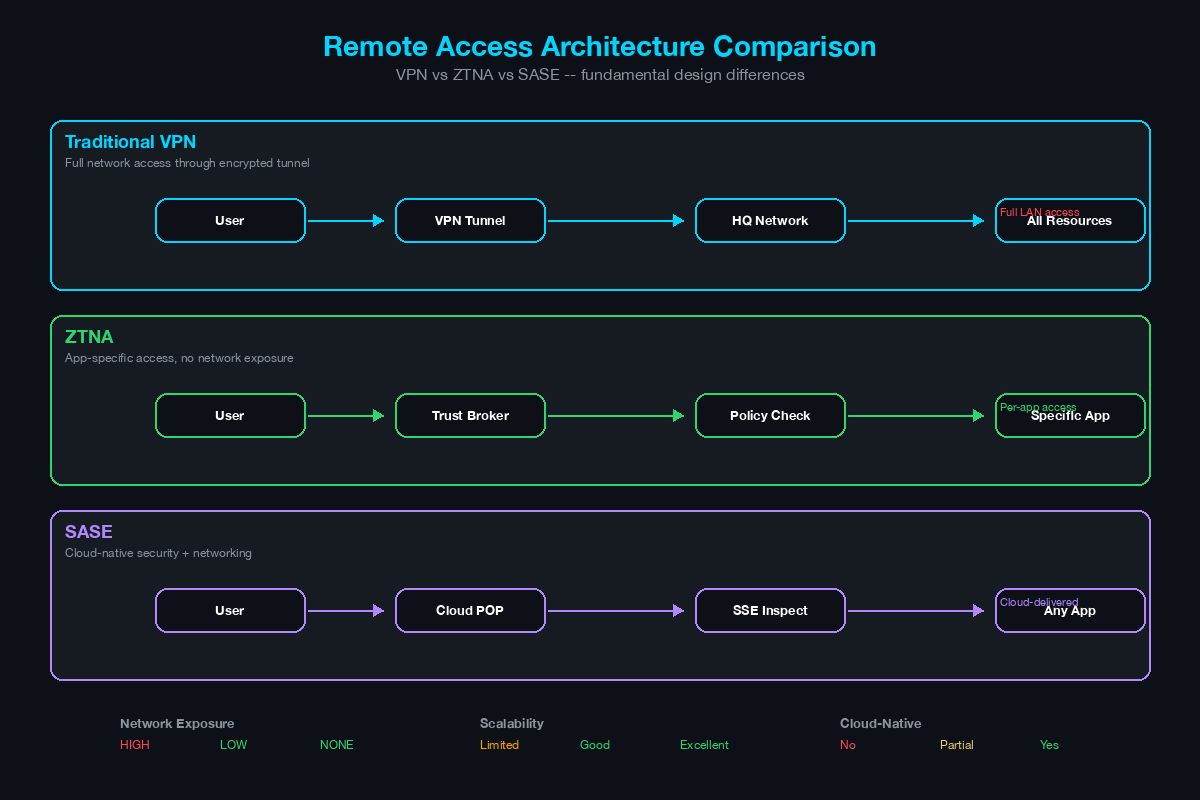
Traditional VPN
[Remote User]
     |
     | (IPsec or SSL/TLS tunnel)
     |
     v
[VPN Concentrator / Firewall]
     |
     | (User is now "on the network")
     |
     v
[Corporate Network]
     |
     +-- [Servers]
     +-- [File Shares]
     +-- [Applications]
     +-- [Printers]
     +-- [Everything else on the network]
How it works: The remote user’s device establishes an encrypted tunnel to a VPN concentrator (typically a firewall appliance). Once connected, the user’s device receives an IP address from the corporate network and can access resources as if physically connected. Traffic flows through the tunnel to the concentrator and then into the corporate network.
Variations:
- Full tunnel: All user traffic (including internet browsing) flows through the VPN tunnel and exits through the corporate internet gateway. Provides maximum security visibility but adds latency and consumes concentrator bandwidth.
- Split tunnel: Only traffic destined for corporate subnets flows through the VPN. Internet traffic goes directly to the internet from the user’s local connection. Reduces concentrator load but creates a security gap - the user’s device is simultaneously connected to the corporate network and the open internet.
ZTNA (Zero Trust Network Access)
[Remote User]
     |
     | (TLS connection to ZTNA broker)
     |
     v
[ZTNA Broker / Cloud Edge]
     |
     | (Validates: identity + device posture + context)
     |
     | (Creates application-specific micro-tunnel)
     |
     v
[Application Connector / Gateway]
     |
     | (Only this specific application is accessible)
     |
     v
[Application Server]

     Note: The user NEVER joins the corporate network.
     The application is NOT exposed to the internet.
     Each application requires separate authorization.
How it works: The user authenticates to a ZTNA broker (cloud-hosted or on-premises). The broker validates the user’s identity (via IdP/SSO), the device’s security posture (OS version, patch level, EDR status, disk encryption), and contextual signals (location, time, risk score). If all checks pass, the broker creates an outbound-only connection from an application connector inside the corporate network to the broker - the application is never exposed to inbound internet connections. The user accesses the application through the broker without ever being placed on the corporate network.
Key architectural differences from VPN:
- No network access: The user accesses specific applications, not the network. There is no IP address assigned from the corporate range, no broadcast domain membership, no ability to scan or discover other devices.
- Inside-out connectivity: The application connector initiates outbound connections to the broker. No inbound ports are opened on the firewall for remote access. This makes applications invisible to internet-based scanners and attackers.
- Per-application authorization: Each application session is independently authorized. Accessing the CRM does not grant access to the ERP. Compromising one session does not enable lateral movement to other applications.
SASE (Secure Access Service Edge)
[Remote User]
     |
     | (Lightweight agent connects to nearest SASE PoP)
     |
     v
[SASE Cloud Edge / Point of Presence]
     |
     +-- [ZTNA] -- Application-level access to private apps
     +-- [SWG]  -- Secure Web Gateway for internet access
     +-- [CASB] -- Cloud Access Security Broker for SaaS
     +-- [FWaaS] -- Firewall as a Service
     +-- [DLP]  -- Data Loss Prevention
     |
     | (All security services applied at the cloud edge)
     |
     +---------> [Corporate Applications] (via ZTNA connectors)
     +---------> [Internet] (via SWG inspection)
     +---------> [SaaS Applications] (via CASB inline)
How it works: SASE converges networking and security into a cloud-delivered platform. A lightweight agent on the user’s device connects to the nearest SASE point of presence (PoP). All traffic - to corporate applications, to the internet, and to SaaS applications - routes through the SASE cloud where security policies are applied consistently. ZTNA provides secure access to private applications. SWG inspects and filters internet traffic. CASB provides visibility and control over SaaS usage. FWaaS replaces or supplements on-premises firewalls. DLP prevents sensitive data from leaving the organization.
Key distinction from standalone ZTNA: ZTNA solves the remote access problem. SASE solves the remote access problem AND the internet security problem AND the SaaS security problem AND the branch connectivity problem - all from a single platform. SASE is ZTNA plus everything else.
Security Posture Comparison
Attack Surface
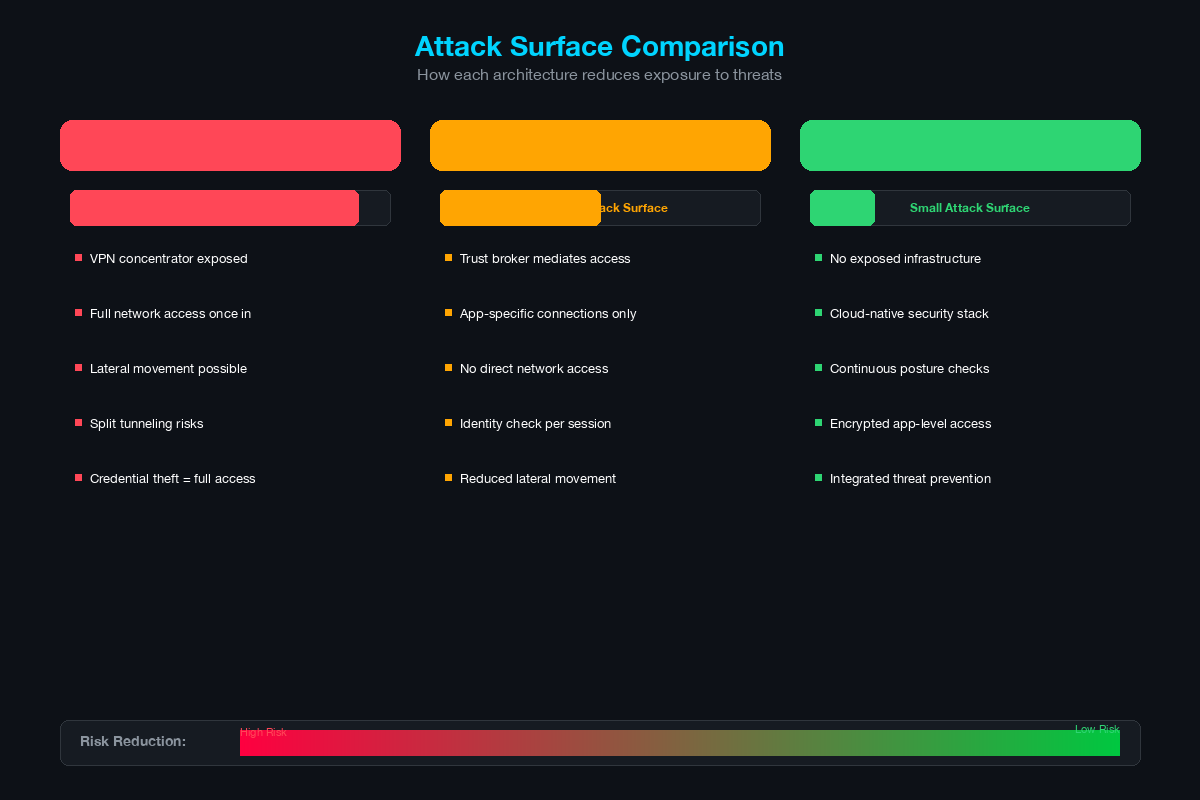
| Attack Vector | VPN | ZTNA | SASE |
|---|---|---|---|
| VPN concentrator as target | Exposed to internet (CVE risk) | No concentrator exposed | No concentrator exposed |
| Lateral movement after compromise | Full network access | No network access | No network access |
| Application discovery/scanning | All apps reachable on network | Apps invisible to internet | Apps invisible to internet |
| Compromised device impact | Device is on the network | Device accesses only authorized apps | Device accesses only authorized apps + internet traffic inspected |
| Split tunnel risk | Simultaneous corporate + internet exposure | Not applicable (no tunnel) | All traffic inspected at cloud edge |
| Credential theft impact | Full network access with stolen creds | Limited to authorized apps + posture check may block | Limited to authorized apps + continuous evaluation |
The VPN Vulnerability Problem
VPN concentrators sit on the internet perimeter and must accept inbound connections from any remote user. This makes them high-value targets. Recent critical vulnerabilities demonstrate the risk:
- Ivanti Connect Secure / Pulse Secure (CVE-2023-46805, CVE-2024-21887): Authentication bypass and command injection vulnerabilities that were actively exploited in the wild before patches were available. CISA issued emergency directives requiring federal agencies to disconnect affected devices.
- Fortinet FortiOS (CVE-2024-21762): Out-of-bound write vulnerability in SSL VPN, actively exploited, allowing remote code execution without authentication.
- Cisco ASA / FTD (CVE-2023-20269): Brute-force vulnerability in VPN services that allowed unauthorized access. Actively exploited by ransomware operators (Akira, LockBit).
ZTNA and SASE architectures eliminate this attack vector entirely. There is no internet-facing appliance accepting inbound connections. The application connectors initiate outbound connections only.
Device Posture Assessment
| Capability | VPN | ZTNA | SASE |
|---|---|---|---|
| Pre-connection posture check | Optional (ISE, host checker) | Built-in (required for authorization) | Built-in (required for authorization) |
| Continuous posture evaluation | Rare (periodic re-check) | Yes (real-time posture changes trigger re-evaluation) | Yes (continuous) |
| Posture signals | OS version, AV status | OS, patch level, EDR, disk encryption, jailbreak, etc. | Same as ZTNA + network threat signals |
| Response to posture failure | Disconnect VPN or quarantine VLAN | Revoke access to specific applications | Revoke access + isolate from all resources |
User Experience Comparison
User experience drives adoption. The best security architecture fails if users bypass it.
| Aspect | VPN | ZTNA | SASE |
|---|---|---|---|
| Connection process | Launch VPN client, select profile, enter credentials, wait for tunnel | Transparent (agent runs in background, access is seamless after SSO) | Transparent (agent always connected, all traffic secured) |
| Application access | Same as on-premises (full network access) | Click app link or use bookmark - broker handles the rest | Same as ZTNA for private apps, internet access just works |
| Performance - corporate apps | All traffic backhauled through concentrator (latency) | Direct path through nearest PoP to app (optimized) | Same as ZTNA (nearest PoP) |
| Performance - internet | Full tunnel: backhauled through corporate. Split tunnel: direct | Not applicable (ZTNA only handles private apps) | Inspected at nearest PoP, then direct (minimal latency) |
| Disconnection issues | Tunnel drops on network change (Wi-Fi to cellular), requires reconnection | Persistent connection, survives network transitions | Persistent connection, always-on |
| User perception | “VPN is slow,” “VPN keeps disconnecting” | “I just open the app and it works” | “Everything just works, everywhere” |
Cost Analysis
VPN - Capital + Operational Model
| Cost Component | 3-Year Estimate (500 users) |
|---|---|
| VPN concentrator / firewall (HA pair) | $30,000–$60,000 |
| Annual support + licensing | $30,000–$60,000 (3 years) |
| Client licensing (if applicable) | $5,000–$15,000 |
| Bandwidth for backhauled traffic | Included in internet circuit (but capacity may need upgrade) |
| Operational overhead (patching, troubleshooting, config management) | Staff time - 10–20 hours/month |
| Total (hardware + licensing) | $65,000–$135,000 |
ZTNA - Subscription Model
| Cost Component | 3-Year Estimate (500 users) |
|---|---|
| Per-user subscription ($5–$12/user/month) | $90,000–$216,000 |
| Application connector (VM or container) | Included in subscription |
| Operational overhead | Staff time - 5–10 hours/month (lower operational burden) |
| Total | $90,000–$216,000 |
SASE - Subscription Model
| Cost Component | 3-Year Estimate (500 users) |
|---|---|
| Per-user subscription ($10–$20/user/month) | $180,000–$360,000 |
| Includes: ZTNA + SWG + CASB + FWaaS + DLP | All included |
| Replaces: VPN concentrator, web proxy, CASB point product, branch firewall (potentially) | Subtract cost of replaced products |
| Operational overhead | Staff time - 5–10 hours/month (single console) |
| Total | $180,000–$360,000 (but replaces multiple point products) |
The Real Comparison
Comparing VPN cost to SASE cost directly is misleading. VPN provides only remote access. SASE provides remote access plus internet security plus SaaS security plus DLP. The fair comparison is:
VPN Cost + SWG Cost + CASB Cost + DLP Cost + Branch FW Cost
                        vs
                    SASE Cost

For many customers, the sum on the left exceeds the SASE subscription cost.
SEs should build this comparison for the specific customer by listing all the security tools that SASE would consolidate and calculating the total cost of ownership for the current multi-product approach versus the SASE subscription.
Migration Paths
VPN to ZTNA Migration
Phase 1 - Parallel Deployment (Month 1–2)
- Deploy ZTNA broker and application connectors alongside existing VPN
- Migrate 2–3 web-based applications with the highest remote access usage to ZTNA
- Users access migrated applications through ZTNA, everything else through VPN
- Monitor performance, user experience, and support tickets
Phase 2 - Expand Application Coverage (Month 3–6)
- Migrate all web applications and API-based services to ZTNA
- Migrate SaaS application access through ZTNA (if the ZTNA platform supports inline SaaS access)
- Reduce VPN scope to legacy applications only
Phase 3 - Address Legacy Applications (Month 6–9)
- Evaluate each remaining VPN-dependent application:
- Can it be modernized to work with ZTNA (web interface, API access)?
- Does the ZTNA vendor offer clientless or network-extension mode for legacy protocols?
- Is a small, hardened VPN gateway for only these applications acceptable?
- Implement solutions for each legacy application
Phase 4 - Decommission VPN (Month 9–12)
- Decommission VPN concentrators once all applications are accessible through ZTNA (or ZTNA + limited VPN for confirmed legacy apps)
- Reclaim public IP addresses, firewall rules, and DMZ infrastructure
- Update security policies and documentation
VPN to SASE Migration
The SASE migration follows the same application migration path as ZTNA but adds:
- Internet traffic migration: Route user internet traffic through the SASE SWG (replaces on-premises web proxy)
- SaaS traffic migration: Route SaaS traffic through the SASE CASB (replaces standalone CASB)
- Branch migration: Replace branch firewalls with SASE PoP connectivity (SD-WAN integration)
SASE migration is more comprehensive but consolidates more infrastructure.
Decision Tree for Customer Conversations
When a customer asks “what should we do about remote access,” use this decision tree:
[How many remote users do you have?]
         |
    +----+----+
    |         |
  <50       50+
    |         |
    v         v
[Harden     [What types of applications
 existing    do remote users access?]
 VPN:             |
 +MFA        +----+----+----+
 +posture    |         |    |
 +split     Mostly    Mix   Mostly
 tunnel     web/SaaS  of    legacy/
 controls]           both   thick client
                |         |         |
                v         v         v
           [ZTNA     [ZTNA for   [ZTNA for
            or        web apps,   web apps +
            SASE]     VPN for     hardened VPN
                      legacy]     for legacy]
                |
           [Do you also need to replace
            SWG, CASB, or branch FW?]
                |
           +----+----+
           |         |
          Yes       No
           |         |
           v         v
        [SASE]    [ZTNA]
When VPN Is Still the Right Answer
- Under 50 users with simple requirements
- Heavy dependency on legacy thick-client applications with dynamic ports
- Recent investment in VPN hardware (within last 12–18 months) - harden it and plan migration
- Environments with extremely limited internet bandwidth where cloud-based solutions add unacceptable latency
- Air-gapped or highly restricted environments where cloud services are not permitted
When ZTNA Is the Right Answer
- 50+ remote users accessing primarily web-based and SaaS applications
- Customer wants to reduce attack surface and eliminate VPN concentrator exposure
- Customer has an IdP in place (Azure AD, Okta, Ping) for SSO and MFA
- Customer does not need to replace SWG, CASB, or branch firewalls in this project cycle
When SASE Is the Right Answer
- Customer needs remote access AND internet security AND SaaS security
- Customer has multiple branch offices with aging firewalls
- Customer is consolidating security tools and wants a single-vendor platform
- Customer is cloud-first with minimal on-premises infrastructure
- Customer has compliance requirements that demand consistent policy across all access paths (remote, branch, HQ)
The SE Conversation Framework
Remote access conversations are emotional. Users remember the VPN outages during the pandemic. IT teams remember the emergency scaling. Executives remember the productivity loss. Use that institutional memory constructively.
Opening: “How did your remote access hold up during the last major work-from-home event? What would you change if you could do it over?”
Discovery: Map the application portfolio. How many applications are web-based? How many require thick clients or network-level access? What percentage of users are remote full-time versus occasionally?
Architecture discussion: Draw the three architectures on the whiteboard. Show where the user connects, what they can access, and what happens if their device is compromised. The visual difference between “user is on the network” (VPN) and “user accesses only authorized apps” (ZTNA) is immediately compelling to both technical and non-technical audiences.
Cost discussion: Build the real comparison. VPN cost alone versus SASE cost is misleading. VPN plus all the security tools that SASE replaces versus SASE cost is the honest comparison.
Migration discussion: Nobody wants a rip-and-replace. Show the phased migration path. Start with the easy wins (web apps through ZTNA), maintain VPN for legacy apps during the transition, and decommission VPN only after everything is migrated.
The SE who can walk a customer through this decision tree - honestly acknowledging when VPN is still the right answer and when it is time to move on - builds the credibility that wins deals. The customer does not need another vendor telling them to buy the newest thing. They need an advisor who understands their environment and recommends the right architecture for where they are today and where they need to be.
Related Posts in This Series
- How to Position SASE to a CISO - SASE is the consolidation play that includes ZTNA; learn how to pitch it
- Umbrella vs Zscaler vs Prisma Access SSE - Compare the SSE platforms that deliver cloud-based remote access
- Cisco SD-WAN vs Traditional VPN - SD-WAN is the network underlay that SASE and ZTNA build on
- How to Whiteboard a Zero Trust Architecture in 10 Minutes - ZTNA is a core component of zero trust; whiteboard the full architecture
- Hybrid Cloud Security Architecture - Remote access decisions are tightly coupled with hybrid cloud design
Practice with free flashcards, quizzes, and hands-on lab scenarios at cciesec.it-learn.io — built specifically for the CCIE Security v6.1 written (350-701 SCOR) and lab exam.


