

You are six minutes into a firewall demo. You have shown the dashboard, navigated to the policy page, and started explaining rule ordering. The CISO is checking their phone. The network engineer in the back is looking at their laptop. The account executive is making eye contact with you, silently begging you to say something interesting.
This is where most firewall demos go to die. The product works fine. The firewall is capable. The features are competitive. But the demo is a feature walkthrough disguised as a conversation, and the audience stopped listening the moment you opened the admin settings.
This post is about how to demo a firewall in a way that holds the room, drives technical validation, and moves the deal forward. The principles apply to any next-generation firewall - Palo Alto, Fortinet, Cisco, Check Point, or anyone else.
Why Most Firewall Demos Fail
The failure modes are consistent across every SE organization:
The Feature Tour: The SE opens the management console and walks through every menu item. Policies. Objects. Threat Prevention. URL Filtering. Decryption. Logging. The demo mirrors the navigation menu, not the customer’s problems.
The Tab Explosion: Fifteen browser tabs open before the demo starts - management console, threat dashboard, log viewer, reporting, documentation. Switching between tabs creates cognitive overload and makes the audience feel lost.
The Config Screen: The SE shows how to configure a feature instead of what the feature does. Creating an IPS policy is not interesting. Blocking an exploit in real time is interesting.
No Story: The demo has no narrative arc. It is a sequence of screens without a thread connecting them. No before and after. No problem and solution. No tension and resolution.
The 3-Act Demo Structure
Every effective demo follows a narrative structure. The same three-act structure that works in storytelling works in sales engineering.
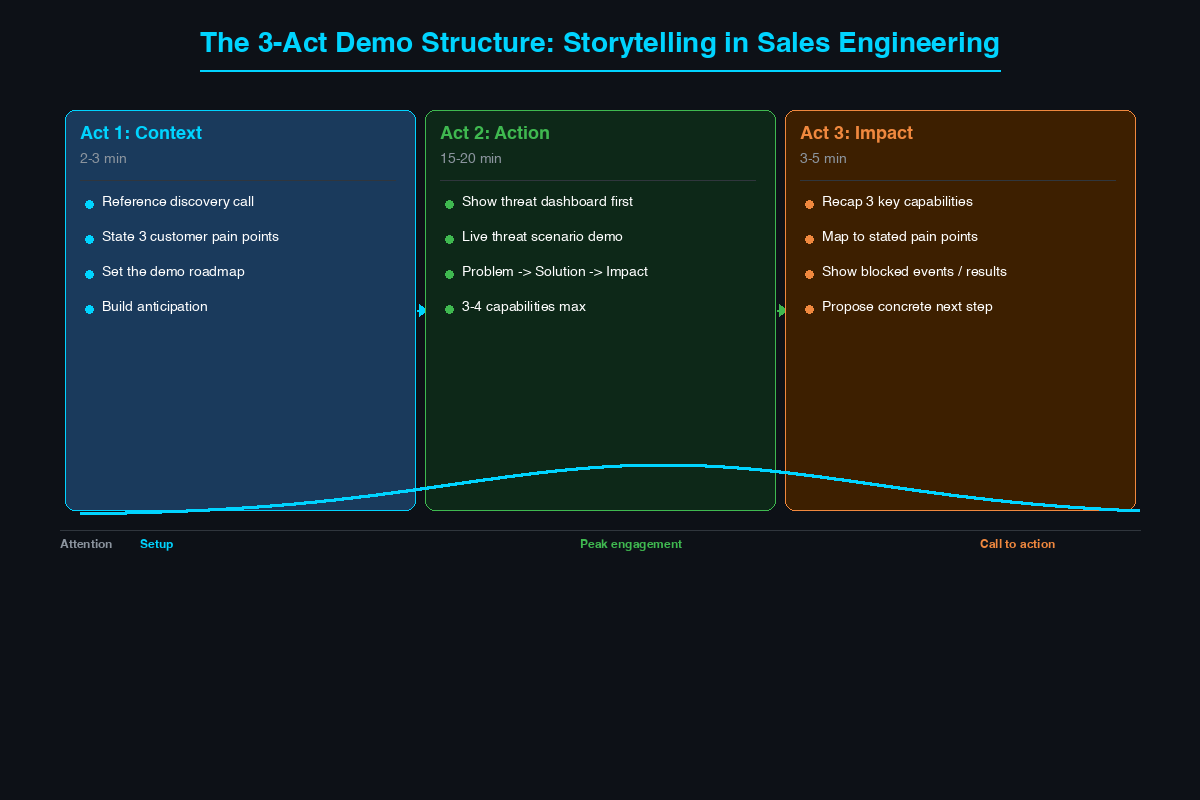
Act 1: Context (2-3 Minutes)
Set the stage. Do not start by opening the management console. Start by talking.
“Based on our discovery call, you told me three things that keep you up at night: your team cannot see what applications are running on the network, you are concerned about encrypted traffic hiding threats, and your current firewall cannot identify users - just IP addresses. Today I am going to show you how we solve all three. I will start with visibility because that is the foundation for everything else.”
This proves you listened in the discovery call. It limits the demo to three relevant topics instead of thirty features. It gives the audience a roadmap. And it creates a contract - when you have shown these three things, you will discuss next steps.
Act 2: Action (15-20 Minutes)
Show three to four capabilities that directly address the customer’s stated needs. For each capability, follow a micro-structure:
- The problem (10 seconds): “Right now, your firewall sees this traffic as port 443. It cannot tell you whether it is Office 365, Slack, or an attacker exfiltrating data over HTTPS.”
- The solution (2-3 minutes): Show the Application Command Center or traffic log filtered by application. “Here is the same traffic, but now we see 147 distinct applications - and three of them are file-sharing apps your security policy prohibits.”
- The impact (10 seconds): “This means your team stops guessing and starts making policy decisions based on what applications are actually running.”
Problem. Solution. Impact. Repeat for each capability.
Act 3: Impact and Next Steps (3-5 Minutes)
Tie everything back to the customer’s environment and propose a concrete next step. “We covered application visibility, TLS decryption, and user-based policies. These three capabilities close the gaps you described in our discovery. The next step is getting this into your environment - I recommend a 30-day proof of value.”
What to Show in the First Five Minutes
The first five minutes determine whether the audience stays engaged or mentally checks out.
Start with the Threat Dashboard
Open the demo on the threat dashboard or application visibility page - not the policy configuration page. Show what the firewall sees:
- Top applications by bandwidth: “Here are the top 20 applications. Four of them are personal cloud storage apps. Two are remote access tools your team did not deploy.”
- Blocked threats in the last 24 hours: “This firewall blocked 847 threats yesterday - two exploit attempts targeting a recent CVE, a command-and-control callback, and two instances of DNS tunneling exfiltration.”
- User activity: “These are not just IP addresses - these are users. Jane in Finance generated 47 GB of traffic to a personal Dropbox account last week.”
This is visceral. The audience sees their network through a lens they have never had. It creates an immediate reaction: “We cannot see any of this today.”
Then Show One Scenario End-to-End
Pick the scenario most relevant to the customer’s stated concern and walk through it completely. A user clicks a phishing link. The firewall decrypts the TLS session, inspects the content, matches the destination against threat intelligence, and blocks the callback. Show the log entry. Show the user who clicked. Show the threat category. One scenario. Five minutes. The audience now understands what this firewall does differently.
What to Skip
Knowing what to skip is as important as knowing what to show. Every minute spent on irrelevant content is a minute of attention lost.
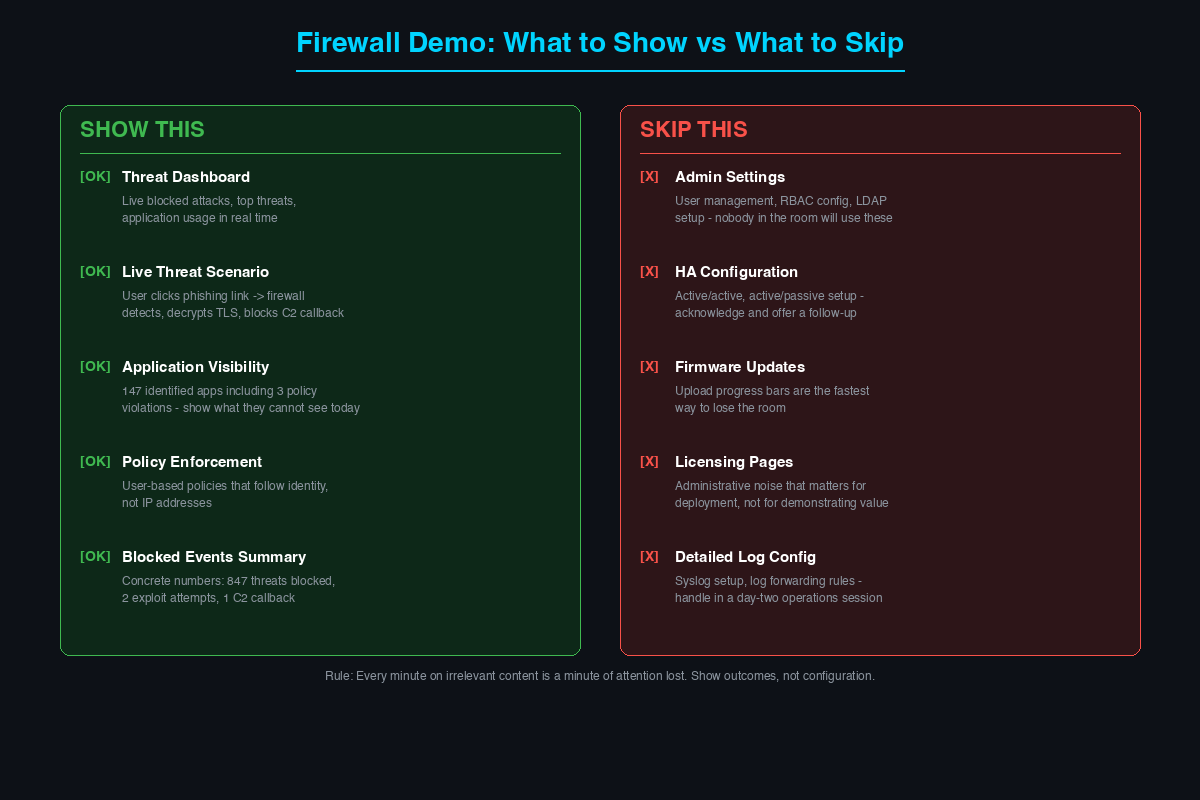
Administrative settings: User account management, RBAC role configuration, LDAP integration setup. Nobody in the audience will configure these. If asked, say: “Full RBAC with custom roles is supported. I can do a deep dive in a follow-up session focused on operations.”
High availability: HA is a checkbox evaluation item. Acknowledge it: “We support active-active and active-passive HA with sub-second failover. I can walk through the HA architecture in a separate 15-minute session.”
Firmware upgrades: Showing a firmware upload progress bar is the fastest way to lose the room.
Licensing pages and log configuration: Administrative noise that matters for deployment but not for demonstrating value. Handle separately.
Handling “Can It Do X?” on the Fly
Quick win: If answerable in the demo interface in under 30 seconds, answer it live. “Can it filter by country?” Navigate to the geo-IP policy, show the country-based rule, and move on. Quick wins demonstrate mastery and build trust.
Deep dive redirect: “The SD-WAN integration is a full topic on its own. Let me show you the high-level architecture now, and I will schedule a separate session with your network team.” Write the question on the whiteboard - the audience sees it is captured.
Follow up: “I want to give you the right answer, not a guess. Let me confirm with engineering and get back to you by end of day tomorrow.” Never guess. Never make up a feature. The audience will remember the wrong answer longer than the right one delivered a day later.
Competitive deflection: Avoid directly bashing the competitor. “We approach that differently. Let me show you how we handle that use case.” Demonstrate your approach. The audience draws their own conclusions.
Demo Environment Tips
Use realistic traffic: A demo with no traffic is a dead demo. Generate realistic traffic showing application diversity, user activity, and blocked threats.
Pre-stage scenarios: Before every demo, run the exploit attempt, trigger the DLP violation, generate the suspicious DNS query. Verify events appear in logs with the detail you need. Nothing kills a demo faster than “that should have shown up… let me try again.”
Match the vertical: Healthcare demos reference HIPAA with Epic and Cerner traffic. Retail demos show PCI-relevant policies and point-of-sale application visibility. Manufacturing demos include SCADA protocol visibility. Vertical customization signals that you understand the customer’s world.
Have a backup plan: Live demos break. The management console times out. The VPN drops. Always have a recorded walkthrough, annotated screenshots, or a secondary environment ready. Never apologize for switching - just transition smoothly.
Custom vs. Canned
Use a stable canned base with customizable overlays. Maintain working traffic and pre-validated scenarios. Customize the top layer for each opportunity: rename network segments to match the customer’s industry, add policies reflecting their use cases, and pre-stage relevant threat scenarios. Preparation time: 60-90 minutes per deal. That is a reasonable investment for a deal that matters.
Closing the Demo
The Summary Close
Recap the three capabilities you showed and map them to stated pain points: “Application visibility - we showed 147 identified applications including three policy violations. TLS decryption - inspecting encrypted traffic without breaking user experience. User-based policy - policies that follow the user, not the IP. These are the three gaps you described in discovery, and this is how we close them.”
The Next Step Offer
Match the next step to deal stage:
- Early stage: “Let us schedule a deeper technical session with your network and security teams to go through your specific architecture.”
- Mid stage: “I recommend a 30-day proof of value. We deploy in monitor mode alongside your existing firewall and review findings in two weeks.”
- Late stage: “I will put together the technical design document for your environment. Can we schedule a review for next week?”
The Calendar Commitment
End by getting a specific date and time on the calendar. Not “let us circle back” - a concrete meeting. The difference between a demo that moves a deal forward and one that stalls into a follow-up email thread is what happens in the last three minutes of the conversation.
A firewall demo is not a product tour. It is a conversation between your technology and the customer’s problems. What separates you from the competition is not the feature list - your competitors probably have the same features. It is how well you understand the customer’s environment, how clearly you connect your technology to their specific challenges, and how naturally you lead them from “that is interesting” to “let us test this in our network.” Prepare the environment. Tell a story. Show outcomes before configuration. And always end with a next step.
Related Posts in This Series
- How to Run a Technical Discovery Call for Security Deals - Great demos start with great discovery; learn what to ask before you present
- MITRE ATT&CK Framework Explained for Solutions Engineers - Map your firewall demo scenarios to ATT&CK techniques for credibility
- How to Build a Home Lab - Build the lab environment where you practice and customize your demos
- Using Threat Intelligence in Customer Presentations - Incorporate live threat data into your firewall demo for maximum impact
- Handling the 5 Most Common Security Objections - Prepare for the objections that come after every demo
Practice with free flashcards, quizzes, and hands-on lab scenarios at cciesec.it-learn.io — built specifically for the CCIE Security v6.1 written (350-701 SCOR) and lab exam.


