

“Cortex XDR vs CrowdStrike for Security+” hides a real anxiety: SY0-701 tests EDR as a category, but study guides and hiring managers speak in vendor terms. You need both. Pass the test, then walk into the interview without freezing when someone says “we run Falcon.”
This post compares Palo Alto Cortex XDR and CrowdStrike Falcon through the lens of Security+ SY0-701. It maps each platform to the generic EDR concepts CompTIA tests, calls out where vendor reality diverges from the textbook, and gives a hands-on plan on a student budget. For the broader category view including Sentinel, start with XDR Explained: Cortex vs CrowdStrike vs Sentinel.
What CompTIA Security+ SY0-701 Tests on EDR
EDR is not its own domain. It surfaces inside two SY0-701 areas:
- Domain 4.0 Security Operations, objective 4.4 (“Security alerting and monitoring concepts and tools”) is where EDR lives explicitly, alongside SIEM, SCAP, NetFlow, and antivirus.
- Domain 1.0 General Security Concepts covers telemetry, behavioral analysis, and the building blocks (logs, processes, file hashes, network connections) EDR consumes.
Cross-cutting: domain 2.0 covers fileless malware, living-off-the-land, and persistence; domain 3.0 covers endpoint hardening EDR complements.
CompTIA does not name vendors. The exam says “an EDR tool” and expects you to reason about behavior, not branding.
EDR Fundamentals (the part Sec+ tests)
EDR mental model: an agent on every endpoint streams telemetry to a console, detection logic runs, alerts fire, and the agent can act on the host. Five concepts to own cold:
- Telemetry collection. Process creation, command-line arguments, registry writes, file operations, network connections, module loads, authentications.
- Behavioral detection vs IOC matching. An IOC is a known-bad artifact (hash, IP, domain). An IOA or behavioral rule describes a sequence: “Office spawns PowerShell which makes an outbound connection.” IOCs catch known threats; behavioral rules catch novel ones.
- Process tree visualization. EDR reconstructs parent-child relationships. The diagram you draw on a whiteboard during interviews.
- Response actions. Isolate host, kill process, quarantine file, roll back changes, collect forensic artifacts. Sec+ loves host isolation as the answer.
- Integration with SIEM/XDR. EDR feeds upstream platforms for correlation across email, network, and cloud.
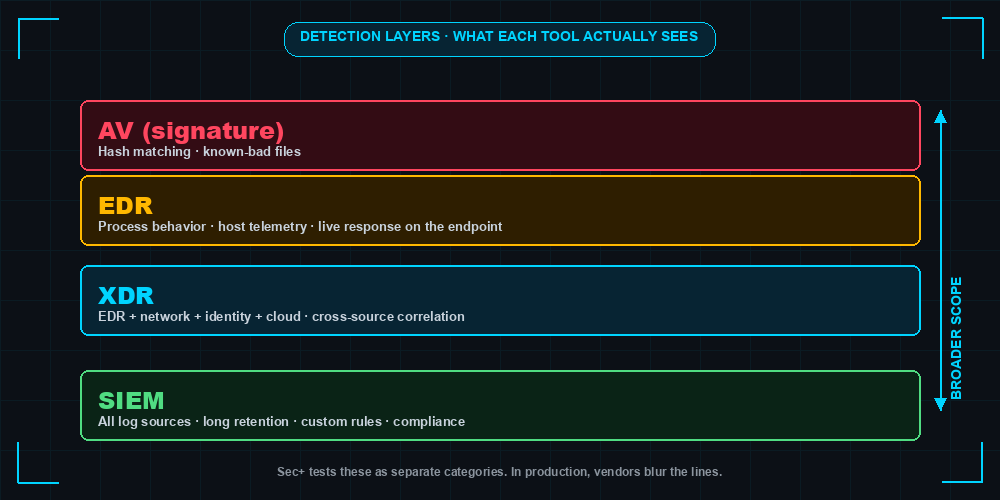
EDR vs Antivirus vs SIEM vs XDR
| Capability | Antivirus (legacy) | EDR | SIEM | XDR |
|---|---|---|---|---|
| Primary scope | Endpoint | Endpoint | All log sources | Endpoint + network + identity + cloud |
| Detection method | Signatures | Signatures + behavior + ML | Correlation rules on logs | Cross-domain correlation + behavior + ML |
| Telemetry depth | Low (file scans) | High (continuous process/registry/net) | Variable (whatever you ingest) | High, multi-domain |
| Response | Quarantine file | Isolate host, kill process, rollback | Alert only (SOAR adds response) | Automated multi-domain response |
| Sec+ exam framing | “Traditional” or “signature-based” | Continuous monitoring + response | Aggregation + correlation | Extension of EDR across domains |
Fill that table from memory and you have most of objective 4.4.
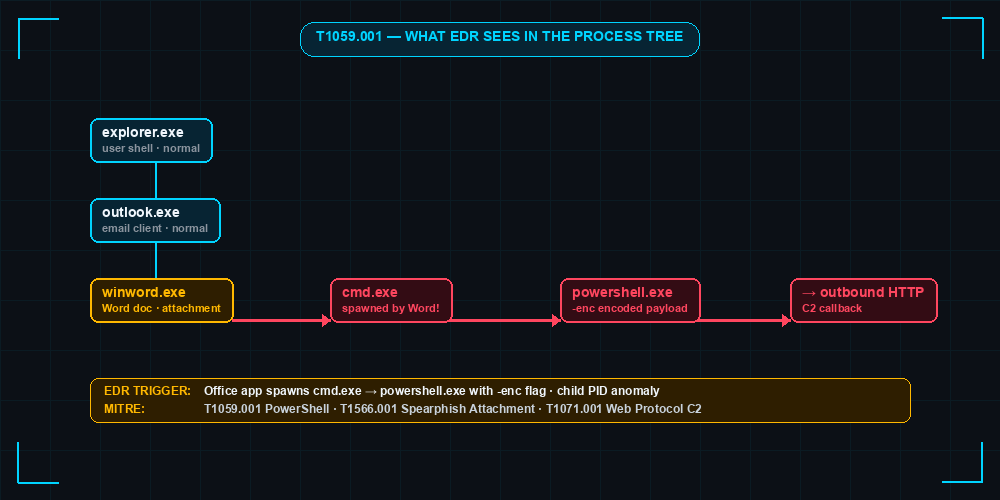
Process Tree: How EDR Sees an Attack
explorer.exe (PID 1240, user: alice)
└── outlook.exe (PID 4892)
    └── winword.exe (PID 5104)
        └── cmd.exe (PID 6212)
            └── powershell.exe -enc <base64-blob> (PID 6280)   ← ALERT
                └── powershell.exe -nop -w hidden -c IEX(...)  ← Network: 185.x.x.x:443
That chain is the canonical macro-borne dropper: Outlook opens a Word doc, the macro spawns cmd, cmd spawns encoded PowerShell, PowerShell calls home. In MITRE ATT&CK that is T1566 → T1204 → T1059.001 → T1071. For why attackers love this pattern see Living Off the Land: LOLBins.
Palo Alto Cortex XDR Deep Dive
Cortex XDR is Palo Alto’s evolution of Traps. The 2024-2026 product line, Cortex XSIAM, folds XDR into a SIEM/XDR convergence; for Security+ treat XDR and XSIAM as the same agent-plus-cloud architecture.
Architecture:
- Agent on every endpoint (Windows, macOS, Linux) doing prevention (exploit and malware blocking) and telemetry collection.
- Cloud analytics ingest endpoint telemetry alongside Palo Alto firewall logs, Prisma Cloud, and Cortex Data Lake sources.
- Behavioral Threat Protection (BTP) flags suspicious behavior chains.
- Investigation and response in the Cortex console (host isolation, live terminal).
Sec+ concept mapping:
- Process behavior monitoring → objective 4.4 telemetry.
- Host-based firewall and disk encryption visibility → domain 3.0 endpoint hardening.
- Exploit prevention (memory protection, ROP/heap-spray defense) → domain 2.0 mitigations.
- Network-aware analytics correlating endpoint events with NGFW data.
Where it shines: shops already running Palo Alto firewalls. Cross-correlating firewall sessions and endpoint processes is hard to replicate when EDR is bolted onto someone else’s network gear.
CrowdStrike Falcon Deep Dive
Falcon is the cloud-native EDR/XDR that defined the modern category and the one most likely named in a job posting.
Architecture:
- Single lightweight kernel-level agent (the Falcon sensor) covering EDR, NGAV, USB device control, host firewall management, and more depending on the SKU.
- Agent streams events to the Falcon cloud (Threat Graph), which performs detection and stores history.
- All analyst work happens in the cloud console; no on-prem management server.
- Falcon OverWatch layers human-led managed threat hunting on top.
Sec+ concept mapping:
- Continuous telemetry and behavioral detection → objective 4.4.
- Real-time response (RTR) → response actions.
- IOC management → IOC matching.
- Threat hunting via Falcon event search → proactive detection.
Where it shines: speed of deployment and breadth of detection content.
Side-by-Side Comparison
| Dimension | Cortex XDR / XSIAM | CrowdStrike Falcon |
|---|---|---|
| Deployment model | SaaS console + on-prem or cloud data lake options | SaaS only |
| Agent footprint | Moderate (single agent, multiple modules) | Lightweight kernel-level agent |
| Detection method | Signatures + BTP behavioral rules + ML | Signatures + IOA behavioral patterns + ML |
| MITRE ATT&CK coverage | Strong, regularly evaluated | Strong, regularly evaluated |
| Pricing approach | Subscription, vendor-quoted, no public list price | Subscription per endpoint per year, tiered bundles, vendor-quoted |
| Threat hunting | XQL query language in console | Falcon event search and Falcon LogScale |
| Managed services (MDR) | Cortex Managed Threat Hunting | Falcon Complete |
| Integration ecosystem | Strongest with Palo Alto stack and XSOAR | Broad partner integrations via Falcon Store |
| Compliance / certifications | FedRAMP, ISO 27001, SOC 2 | FedRAMP High, ISO 27001, SOC 2, PCI |
| Free learning resources | Palo Alto Beacon training, vendor docs | CrowdStrike University, free courses on YouTube |
| Student trial / community edition | Cortex XSIAM Community Edition (limited) | Falcon Free Trial (15 days typical) |
| Sec+ vocabulary mapping | “EDR with extended telemetry” | “EDR / XDR” |
| What the vendor calls a behavioral rule | BTP module / analytics rule | IOA (Indicator of Attack) |
| Host isolation feature name | Endpoint isolation | Network containment |
Real-World Detection Example: T1059.001 PowerShell Abuse
Anchor on one technique: T1059.001, PowerShell abuse. It is on every modern attack chain and shows up in Security+ scenario questions on fileless and living-off-the-land. Both platforms detect the encoded-payload pattern; rule shapes differ.
Cortex XDR BTP-style rule (spirit, not literal syntax):
rule "Office spawns encoded PowerShell"
when
  process.parent.name in ("winword.exe","excel.exe","outlook.exe")
  and process.name = "powershell.exe"
  and process.cmdline contains_any ("-enc","-EncodedCommand","FromBase64String")
then
  severity = high
  tag = "ATT&CK:T1059.001,T1204.002"
  response = isolate_host_optional
CrowdStrike Falcon event search (spirit, not literal CQL):
event_simpleName=ProcessRollup2
ParentBaseFileName IN (winword.exe, excel.exe, outlook.exe)
ImageFileName=*\powershell.exe
| search CommandLine="*-enc*" OR CommandLine="*EncodedCommand*"
| table ComputerName UserName ParentBaseFileName CommandLine
Both catch the same behavior: an Office process spawning PowerShell with an encoded command. Cortex BTP fires inline as the process starts; Falcon’s event search lets a hunter pivot through the Threat Graph for historical instances. For mapping more techniques into your study notes, see MITRE ATT&CK Framework Explained.
What Sec+ Asks vs What These Tools Actually Do
CompTIA writes generic; vendors brand everything. Bridge the two with example exam-style questions and a vendor reality sidebar.
Q1. A security analyst needs to stop a compromised laptop from communicating with C2 while preserving evidence. Which action is most appropriate?
- A. Power off the device
- B. Run a full antivirus scan
- C. Isolate the host from the network using the EDR agent
- D. Reimage the system
Answer: C. Vendor reality: Cortex calls this “endpoint isolation,” Falcon calls it “network containment.” Same thing.
Q2. Which EDR capability detects an attacker using only built-in operating system tools?
- A. Signature-based antivirus
- B. Behavioral analysis
- C. File integrity monitoring
- D. Port scanning
Answer: B. Vendor reality: exactly where Cortex BTP and CrowdStrike IOAs earn their license cost.
Q3. A SIEM alert references a process tree from an EDR. Which best describes the relationship?
- A. The SIEM replaces the EDR
- B. The EDR feeds telemetry the SIEM correlates with other sources
- C. The EDR uses the SIEM’s signatures
- D. They cannot share data
Answer: B. Vendor reality: in Cortex XSIAM the SIEM and EDR share one data lake; Falcon customers commonly forward telemetry via Falcon Data Replicator.
Q4. Which best describes an Indicator of Compromise (IOC)?
- A. A behavior pattern observed during an attack
- B. A specific artifact such as a hash, IP, or domain
- C. A SIEM correlation rule
- D. A threat actor profile
Answer: B. Vendor reality: both platforms support IOC import; Falcon’s IOC management API is widely used in CTI integrations.
Q5. A user receives repeated push notifications until they accept one. Which attack is this?
- A. Pass-the-hash
- B. MFA fatigue
- C. Kerberoasting
- D. SQL injection
Answer: B. Vendor reality: both EDRs detect downstream consequences but neither prevents push spam itself. See MFA Fatigue Attack.
Hands-on Labs Without a Corporate Budget
You do not need a SOC seat to feel either platform. Spend a weekend on this:
- Stand up the lab. A small Windows 10/11 VM and a Linux attacker VM in your home lab. The Security+ Home Lab Guide covers the topology if you have not built one yet.
- Cortex XSIAM Community Edition. Install the agent on the Windows VM, run a benign Atomic Red Team test (encoded PowerShell, scheduled task creation), find the alert.
- CrowdStrike Falcon Free Trial. Most students can request a 15-day trial. Repeat the test, then practice an event search query to find the process by command line.
- Portfolio artifacts. Put three things in a GitHub repo: a process tree screenshot, an IOC blocklist you authored, and one threat-hunt query with a one-paragraph explanation. Hiring managers prefer evidence over claims.
If a Falcon trial is unavailable, Atomic Red Team plus Sysmon plus a free SIEM trial gives a near-equivalent feel for what EDR collects.
Decision Matrix: When Each Platform Wins
| Customer profile | Likely fit |
|---|---|
| Already runs Palo Alto NGFW and Prisma | Cortex XDR / XSIAM |
| Cloud-first, no on-prem stack to integrate with | CrowdStrike Falcon |
| Heavy regulated industry needing FedRAMP High | Both qualify; check current authorization scope |
| No internal SOC, needs MDR | Falcon Complete (more mature) or Cortex Managed Threat Hunting |
| Wants single agent, fastest deploy | CrowdStrike Falcon |
| Wants tightest network + endpoint correlation | Cortex XDR / XSIAM |
| Existing SIEM investment to keep | Either, with telemetry forwarding |
| Replacing SIEM and EDR together | Cortex XSIAM consolidation story |
Positioning, not gospel. Real procurement hinges on existing contracts, integrations already paid for, and whether the security team has the headcount to operate the platform.
Sec+ Study Tips and What Comes After
Three habits that move you from passing Security+ to useful on day one:
- Translate every vendor concept into CompTIA vocabulary. When Falcon says “IOA,” write “behavioral rule / indicator of attack.” When Cortex says “BTP,” write “behavioral threat protection.” On test day you see generic terms.
- Practice with one vendor, read about the other. Pick the platform more common in your local job market, get hands-on, and read the other vendor’s docs enough to recognize the equivalents.
- Plan the next cert. CySA+ for blue-team analysts (deeper EDR and SIEM), PenTest+ for red-team-curious folks, or a vendor cert (CrowdStrike CCFA, Palo Alto PCDRA) once you target a shop. CCSK or CCSP rounds out the cloud side.
EDR is not the hardest Security+ topic, but it is one of the most reused: CySA+, interviews, the first ticket on the job. Knowing both Cortex XDR and CrowdStrike Falcon well enough to recognize the pattern under each label is a high-leverage hour of study.
Related Posts
- XDR Explained: Cortex vs CrowdStrike vs Sentinel - broader category view including Sentinel
- Security+ Home Lab Guide - the lab to host the EDR trial work
- MITRE ATT&CK Framework Explained - technique IDs in every EDR alert
- Living Off the Land: LOLBins - why behavioral detection matters
- MFA Fatigue Attack - identity-side attack pairing with EDR lateral movement
Practice with free flashcards, quizzes, and hands-on lab scenarios at cciesec.it-learn.io — built specifically for the CCIE Security v6.1 written (350-701 SCOR) and lab exam.


