

I’ve configured Cisco ISE more times than I’d like to admit. Network Device Groups, AD joins, policy sets, authorization profiles, TACACS+ device admin, MAB for IoT - every deployment hits the same rhythm: a week of clicking through admin screens, a sprint of “wait, why isn’t this matching?”, and a final lap of building runbooks nobody will read.
Last week I sat down with Claude and a Cisco dCloud sandbox to try something different: build the whole thing as code, end-to-end, in one evening. AD-integrated wireless 802.1X. TACACS+ admin login. MAB for IoT endpoints. VLAN + dACL push. Config snapshots. Smoke tests.
It worked. The repo is here: github.com/asarmiento85/cisco-ise-automation.
This post is the story of what we built, the ISE 3.4 paper cuts we hit along the way, and why I think this pattern - engineer plus LLM plus good APIs - is going to change how NAC work gets done in the field.
The lab
A standard Cisco dCloud ISE 3.4 sandbox: one ISE PAN, one Catalyst 9800-CL virtual WLC, a Windows Server 2016 AD DC, a Windows workstation, and an Ubuntu 22.04 host I’d use as my RADIUS test client. Everything on RFC-reserved IP space, reachable over AnyConnect VPN.
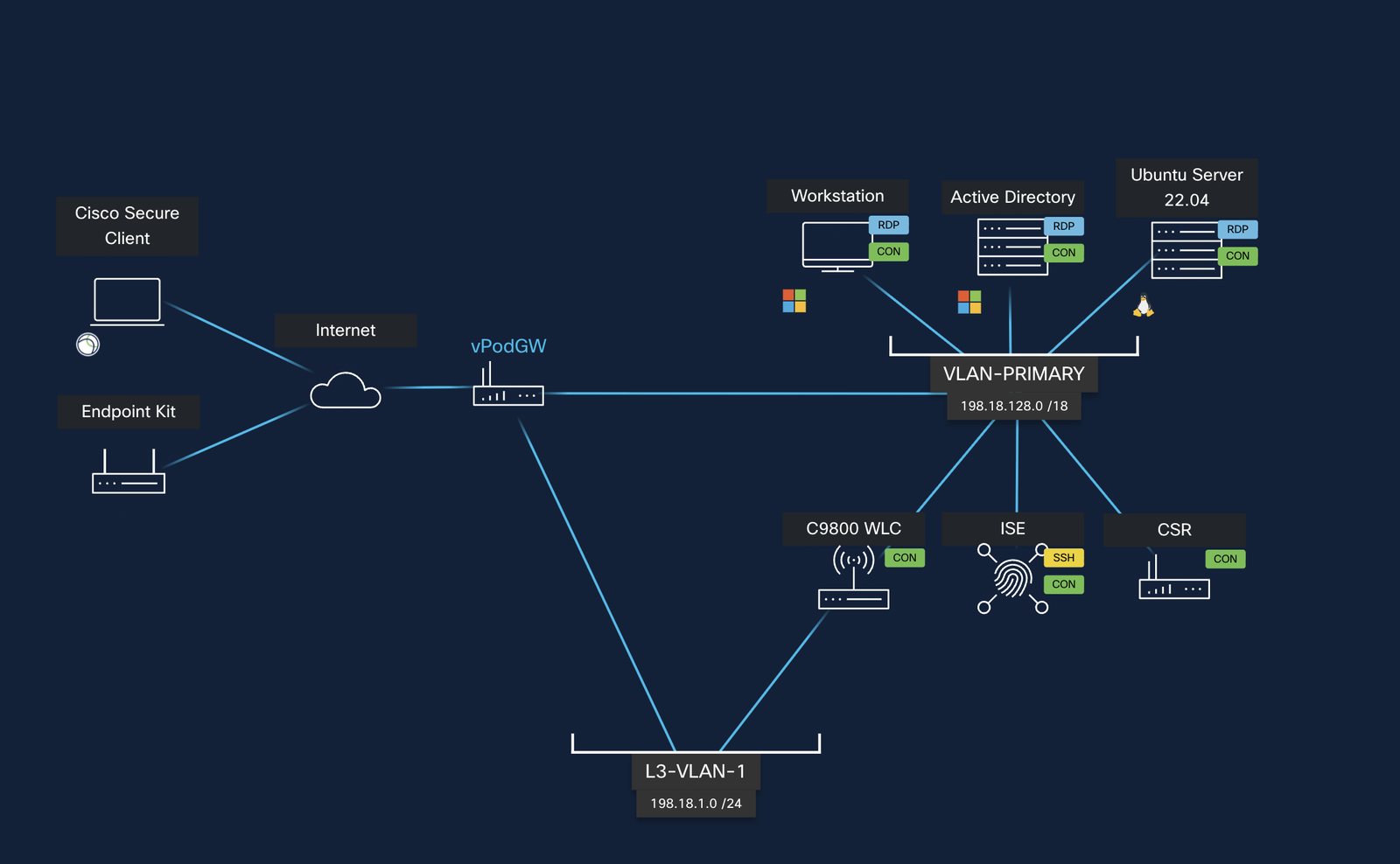
The only thing not in the diagram: my MacBook, where Ansible and Python would run against everything else over the VPN tunnel.
The stack
Three deliberate choices that mattered:
- Ansible for orchestration, but using
ansible.builtin.urito hit ISE’s ERS and OpenAPI directly. Thecisco.isecollection exists but has real schema drift against ISE 3.4 - I burned 30 minutes fighting it before switching strategies. Raw API calls turned out to be more predictable and easier to debug. - Python plus uv for the bits Ansible isn’t great at: bulk ops, structured config exports, restore replays, smoke tests with rich output.
cisco.iosfor the WLC overnetwork_cli, since the C9800 is just IOS-XE with extra wireless models.
uv has been a quiet revelation for me. uv sync and uv tool install ansible-core --with ciscoisesdk --with paramiko are the only two commands needed to bootstrap a working environment on a fresh machine.
What got built
The repo structure tells the story better than I can:
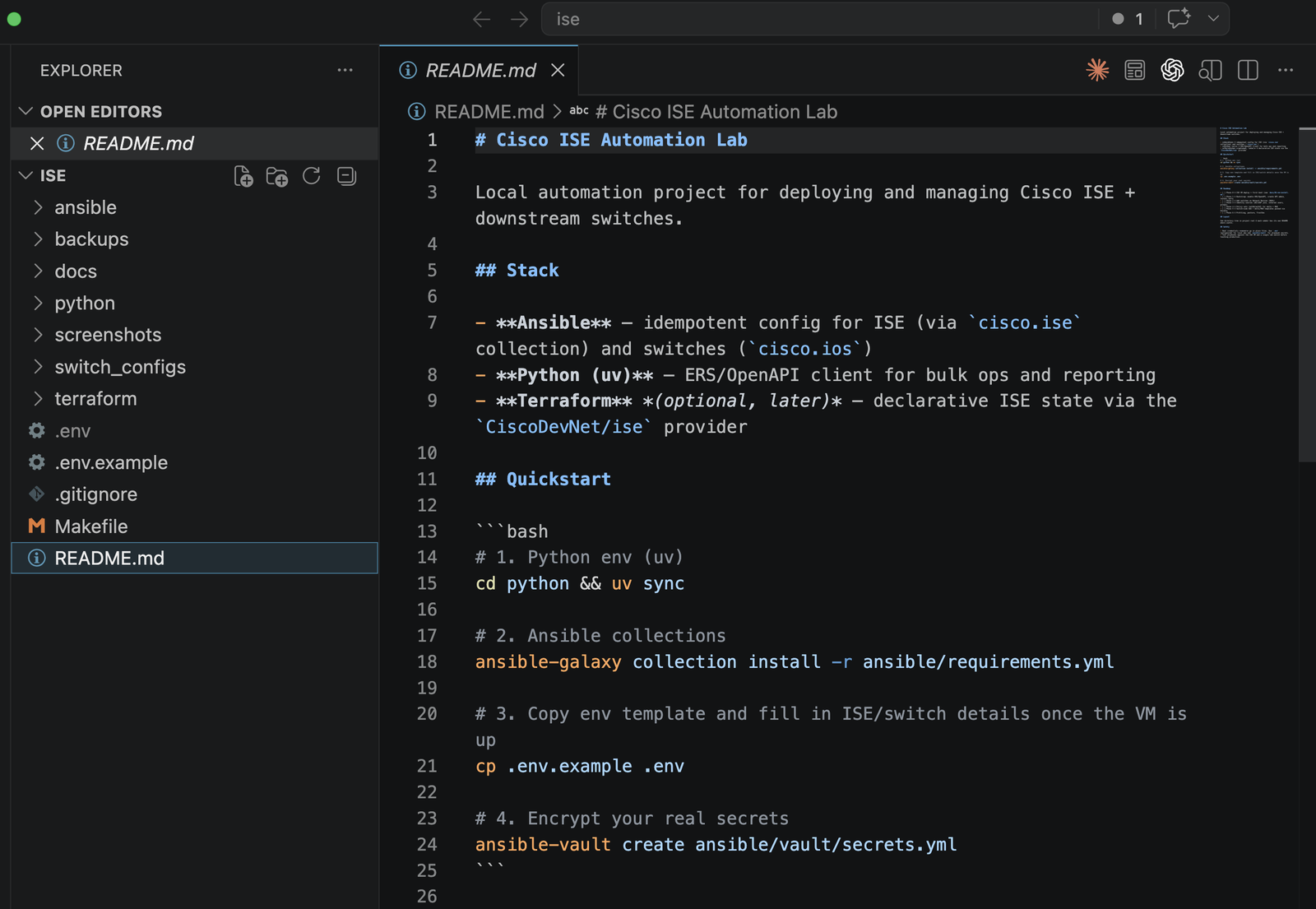
Each playbook does one job and is idempotent. Re-running anything is safe - make bootstrap twice does nothing the second time. That property alone is worth the effort: it means the playbooks ARE the documentation, because they always accurately describe the desired state.
Project layout
ansible/
├── ansible.cfg
├── inventory/
│   ├── hosts.yml                  # ISE PAN, vWLC, AD, Ubuntu test host
│   └── group_vars/
├── playbooks/
│   ├── ise_bootstrap.yml          # NDGs + identity groups
│   ├── ise_network_devices.yml    # Register NADs (with 3.4 leaf-NDG fix)
│   ├── ise_ad_join.yml            # AD join point + groups
│   ├── ise_policy_wireless_dot1x.yml
│   ├── ise_authz_profiles.yml     # dACL + VLAN-push profiles
│   ├── ise_tacacs_admin.yml       # Device Admin policy + TACACS profiles
│   ├── ise_mab_iot.yml            # IoT endpoint groups + MAB policy set
│   ├── wlc_discover.yml           # Read-only state dump
│   ├── wlc_aaa.yml                # RADIUS + AAA method lists on WLC
│   ├── wlc_wlan_dot1x.yml         # WPA2-Enterprise SSID
│   ├── wlc_tacacs.yml             # TACACS+ client on WLC
│   └── radius_smoke_test.yml      # 4-case end-to-end validation
└── vault/secrets.yml              # ansible-vault encrypted

python/
├── pyproject.toml
├── ise_api/                       # ERS / OpenAPI client
│   ├── client.py                  # httpx + retry + pagination
│   ├── nads.py
│   ├── policy.py
│   └── endpoints.py
└── scripts/
    ├── health_check.py            # quick reachability + NAD list
    ├── bulk_import_nads.py        # CSV → NADs
    ├── export_config_backup.py    # snapshot with secret redaction
    └── restore_config.py          # POST/PUT replay

switch_configs/templates/          # Jinja2 IOS-XE for IBNS 2.0 wired dot1x
docs/                              # VM install + post-install runbook
backups/                           # local snapshots (gitignored)
The use cases that got automated
| Layer | What got automated |
|---|---|
| ISE bootstrap | Network Device Groups (Location / Device Type), baseline identity groups |
| Network devices | vWLC and Ubuntu test host registered as NADs (with the right group hierarchy - more on that below) |
| AD integration | Join point creation, group import (Domain Users, Domain Computers, Domain Admins) |
| Wireless 802.1X | Policy set matching Device Type=WLC AND SSID=dCloud-Corp, AuthN via AD, AuthZ pushing VLAN + dACL per session |
| Device admin | TACACS+ policy set for WLC management, shell profiles for full-admin and read-only, AD-backed authN |
| IoT / MAB | Endpoint Identity Groups (Printers, Cameras), seed MACs, policy set for Service-Type=Call-Check with VLAN push |
| WLC | RADIUS + AAA method lists, CoA listener, WPA2-Enterprise SSID, TACACS+ client config |
| Operations | Config snapshot/restore (with secret redaction), 4-case end-to-end smoke test |
Proof it works
The most satisfying part: ISE’s RADIUS Live Logs lit up with real auth events from our smoke tests.
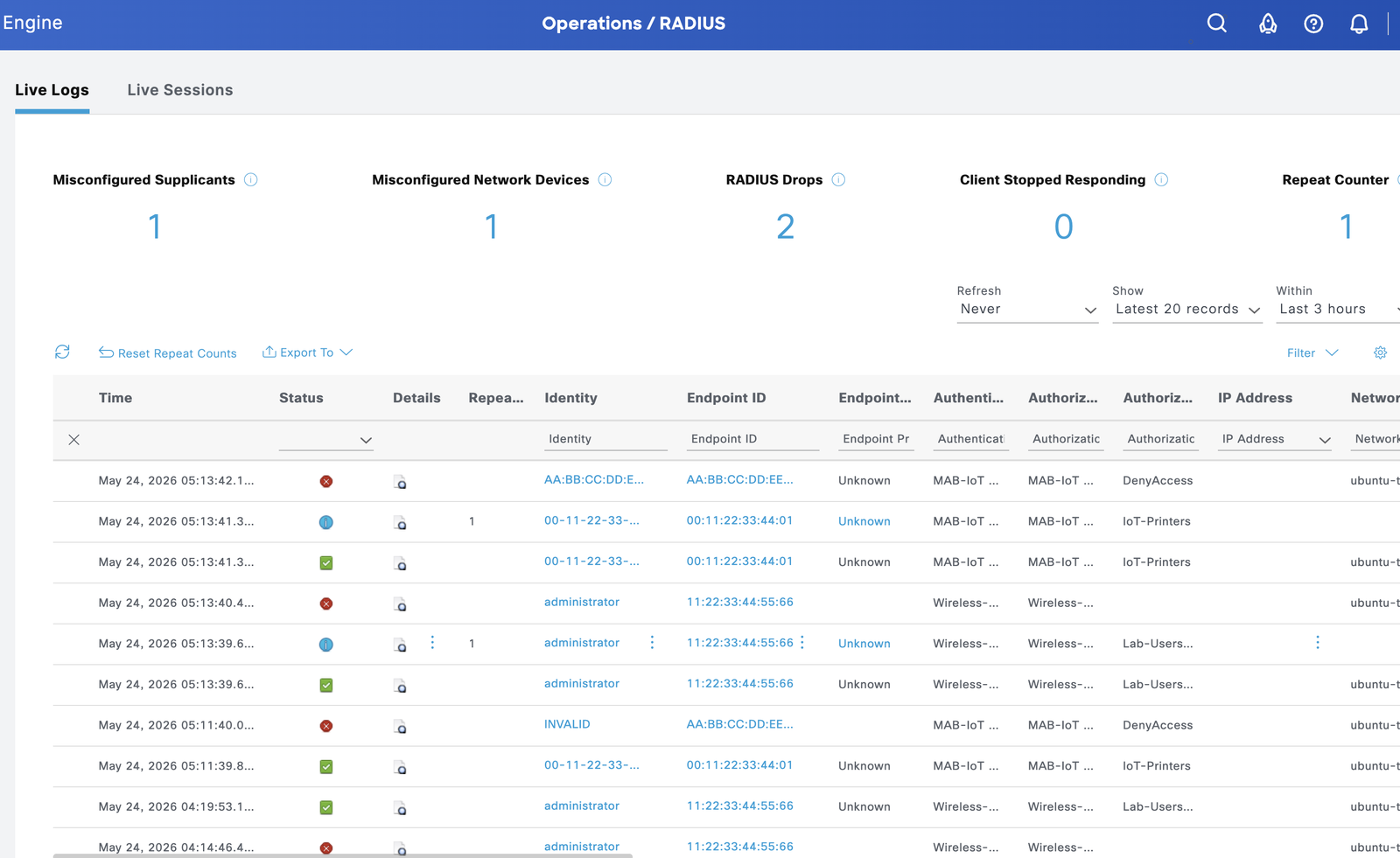
What you’re looking at:
administratorentries → AD user hitting theWireless-Dot1xpolicy set, gettingLab-Users-Profile(VLAN 10 + permit-all dACL)00-11-22-33-44-01→ our seed IoT printer MAC, hitting theMAB-IoTpolicy set, gettingIoT-Printers(VLAN 30)AA-BB-CC-DD-E…with red ❌ → deliberately unknown MAC hittingMAB-IoTthenDenyAccessbecause no rule matched - proves the policy is actually enforcing, not just rubber-stamping
The Policy Sets view in ISE shows what got built, with hit counts confirming traffic actually landed:
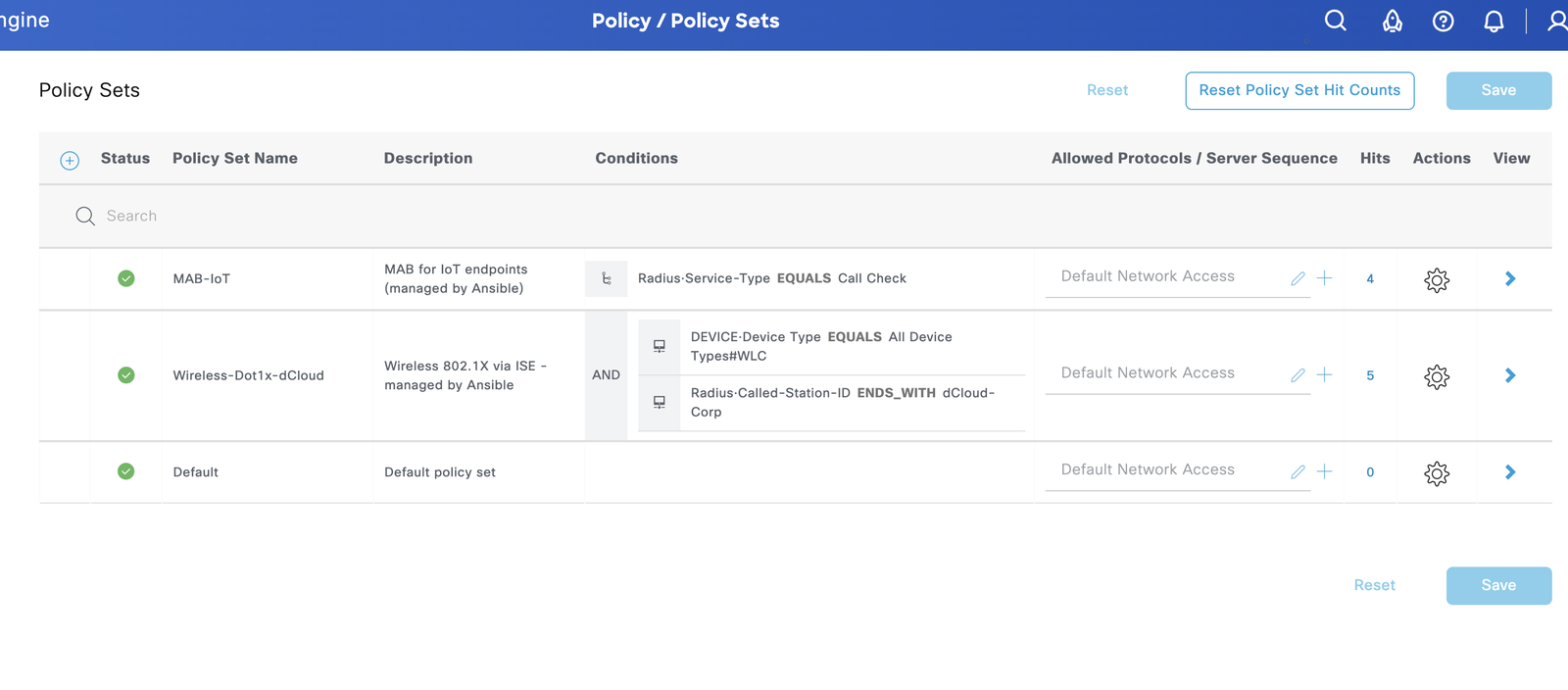
Three policy sets, all enabled, all hitting. MAB-IoT and Wireless-Dot1x-dCloud both above Default, with conditions exactly as written in the playbooks.
The AD join point is operational with the groups we need:
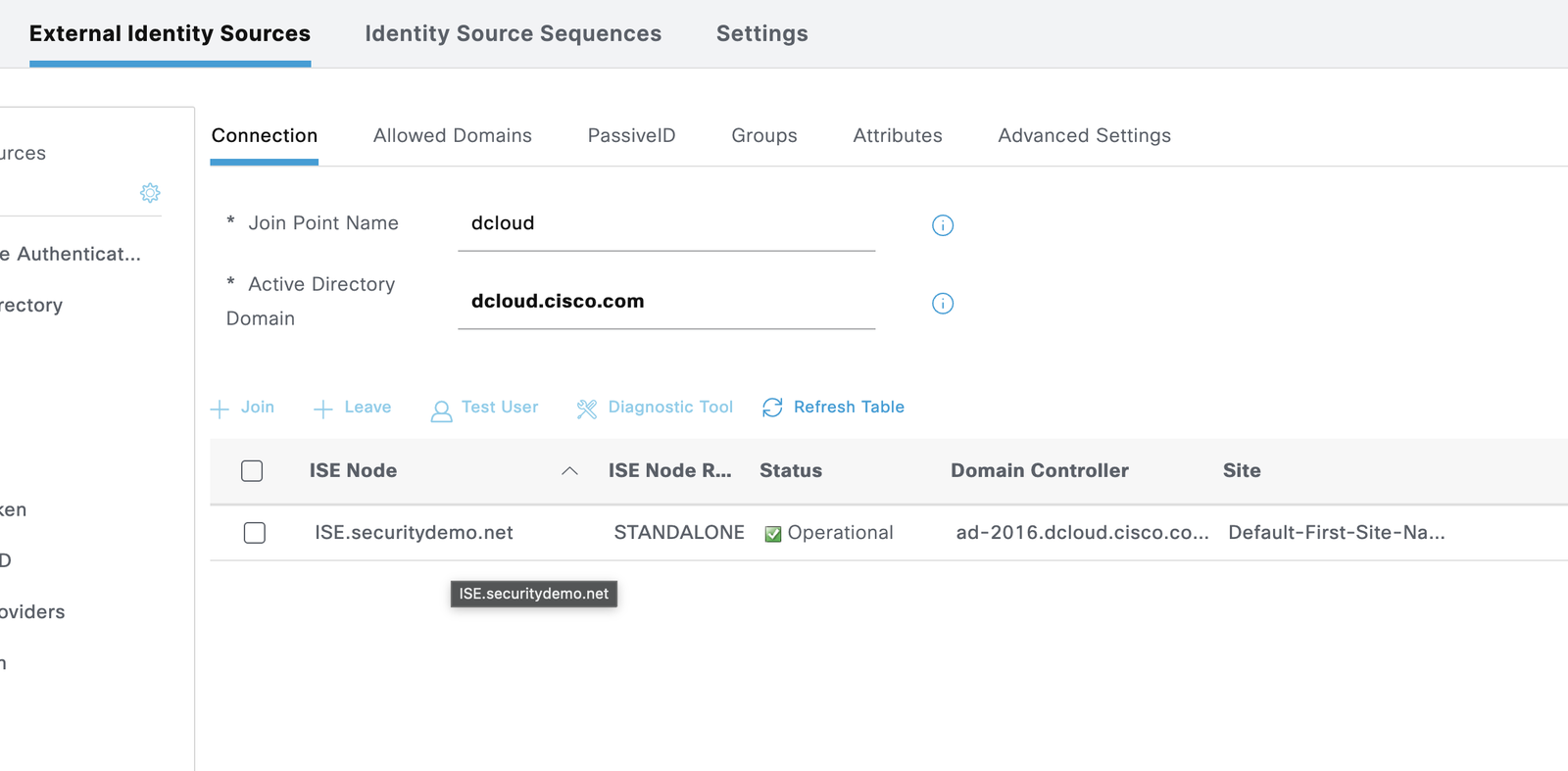
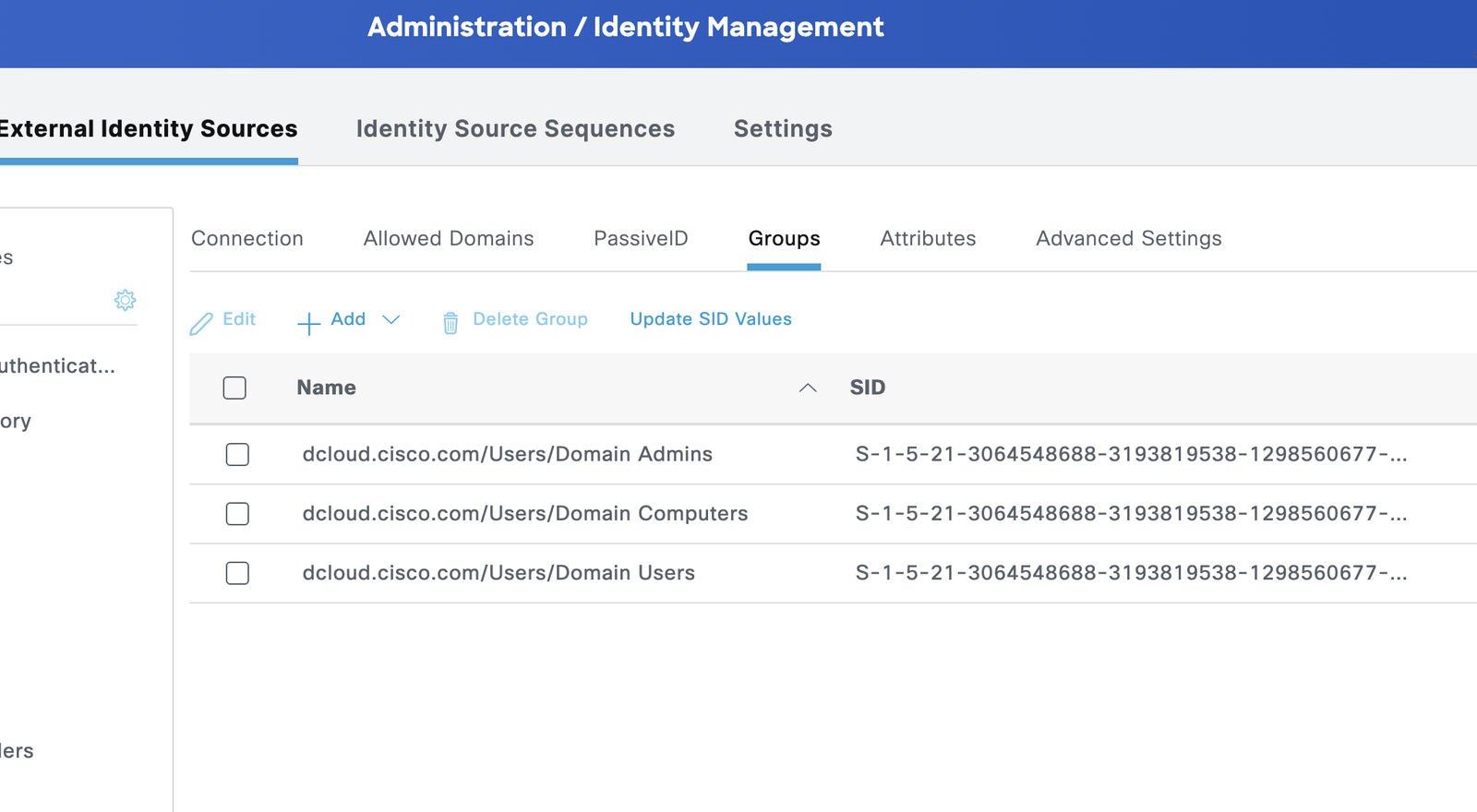
And for the TACACS+ device admin chain, the live logs show AD users SSH’ing into the WLC:
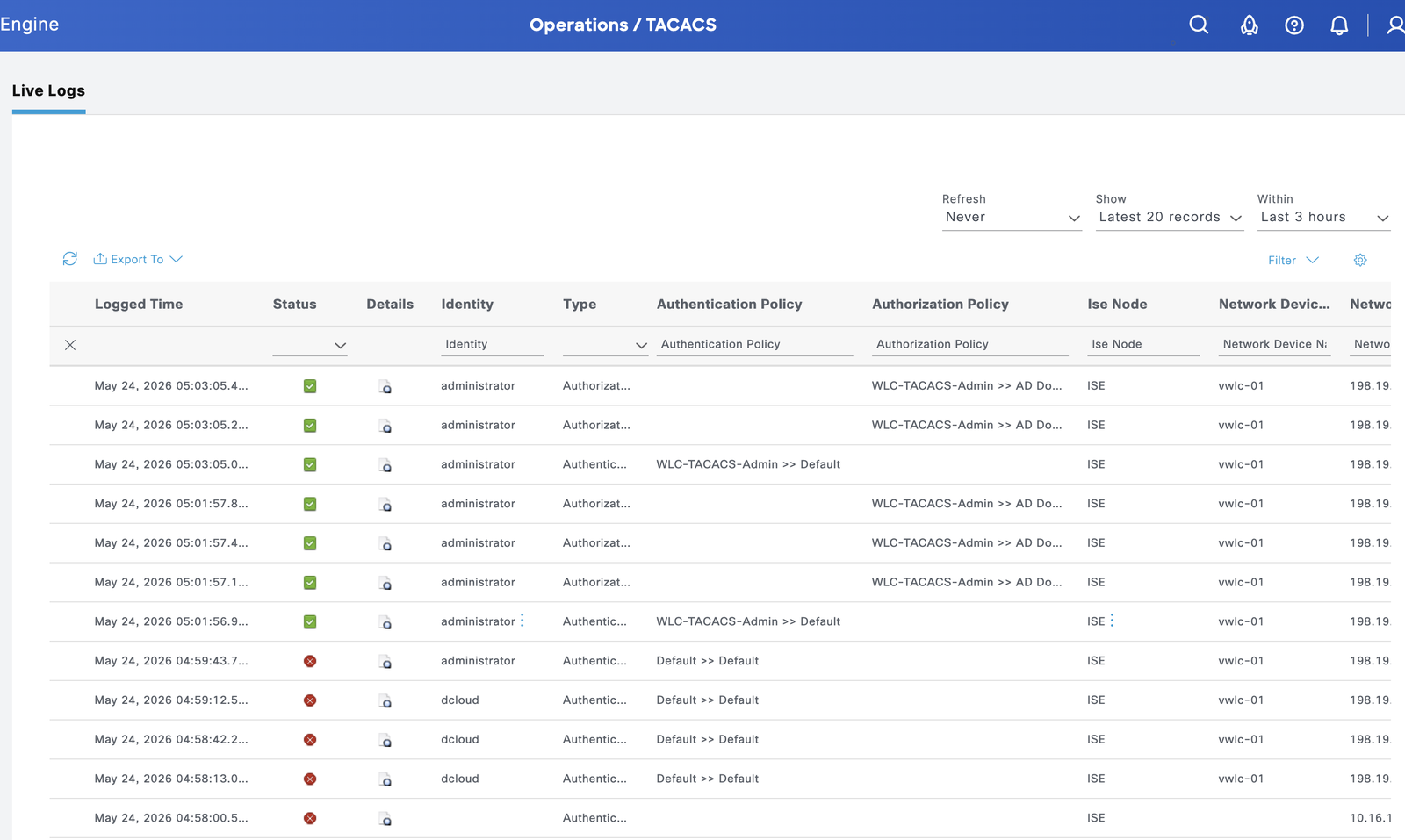
Auth → AD lookup → shell profile applied → priv level enforced on the network gear. That’s the loop that used to take a half-day to wire up by hand.
The smoke test that closes the loop
make radius-test runs four scenarios from the Ubuntu host against ISE:
AD positive   (administrator + correct pw)        → PASS Access-Accept
AD negative   (administrator + wrong pw)          → PASS Access-Reject
MAB positive  (known printer 00:11:22:33:44:01)   → PASS Access-Accept
MAB negative  (unknown MAC aa:bb:cc:dd:ee:ff)     → PASS Access-Reject
Every scenario validates a different path through the policy engine. The Access-Accept for the AD user comes back with Tunnel-Type=VLAN, Tunnel-Private-Group-Id=10, Cisco-AVPair=ACS:CiscoSecure-Defined-ACL=#ACSACL#-LAB-PERMIT-ALL - exactly the attribute push we’d want on a real wireless deployment.
The landmines (this is the actually useful part)
ISE deployments don’t fail in the documented ways. They fail in tiny, undocumented, “wait, why is this empty?” ways. Here are the ones we hit and pinned down:
1. ISE 3.4 ERS silently drops leaf Network Device Groups on POST. Send a NAD with Device Type#All Device Types#WLC in NetworkDeviceGroupList and the API returns 201 - but if you re-fetch the object, only Device Type#All Device Types (the parent) is set. The fix: follow up the POST with an immediate PUT containing the same list. Then ISE saves it. This one cost me 90 minutes of “why isn’t my policy matching?”
2. joinDomainWithAllNodes returns empty HTTP 500s. The endpoint exists, accepts the right payload, and just… returns 500 with an empty body. No error message, no logs that match. I tried bare usernames, UPN format, NetBIOS format, multiple recreates of the join point. Eventually fell back to one manual click in the GUI for that single operation. Everything else around AD is automated; the join itself isn’t. Worth it.
3. TACACS+ port 49 stays closed until you explicitly enable the Device Admin Service persona on the node. ISE’s API for TACACS objects responds 200 regardless. You can create policy sets, shell profiles, and AuthZ rules - and nc -zv ise 49 will tell you the port is refused because the daemon isn’t running. Toggle is at Administration → System → Deployment → node → Personas → Enable Device Admin Service.
4. IOS-XE 17.09 silently drops address ipv4 inside a tacacs server block when stale auto-generated servers (like TACACS_SERVER_AUTH_1 from a dCloud bootstrap script) are sitting in the running config. The new server gets created, accepts the address command without error, but show running-config shows the address line missing and show tacacs reports “Server address: UNKNOWN”. The fix: delete the stale servers first.
5. ISE’s DNS resolver hits the first server in ip name-server and won’t fail over even when that server returns NXDOMAIN. In dCloud, the default DNS forwards dcloud.cisco.com to a public Cisco web property instead of the lab AD. Re-pointing ISE’s primary DNS to the AD DC (198.18.133.1) requires a service restart - which the CLI prompts for explicitly and aborts the change if you answer “no”.
6. macOS Python 3.13+ deadlocks Ansible workers on fork(). The workaround is one environment variable: OBJC_DISABLE_INITIALIZE_FORK_SAFETY=YES. The Makefile sets it for every target.
Every one of these is in the README’s troubleshooting table. If you’re doing this in the wild, that table alone may save you a day.
Why this pattern matters
I want to be specific about the value here, because “AI helped me write some Ansible” is not interesting on its own.
POV / PoC engagements
This is the biggest. Cisco SEs and partners spend significant chunks of pre-sales building proof-of-value labs. The traditional flow is: receive customer requirements → click through ISE for two days → demo → customer asks “can we change X?” → another half-day. With this pattern, requirement changes are variable edits. make bootstrap && make add-nads && make radius-test runs in three minutes against a fresh sandbox. You can demo more variations, more cleanly, and the customer leaves with a real artifact instead of screenshots.
Troubleshooting becomes a conversation
Every error in this build became fast back-and-forth. I’d paste a 500 response, the request payload, what I’d already tried - and get back a hypothesis and the next experiment. Sometimes the hypothesis was wrong. That’s fine; the loop is fast. Compared to scrolling ise-psc.log hoping a familiar string appears, this is a different mode of work.
The joinDomainWithAllNodes debug is a good example. I exhausted three different payload shapes, two different username formats, and a fresh join point recreation. We ended up documenting it as a known ISE quirk and routing around it. Not glamorous, but practical - and the documentation now lives in the repo so the next person doesn’t burn the same hour.
Knowledge transfer collapses
NAC has historically been deep tribal knowledge. The people who know how ISE policy sets resolve, how Service-Type=Call-Check triggers MAB, how Tunnel-Private-Group-Id maps to a VLAN assignment - those people are valuable and hard to find. They’re also a single point of failure for their organizations.
The repo is now the source of truth. A new engineer can clone it, read the playbooks (which are short, named clearly, and idempotent), follow the README, and stand up the same deployment. The implicit knowledge becomes explicit. The runbook becomes the code becomes the system.
What I’m not claiming
This isn’t “AI replaces network engineers.” Several times Claude proposed approaches that I had to reject because they wouldn’t work in production (e.g., disabling certificate verification permanently, hardcoding the vault password into the Makefile). The engineer-in-the-loop is what makes the pattern work. The LLM is a fast typist and a tireless API reader; the human is the judgment.
And there are still places where ISE’s surface is too sharp for full automation - the AD join is the clearest example. For now, accepting one manual click in a multi-step deployment is the right tradeoff. Maybe in ISE 3.5 the API quirk gets fixed.
What we did not cover (yet)
ISE is a deep platform. The deployment in this repo nails the bread-and-butter NAC use cases, but there is a long list of features and integrations we did not automate. Some of these are “next sitting” candidates; some are bigger lifts that deserve their own posts.
Endpoint and access posture
- Posture assessment - endpoint compliance checks (AV running, OS patches current, disk encryption on) with Cisco Secure Client agent and remediation actions
- BYOD self-service onboarding - personal-device registration portal that issues per-user certificates
- EAP-TLS with internal ISE CA - certificate-based wireless auth (the production version of what we built with PEAP)
- Profiling - device fingerprinting via DHCP, HTTP, RADIUS, SNMP, and NMAP probes to classify endpoints automatically
- Anomalous endpoint detection - behavioral profiling to catch endpoints that suddenly look different
Identity and admin login
- Guest portal - sponsored, self-registration, or hotspot guest access with email/SMS notifications
- SAML / SSO integration - external identity providers like Microsoft Entra ID, Okta, or Ping Identity
- MFA for ISE admin login - Duo, Cisco Secure Access, or YubiKey for the admin UI itself
- External RADIUS proxy - chain ISE to a third-party RADIUS server (e.g., for student or research networks)
Segmentation and integration
- TrustSec / Security Group Tags (SGT) - software-defined segmentation that travels with the user instead of with the VLAN
- pxGrid integration - share session and tag context with Cisco Secure Firewall (FTD/FMC), Palo Alto, Fortinet, or other XDR platforms
- Cisco DNA Center / Catalyst Center - fabric integration for SD-Access
- Cisco Secure Endpoint - endpoint posture feed from the AMP cloud
- Cisco Umbrella - DNS-layer policy tied to ISE-known users
- VPN with ISE backend - Secure Client / AnyConnect terminating into ISE policy
Wired NAC
- Wired 802.1X with IBNS 2.0 - the Catalyst switch policy maps that are the wired equivalent of what we built for wireless (we have a Jinja2 template; we did not push it end to end)
- Closed-mode vs low-impact-mode rollout - staged 802.1X deployment that lets MAB fallback work during transition
- MACsec - encrypted Layer 2 between switches
Operations and scale
- High availability - primary/secondary PAN, redundant MnT, distributed PSN cluster
- Patch automation - schedule and apply ISE patches via API
- Backup to remote repository - SFTP/SCP automated backups beyond local snapshots
- Splunk / Sentinel / Elastic feeds - production SIEM integration for RADIUS Live Logs (we have a Splunk dashboard post but the playbook hookup is not in this repo yet)
- Smart Licensing automation - license token registration without GUI clicks
- CMDB sync - ServiceNow integration for NAD inventory and incident creation
Testing and resilience
- Negative scenarios beyond the four we ran - what happens when AD is down, when a PSN fails mid-session, when a CoA request times out
- Load testing - RADIUS authentication throughput under realistic concurrency
- Chaos testing - deliberately break a component and validate the recovery playbook
If any of these would be useful to see automated next, open an issue on the repo - the next sitting can prioritize what people actually need.
Try it
The repo is MIT-licensed and ready to run against any ISE 3.4+ deployment:
https://github.com/asarmiento85/cisco-ise-automation
Quick start
 1# 1. Python env (uv)
 2cd python && uv sync && cd ..
 3
 4# 2. Install ansible-core + Cisco ISE SDK + paramiko (single tool env via uv)
 5uv tool install ansible-core --with ciscoisesdk --with paramiko
 6ansible-galaxy collection install -r ansible/requirements.yml
 7
 8# 3. Configure connection details
 9cp .env.example .env
10cp ansible/vault/secrets.example.yml ansible/vault/secrets.yml
11# edit both with your real ISE / AD / RADIUS values
12ansible-vault encrypt ansible/vault/secrets.yml
13
14# 4. Sanity check
15make health
16
17# 5. Build it
18make bootstrap          # NDGs + identity groups
19make add-nads           # register WLC / switches / test host as NADs
20# then run individual playbooks in order from playbooks/
21
22# 6. Validate
23make radius-test        # 4 smoke tests (AD pos/neg, MAB pos/neg)
24
25# 7. Snapshot config
26make backup             # writes backups/<UTC>/, secrets redacted
27make backup-commit      # snapshot + git commit if anything changed
If you’ve got a dCloud sandbox or a lab ISE node, that’s the whole flow. If you hit a paper cut not in the README’s troubleshooting table, open an issue - I’d like the table to grow.
If you’re doing this kind of work and seeing the same shift - or seeing pushback against it - I’d genuinely like to hear about it. Drop a comment.
Related Posts
- Cisco ISE Active Directory Integration: Complete Guide - the manual flow this automation replaces
- Cisco ISE Guest Portal Setup Guide - companion ISE configuration
- Cisco ISE Posture Assessment Complete Configuration Guide - extending the deployment
- Splunk + Cisco ISE Syslog Integration RADIUS Dashboard - operational visibility on top of this stack
- How to Run a Technical Discovery Call for Security Deals - the SE perspective on customer engagement
Built with Cisco ISE 3.4, Ansible, Python (uv), and Claude. Tested against the Cisco dCloud ISE 3.4 Sandbox over AnyConnect VPN. No production deployments were harmed in the making of this post.
Practice with free flashcards, quizzes, and hands-on lab scenarios at cciesec.it-learn.io — built specifically for the CCIE Security v6.1 written (350-701 SCOR) and lab exam.


