

You have seven customer calls today. Between prep, the meetings themselves, follow-up emails, and internal syncs, your calendar has approximately forty-five minutes of unscheduled time spread across the day in fifteen-minute fragments. And somewhere in those fragments, you are supposed to stay current on an industry where a new critical vulnerability can emerge at any hour, threat actor tactics shift quarterly, and vendors release product updates weekly.
This is the reality for every Solutions Engineer and Account Manager in cybersecurity. The industry moves fast. Your calendar does not care. And the consequence of falling behind is real: you walk into a customer meeting, the CISO mentions a breach that happened last week, and you have no idea what they are talking about. That moment - the blank look, the fumbled response - erodes the credibility you have spent months building.
The solution is not “find more time.” You do not have more time. The solution is a system that delivers maximum awareness in minimum time, integrates into the schedule you already have, and converts passive news consumption into active customer value.
The 15-Minute Morning Routine
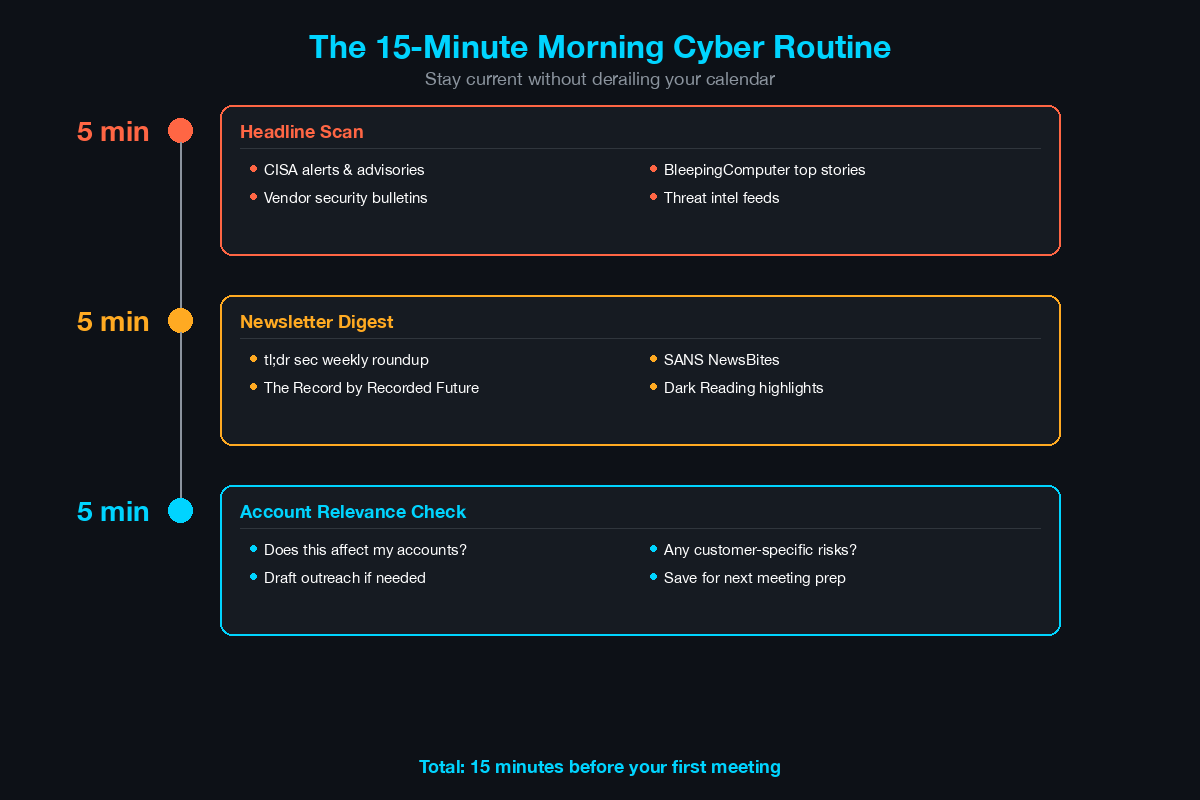
This is the core of the system. Before your first meeting of the day, spend exactly 15 minutes on cybersecurity awareness. Not 30. Not an hour. Fifteen minutes, structured as follows:
Minutes 1-5: Headline Scan
Open these three sources in browser tabs and scan headlines only. Do not click into articles unless a headline is directly relevant to a customer conversation today.
BleepingComputer (bleepingcomputer.com) - Breaking vulnerability disclosures, ransomware news, and vendor security advisories. Most relevant for day-to-day SE conversations.
The Record (therecord.media) - Recorded Future’s news outlet covering threat actors, government policy, and major breaches. Broader perspective than BleepingComputer.
CISA Alerts (cisa.gov/news-events/alerts) - Official US government vulnerability alerts and advisories. When CISA issues an alert, customers notice.
What you are looking for: Any critical vulnerability (CVSS 9.0+) in products your customers use, any breach in your customers’ industry, any news about vendors you sell or compete against.
Minutes 5-10: Newsletter Digest
Read the latest edition of your primary newsletter. These arrive overnight and are already curated, saving you the work of filtering noise.
Primary newsletter (pick one to read daily):
- tl;dr sec by Clint Gibler - Weekly curated security links. The highest signal-to-noise ratio of any security newsletter. Covers tools, research, conference talks, vulnerabilities, and career content.
- Risky Business News - Daily briefing covering threat intelligence, policy, and vendor news. Concise and well-sourced.
Secondary newsletters (read weekly):
- SANS NewsBites - Bi-weekly curated news with commentary from SANS instructors. Good for understanding why a vulnerability matters, not just what it is.
- Krebs on Security - Brian Krebs’ investigative reporting on cybercrime and breaches. Not daily, but essential reading when published.
- The CyberWire Daily Briefing - Daily email summary of cybersecurity news. Good for breadth of coverage.
Minutes 10-15: Account Relevance Check
This is the step most people skip, and it is the most valuable. Ask yourself:
- Does anything I just read affect one of my active accounts?
- Is there a vulnerability in a product my customer uses?
- Is there a breach in my customer’s industry that I can reference in my next meeting?
- Did a competitor announce something I need to know about?
If the answer is yes to any of these, write a one-line note and the customer name. You will use this later.
Curated Newsletter List
Subscribe to all of these. Read them on a rotation - not all on the same day.
Daily Reading (Pick 1-2)
| Newsletter | Frequency | Focus | Time to Read |
|---|---|---|---|
| Risky Business News | Daily | Threat intel, policy, breaches | 5-7 minutes |
| The CyberWire Daily Briefing | Daily | Broad cybersecurity news | 5-7 minutes |
| BleepingComputer RSS | Daily | Vulnerabilities, ransomware | 3-5 minutes (headlines) |
Weekly Reading (Read All)
| Newsletter | Frequency | Focus | Time to Read |
|---|---|---|---|
| tl;dr sec | Weekly (Monday) | Curated security links, tools, research | 10-15 minutes |
| SANS NewsBites | Bi-weekly | Curated news with expert commentary | 10 minutes |
| The it-learn Brief | Weekly | SE-focused cybersecurity content | 5-7 minutes |
As-Published (Read When Available)
| Source | Frequency | Focus | Time to Read |
|---|---|---|---|
| Krebs on Security | Irregular | Investigative cybercrime reporting | 10-15 minutes |
| Google Project Zero Blog | Irregular | Vulnerability research, zero-days | 15-20 minutes (technical) |
| Mandiant Blog | Weekly | Threat actor research, APT reports | 10-15 minutes |
Podcasts for the Commute
Podcasts convert dead time - commuting, exercising, waiting for flights - into learning time. Here are the best options organized by episode length:
Short Episodes (5-15 minutes)
SANS Internet Storm Center Daily Stormcast
- Duration: 5-10 minutes
- Frequency: Daily
- Content: Quick summary of the day’s most notable security events
- Best for: The briefest possible daily update
CyberWire Daily Podcast
- Duration: 15-20 minutes
- Frequency: Daily
- Content: News summary covering threats, vulnerabilities, policy, and industry
- Best for: Comprehensive daily overview during a short commute
Medium Episodes (30-45 minutes)
Risky Business
- Duration: 45-60 minutes
- Frequency: Weekly
- Content: Security news analysis and industry interviews
- Best for: Understanding the context behind headlines. Patrick Gray’s interviews with security practitioners provide insights you will not get from written news.
Security Now with Steve Gibson
- Duration: 90-120 minutes (but can be consumed in segments)
- Frequency: Weekly
- Content: Deep technical dives into security topics, vulnerabilities, and protocols
- Best for: Building deep technical understanding. Steve Gibson explains complex topics clearly enough that you can re-explain them to customers.
Long-Form / Storytelling (30-60 minutes)
Darknet Diaries
- Duration: 45-75 minutes
- Frequency: Bi-weekly
- Content: True stories of hacking, cybercrime, and security incidents
- Best for: Customer storytelling. The narratives from Darknet Diaries give you real-world examples to reference in customer conversations. When a CISO says “that would never happen to us,” you can reference a specific incident from the podcast.
Smashing Security
- Duration: 45-60 minutes
- Frequency: Weekly
- Content: Security news discussed with humor
- Best for: Lighter listening when you need a break from intense technical content
Twitter/LinkedIn Accounts Worth Following
Curating your social media feed transforms it from a time sink into a professional tool. Follow these accounts and hide or mute everything else in your security feed.
For Threat Intelligence
- @vaboronkov (Catalin Cimpanu) - Security journalist, previously at ZDNet and The Record. Breaks news fast.
- @campaboronkov (Kevin Beaumont) - Independent security researcher. Unfiltered, technically deep commentary on major vulnerabilities and breaches.
- @cikifranz (Will Thomas) - Threat intelligence analyst. Tracks threat actor campaigns with technical indicators.
- CISA (official accounts) - Vulnerability alerts and advisories.
For Vendor and Product Intelligence
- Follow the official accounts of every vendor you sell and compete against.
- Follow the product management and SE leadership from your own company.
- Follow security analysts at Gartner, Forrester, and IDC who cover your market segment.
For Career and SE-Specific Content
- Follow SEs at your company and competitors who share technical content.
- Follow cybersecurity hiring managers and recruiters for market intelligence.
- Follow conference accounts (RSA, Black Hat, BSides) for talk announcements and trends.
LinkedIn-Specific Strategy
LinkedIn is more valuable for SEs than Twitter for one reason: your customers are on LinkedIn. When you share or comment on cybersecurity news on LinkedIn, your customers see it. This passive visibility reinforces your credibility between meetings.
Weekly LinkedIn habit (10 minutes):
- Share one cybersecurity article relevant to your customers’ industry with a 2-3 sentence commentary.
- Comment on one post from a customer or prospect’s CISO/security leader.
- Engage with one post from your company’s official page.
This is not social media marketing. This is professional visibility. When a CISO sees that their vendor’s SE regularly shares thoughtful security content, it builds trust passively.
RSS Feeds: Zero-Noise Threat Intelligence
Use Feedly or Inoreader (both have free tiers) to subscribe to key feeds organized into three folders: Daily Check (BleepingComputer, CISA, The Record), Weekly Review (vendor blogs from Cisco, Palo Alto, AWS, Microsoft, Talos), and Deep Dive (Google Project Zero, Mandiant, SentinelOne Labs). Check the Daily folder during your morning routine. Review Weekly on Fridays. RSS eliminates algorithmic filtering - you see everything from your chosen sources in chronological order.
The “One Deep-Dive Per Week” Habit
Daily headline scanning keeps you aware. Weekly deep-dives build expertise. These are different activities with different purposes.
How It Works
Once per week - same day, same time - spend 30-60 minutes going deep on one topic. Choose a topic based on what is most relevant to your current deals or upcoming customer conversations.
Choosing Your Topic
Rotate through these categories:
| Week | Category | Example Topic |
|---|---|---|
| 1 | Vulnerability deep-dive | Read the full CVE analysis for a critical vulnerability |
| 2 | Threat actor research | Read a Mandiant or CrowdStrike report on an APT group |
| 3 | Technology deep-dive | Understand a product feature you demo but have not configured |
| 4 | Industry trend | Read a Gartner or Forrester report on your market segment |
Output
Every deep-dive should produce one artifact you can use:
- A one-paragraph summary you can paste into a customer email
- A whiteboard diagram you can draw in a meeting
- A demo scenario you can add to your lab
- A competitive insight you can share with your SE team
If your deep-dive does not produce something usable, you chose the wrong topic. Optimize for applicability, not curiosity.
Turning News Consumption into Customer Conversations
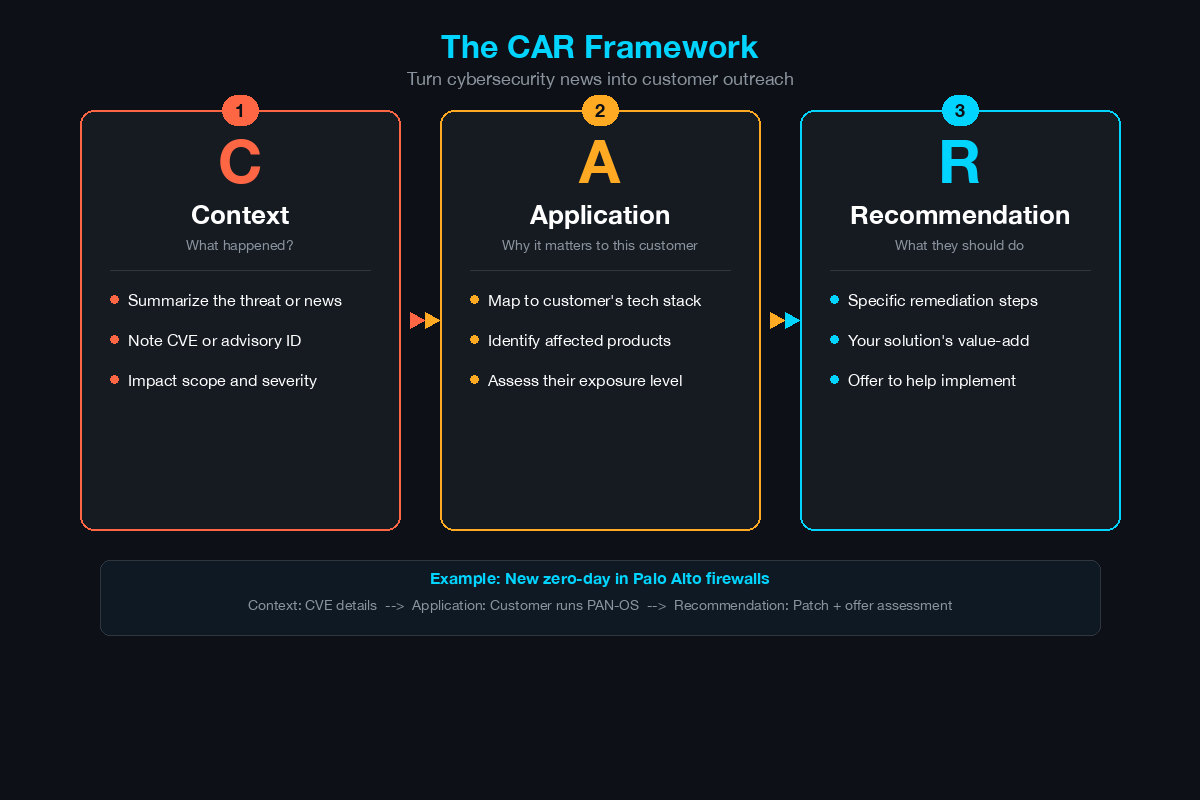
Reading cybersecurity news passively is a waste of time for an SE. Every piece of news should pass through the CAR filter:
Context
What happened? What industry? What attack vector? What was the impact? You need to be able to summarize this in 2-3 sentences.
Application
Which of your customers or prospects could be affected by the same attack? Do they use the same software? Are they in the same industry? Do they have similar infrastructure?
Recommendation
What do you sell that addresses this risk? How would your product have detected, prevented, or mitigated this attack? Can you demonstrate this in your lab?
The Outreach Template
When your CAR analysis identifies a relevant customer, send this message:
Subject: [Incident/Vulnerability Name] — Relevant to [Company Name]

Hi [Name],

This week's [incident/vulnerability] affecting [target/industry]
caught my attention because [specific reason it is relevant to
their environment].

[One sentence about what happened and the impact.]

Given your [specific infrastructure/industry/compliance requirement],
this is worth a conversation. [Your product/feature] specifically
addresses [attack vector/risk] through [brief technical mechanism].

Happy to walk through the details in 15 minutes if it is a
concern for your team.

Best,
[Your name]
This is not a sales pitch. It is a relevant, timely, personalized outreach that positions you as a trusted advisor who is actively monitoring threats on behalf of your customers. It is the highest-value output of your news consumption habit.
Building a Personal Knowledge Base
Over time, your daily and weekly security reading accumulates into expertise - but only if you capture it. Without a system, you will read 200 articles and remember the details of three.
Tool Recommendations
- Obsidian (free): Local-first markdown notes with linking. Best for technical SEs who want full control.
- Notion (free tier): Cloud-based with databases and templates. Best for collaborative teams.
- Apple Notes or Google Keep: Simple but functional. Better than nothing.
Organization Structure
Knowledge Base/
├── Threats/
│   ├── Ransomware/
│   ├── Phishing/
│   ├── APT Groups/
│   └── Vulnerabilities/
├── Technologies/
│   ├── Firewalls/
│   ├── Identity (ISE, Azure AD)/
│   ├── SIEM/
│   └── Endpoint/
├── Industries/
│   ├── Healthcare/
│   ├── Financial Services/
│   ├── Manufacturing/
│   └── Government/
├── Competitors/
│   ├── Palo Alto/
│   ├── Fortinet/
│   ├── CrowdStrike/
│   └── [Others]/
└── Customer Notes/
    ├── Account A/
    ├── Account B/
    └── Account C/
What to Capture
For each note, record:
- Date: When you learned this
- Source: URL or publication
- Key fact: One sentence summary
- Customer relevance: Which accounts or scenarios this applies to
- Action: What you did or will do with this information
Retrieval Speed Test
Your knowledge base is working if you can answer this question in under 60 seconds: “What are the three most significant ransomware incidents from the last 6 months that affected healthcare organizations?” If you cannot answer that from your notes, your system needs adjustment.
Putting It All Together: The Weekly Schedule
Here is how the entire system fits into a typical SE/AM week:
| Day | Activity | Time |
|---|---|---|
| Monday | 15-min morning routine + read tl;dr sec weekly | 25 minutes |
| Tuesday | 15-min morning routine | 15 minutes |
| Wednesday | 15-min morning routine + weekly deep-dive | 45-60 minutes |
| Thursday | 15-min morning routine + LinkedIn post | 20 minutes |
| Friday | 15-min morning routine + weekly RSS review | 30 minutes |
| Weekend | One podcast episode (optional) | 30-60 minutes |
Total weekly time investment: 2.5-3.5 hours
That is less than 4% of your work week. In exchange, you stay current on the industry, generate customer outreach opportunities, build a personal knowledge base, and maintain the credibility that differentiates you from every other SE in the market.
The SE who walks into a meeting and says “I noticed CISA issued an advisory last Tuesday about a vulnerability in the exact firewall model you are running - I wanted to discuss it” wins the room before the demo even starts.
Be that SE.
Related Posts in This Series
- Using Threat Intelligence in Customer Presentations - Turn the threat intelligence you consume daily into compelling customer content
- The SE’s Guide to Reading a Vulnerability Report - Apply your daily learning to interpret vulnerability reports for customers
- SE Career Path in Cybersecurity - Staying current is a career differentiator at every SE level
- The SE’s Toolkit: Scripts, Templates, and Resources - Organize what you learn into reusable templates and resources
- MITRE ATT&CK Framework Explained for Solutions Engineers - ATT&CK is a framework you will reference constantly as you stay current
Practice with free flashcards, quizzes, and hands-on lab scenarios at cciesec.it-learn.io — built specifically for the CCIE Security v6.1 written (350-701 SCOR) and lab exam.


