

CompTIA Security+ candidates memorize a clean definition for multi-factor authentication: something you know, something you have, something you are. The exam rewards you for that mnemonic. The threat landscape does not. Vendor research from Palo Alto Networks Unit 42, Mandiant, and Microsoft’s MSTIC has published the same finding for four years running - when modern intrusion sets bypass MFA, they almost never break the cryptography. They wait for a tired human to tap Approve.
This is the gap between exam knowledge and operational reality, and it is also where Sec+ SY0-701 actually tests you. The 701 revision, current through 2026, explicitly covers MFA fatigue as a social engineering technique. Knowing the textbook definition is enough to pass a single question. Knowing how Lapsus$ ran the play against Uber, how Scattered Spider ran a variant against MGM, and what telemetry catches the attack is what separates a Sec+ pass from a Sec+ candidate ready to work on a SOC floor.
This post walks the bridge. We will cover what Sec+ asks, what Unit 42 has documented, the MITRE ATT&CK mapping, two real intrusions, detection logic for Entra ID and Okta, and the defenses that actually work. By the end you will have exam-ready answers and the operational depth that interviewers test on.
What CompTIA Security+ SY0-701 Tests on MFA & Social Engineering
The current Sec+ exam, SY0-701, restructured the objectives in late 2023. Two domains touch MFA fatigue directly.
Domain 2.0 - Threats, Vulnerabilities, and Mitigations, specifically section 2.2 (compare and contrast common types of social engineering techniques), is where push-bombing lives. CompTIA does not name “MFA fatigue” as its own bullet, but the objective lists phishing, vishing, smishing, impersonation, and pretexting - and CompTIA’s official study guides and exam pool place push-bombing under impersonation and pretexting because the attacker poses as the user (to the IDP) and often as IT (to the user). Expect questions that frame the attack as a social engineering technique, not a cryptographic one.
Domain 4.0 - Security Operations, with section 4.6 (implement and maintain identity and access management), is where the defenses appear. Sec+ tests the difference between MFA factor types, the concept of phishing-resistant authentication, and conditional access. Number matching, FIDO2, and risk-based sign-in policies all map here.
A subtle point: Sec+ also references identity attacks under Domain 2.4 (analyze indicators of malicious activity), which is where detection telemetry - repeated failed prompts, anomalous sign-ins - would be tested.
MFA Fatigue Mechanics
The Sec+ exam answer
An attacker has valid credentials. They submit them to the IDP, which fires an MFA push to the legitimate user’s phone. The attacker repeats the login, generating a flood of push prompts. The user eventually approves one - accidentally, in frustration, or after being convinced by a fake IT helpdesk call. The attacker is now authenticated.
That is the version that earns the point on the exam.
The detailed version
Real attackers do not just spam. They tune the campaign. Push waves typically come in clusters of three to ten over five to fifteen minutes, often during the user’s local lunch hour or after 8pm when the user is off-guard. The attacker watches for any sign of approval (a successful auth event in the IDP or, in some cases, telemetry from a credential proxy). If the user dismisses the prompts, the attacker pauses, then triggers a new wave paired with a vishing call: “Hi, this is IT, we are pushing a security update, please approve the prompt on your phone.”
The psychological lever is conditioned response. Users approve dozens of legitimate MFA prompts every week. The motion of unlocking the phone, glancing at the prompt, and tapping the green button is muscle memory. Alert fatigue collapses the user’s ability to distinguish a legitimate prompt from an attacker-triggered one, especially when a phone call adds plausible context.
Palo Alto Unit 42’s Analysis
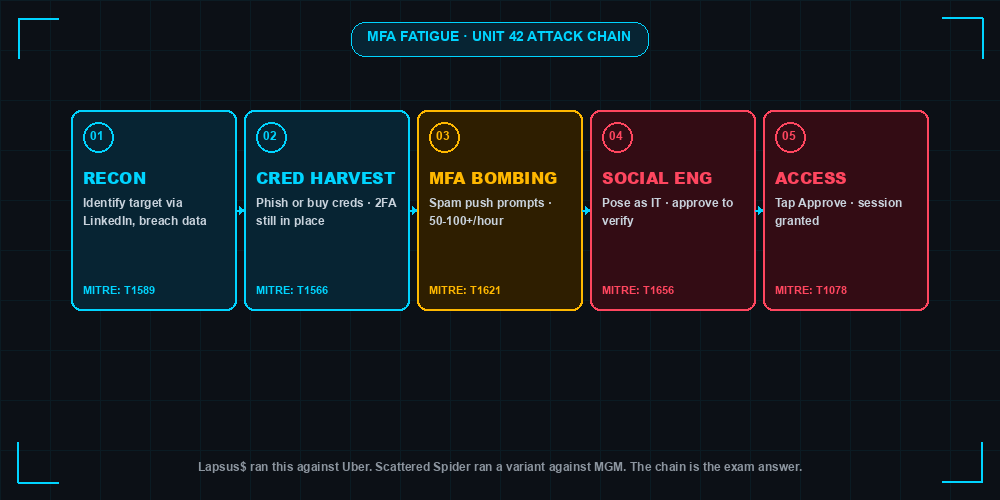
Unit 42 is Palo Alto Networks’ threat intelligence and incident response group. They publish original research on intrusion sets and they are one of the IR firms most often hired after a Scattered Spider or Lapsus$ event, which gives them direct visibility into how the attack runs in production environments.
Unit 42’s published research on Scattered Spider and Lapsus$ documents this kill chain:
- Identify target - reconnaissance against the company’s identity provider (Okta, Entra ID), executive directory, helpdesk procedures, and contractor population. LinkedIn and breach corpora seed the list.
- Harvest credentials - phishing kits cloned for the target’s SSO portal, infostealer logs purchased on Russian Market or Genesis successors, or password spraying against legacy endpoints.
- MFA bomb - push prompts triggered against the target. Volume calibrated to user behavior.
- Social-engineer - vishing the victim, vishing the helpdesk to register a new MFA factor, or SIM swapping the target’s phone number.
- Access - once authenticated, the attacker pivots to email, code repos, identity admin consoles, and cloud platforms.
Unit 42’s framing is that MFA fatigue is not a technical exploit - it is a social engineering technique against a human, with the IDP as a passive relay. That framing matters because it tells you where to invest defenses: at the human and policy layer, not by patching the authenticator.
Real-World Attack Chains
Uber, September 2022 (Lapsus$)
A contractor’s Uber credentials were sold on a dark web market, harvested originally by an infostealer on a personal device. The Lapsus$-affiliated attacker logged in repeatedly, triggering an hour of MFA push notifications to the contractor’s phone. When the contractor stopped responding, the attacker contacted them on WhatsApp, posed as Uber IT, and said the prompts would stop if they approved one. They did. The attacker discovered hardcoded admin credentials for Thycotic (PAM), unlocking Duo, Okta, GSuite, and AWS.
MITRE techniques: T1078 (Valid Accounts), T1621 (Multi-Factor Authentication Request Generation), T1566.004 (Spearphishing Voice).
What defenders missed: no alert on the burst of failed-then-approved MFA events, no conditional access policy gating contractor access by device compliance, secrets stored in plaintext in an internal share.
Cisco, May 2022
An attacker phished a Cisco employee’s personal Google account, recovered Cisco VPN credentials synced to the browser, then enrolled the credentials in a VPN client. Cisco required MFA. The attacker used a combination of voice phishing and MFA push spam to convince the employee to accept the prompt. Once on the VPN, the actor enrolled their own MFA device, escalated, and dropped backdoors. Cisco’s CSIRT detected and contained the intrusion before data was published, but the initial access vector was push-bombing.
MITRE techniques: T1566 (Phishing), T1621 (MFA Request Generation), T1078 (Valid Accounts), T1556.006 (Modify Authentication Process: Multi-Factor Authentication).
What defenders missed: credentials syncing to a personal browser, lack of phishing-resistant MFA on the VPN, no behavioral anomaly detection on the MFA enrollment event.
MITRE ATT&CK Mapping
The technique you must know cold for both the exam and the SOC interview is:
- T1621 - Multi-Factor Authentication Request Generation. This is the formal MITRE technique for MFA fatigue / push bombing.
Adjacent techniques that show up in the same kill chain:
- T1566 - Phishing. The credential acquisition step.
- T1078 - Valid Accounts. The category that covers using stolen-but-legitimate credentials.
- T1110 - Brute Force. Sometimes paired when password spraying preceded fatigue.
- T1556.006 - Modify Authentication Process: MFA. When the attacker registers their own factor post-access.
Sec+ exam framing: a question may describe the scenario (“an attacker repeatedly triggers push notifications until the user approves”) and ask which MITRE technique applies. The answer is T1621. A distractor will offer T1110 (Brute Force) - that is wrong because brute force targets the credential, not the second factor.
Detection - What to Look For
The signature of MFA fatigue is rarely a single event. It is a pattern: many failures or prompts, then a success, often from a different geography or device than the user’s normal pattern.
Entra ID / Microsoft 365
Hunt in SigninLogs for users who experienced multiple MFA-related failures followed by a success within a short window:
SigninLogs
| where TimeGenerated > ago(24h)
| where ResultType in ("50074", "500121", "0")
| summarize
    Failures = countif(ResultType in ("50074", "500121")),
    Successes = countif(ResultType == "0"),
    Countries = make_set(LocationDetails.countryOrRegion)
    by UserPrincipalName, bin(TimeGenerated, 15m)
| where Failures >= 5 and Successes >= 1
| where array_length(Countries) > 1
Result codes 50074 and 500121 surface MFA-strong-auth failures. The combination of a burst of failures, an eventual success, and geo-diversity inside a 15-minute window is a strong fatigue indicator.
Also useful: AuditLogs for “Update user” operations that register a new MFA method shortly after a suspicious sign-in.
Okta
Search the System Log for the same pattern:
eventType eq "user.authentication.auth_via_mfa"
and outcome.result eq "FAILURE"
paired with a subsequent
eventType eq "user.session.start"
and authenticationContext.authenticationStep eq 1
for the same actor.id. Also alert on user.mfa.factor.activate events that follow a flagged sign-in - that is the attacker enrolling their own factor.
Logs to watch in general: failed-then-success patterns within minutes; push notification volume spikes per user (more than five in fifteen minutes); sign-in interruptions immediately followed by approvals.
Defenses That Actually Work
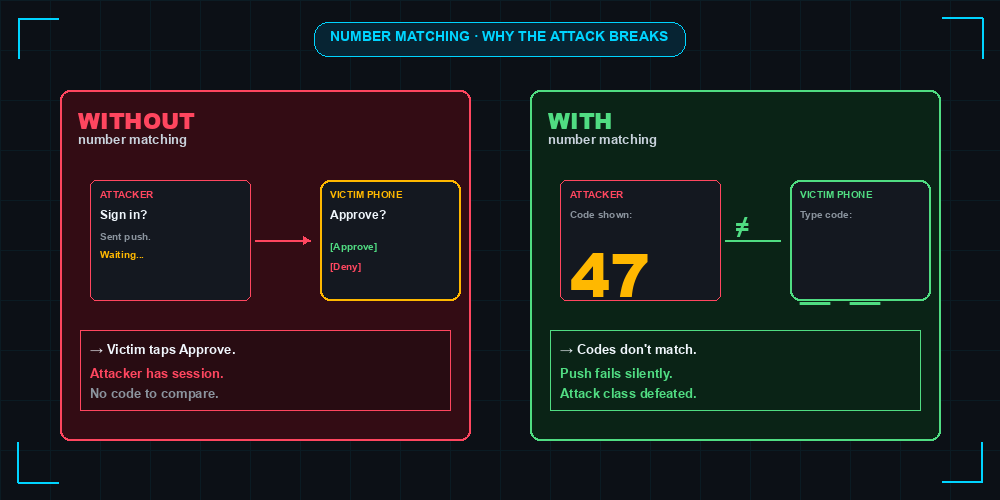
Number matching (Microsoft Authenticator, Okta Verify) requires the user to type a two-digit code from the browser into the authenticator app. It defeats silent approval because the attacker’s session shows a different code than the victim’s app. Microsoft made it the default in May 2023. It does not stop a determined social engineer who reads the code aloud over a phone call, but it raises the bar.
FIDO2 / phishing-resistant MFA (security keys, passkeys, Windows Hello) eliminates the attack class. Authentication is cryptographically bound to the origin domain and requires physical presence. There is no push to bomb. Sec+ specifically tests “phishing-resistant MFA” as the strongest factor - when an exam question asks for the best defense against MFA fatigue, FIDO2 is the answer.
Conditional access policies - geo-fencing, device compliance, session risk - reduce the attack surface even when push MFA remains. Block sign-ins from non-compliant devices. Require step-up auth for risky sessions.
User training matters but is insufficient on its own. Unit 42’s incident data is consistent: even trained users approve under social engineering pressure, especially after-hours or during a fake helpdesk call. Training is a control. It is not the control. Layer it under technical mitigations.
Sec+ Exam Practice Questions
1. An attacker with stolen credentials repeatedly triggers MFA push notifications until the user approves one. Which social engineering technique is this? A. Tailgating B. Pretexting / push-bombing C. Whaling D. Watering hole. Answer: B.
2. Which MITRE ATT&CK technique describes MFA fatigue? A. T1110 B. T1078 C. T1621 D. T1566. Answer: C.
3. Which MFA factor is considered phishing-resistant and immune to push-bombing? A. SMS OTP B. TOTP authenticator app C. FIDO2 security key D. Push approval. Answer: C.
4. Microsoft Authenticator’s number matching defends against MFA fatigue by: A. Encrypting the push payload B. Requiring a code from the browser to be entered in the app C. Locking the account after five prompts D. Sending a backup OTP. Answer: B.
5. A SOC analyst observes 12 failed MFA prompts followed by a successful sign-in for a single user from a new country within ten minutes. The most likely scenario is: A. Brute force attack B. Credential stuffing C. MFA fatigue / push-bombing D. Insider threat. Answer: C.
Building Lab Practice
You can reproduce detection logic for free.
- Entra ID developer tenant - Microsoft 365 E5 developer subscription is free for 90 days, renewable. Stand up two accounts, enable Authenticator, and write the KQL above against your
SigninLogs. - Okta Developer free tier - supports up to 100 users, full System Log access, and Workflows. Build the failed-then-success search and a Workflow that pages on burst events.
What to demonstrate for portfolio: a documented detection rule (KQL or Sigma), a screenshot of the rule firing on a simulated event, and a one-page write-up of the attack technique mapped to T1621. That artifact, posted to a GitHub repo, is concrete evidence in interviews that you can do the work - not just pass the exam.
Related Posts
- MFA Fatigue Attack: Spamming Push Notifications
- Pass-the-Hash Attack
- MITRE ATT&CK Framework Explained
- Security+ Home Lab Guide
- Threat Intelligence in Customer Presentations
- Reading Vulnerability Reports: CVE, CVSS, EPSS
Practice with free flashcards, quizzes, and hands-on lab scenarios at cciesec.it-learn.io — built specifically for the CCIE Security v6.1 written (350-701 SCOR) and lab exam.


