

Every Solutions Engineer develops a personal toolkit over time - the templates, scripts, cheat sheets, and frameworks that make the difference between a productive week and a chaotic one. The problem is that most of this toolkit lives in scattered documents, random folders, and the SE’s memory. When you need the discovery call template, it is in a Google Doc you shared with a colleague two years ago. When you need the subnet calculator, you Google it fresh every time. When you need the competitive battle card, you remember the key points but cannot find the document.
This post is an attempt to consolidate the tools I use every week into a single, organized reference. It covers the templates for customer-facing activities, the CLI commands for technical work, the scripts for common tasks, and the frameworks for deal qualification. Bookmark this page and customize the templates for your own workflow.
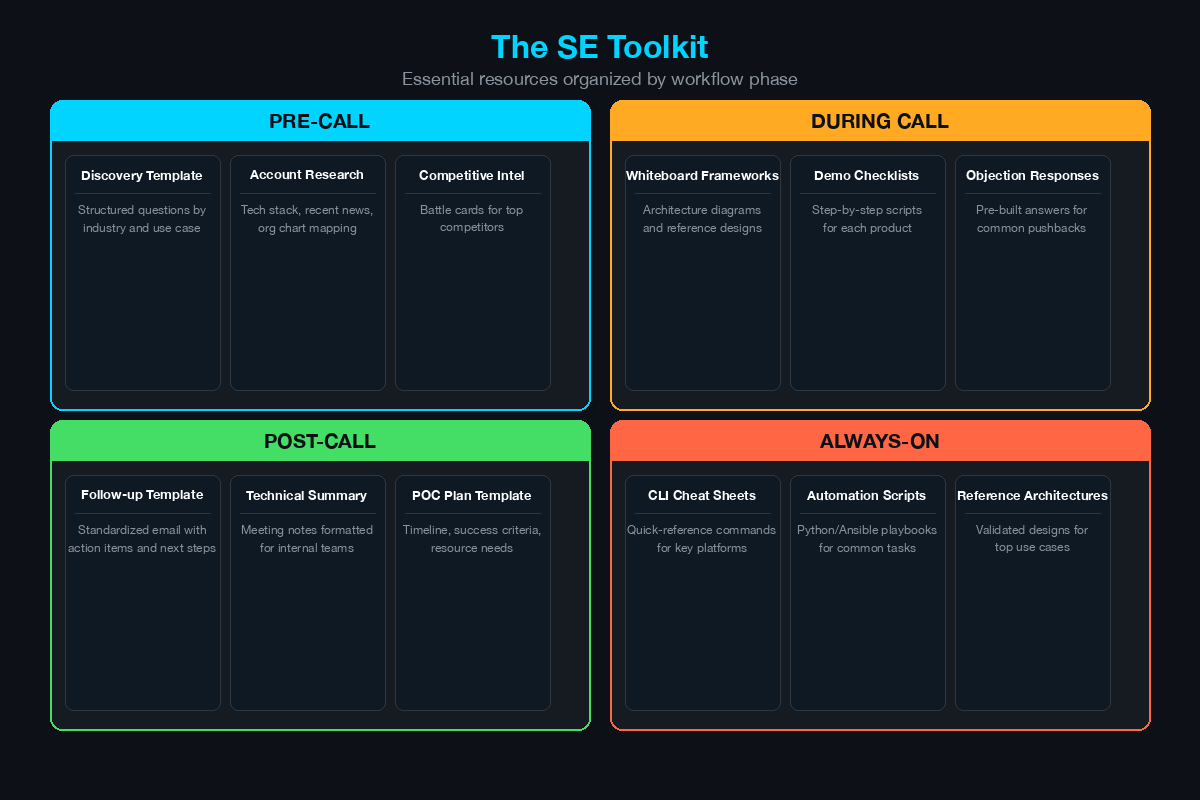
Discovery Call Template
The discovery call is where deals are won or lost. A structured template ensures you capture the information your team needs to qualify the opportunity, design the right solution, and position against competitors.
Pre-Call Preparation (10 minutes)
Before the call, answer these questions from your CRM and account research:
ACCOUNT CONTEXT
- Company name: _______________
- Industry: _______________
- Employee count: _______________
- Revenue (public companies): _______________
- Existing relationship: New / Existing customer / Renewal
- Account manager: _______________
- Source of opportunity: _______________

ATTENDEES
- Customer attendees (name, title, role in decision): _______________
- Internal attendees: _______________

PRE-CALL RESEARCH
- Current security vendor(s) (from public info, job postings): _______________
- Recent news (breaches, acquisitions, leadership changes): _______________
- Compliance requirements (industry-specific): _______________
- Technology stack hints (from job postings or LinkedIn): _______________
Discovery Questions Framework
Organize your questions into five categories. You will not ask all of these on every call - select based on context.
1. Current Environment
- What does your current security architecture look like at a high level?
- What firewall/NAC/SIEM/endpoint solution are you running today?
- How many locations, users, and endpoints are in scope?
- Are you primarily on-premises, cloud, or hybrid?
- What is your identity provider (Active Directory, Azure AD/Entra ID, Okta)?
- How are remote users connecting today (VPN, ZTNA, SASE)?
2. Pain Points
- What triggered this evaluation? Why now?
- What is not working with your current solution?
- Where are you spending the most manual effort today?
- What keeps you (or your CISO) up at night?
- Have you experienced a security incident in the last 12 months?
- What compliance gaps are you trying to close?
3. Requirements and Success Criteria
- What are the must-have capabilities for a new solution?
- What does success look like in 6 months? In 12 months?
- Are there specific use cases you need to see demonstrated?
- What integration requirements exist (SIEM, SOAR, ticketing)?
- What are your performance requirements (throughput, latency, uptime)?
4. Decision Process
- Who are the key stakeholders in this decision?
- What is your evaluation timeline?
- Is budget allocated, or does this need budget approval?
- Will you be conducting a formal POC or bake-off?
- What is your procurement process (RFP, sole source, competitive bid)?
- Who makes the final decision?
5. Competitive Landscape
- Who else are you evaluating for this project?
- Have you seen demos from other vendors? What did you like?
- Are you working with a channel partner or consultant?
- Is there an incumbent advantage to overcome?
Post-Call Notes Template
Complete this within 24 hours and share with your account manager:
DISCOVERY CALL SUMMARY
Date: _______________
Account: _______________
Attendees: _______________

KEY FINDINGS
- Primary pain point: _______________
- Current environment: _______________
- Decision timeline: _______________
- Budget status: _______________
- Key stakeholders identified: _______________
- Competitors in evaluation: _______________

NEXT STEPS
1. _______________
2. _______________
3. _______________

TECHNICAL REQUIREMENTS IDENTIFIED
- _______________
- _______________
- _______________

RISK FACTORS
- _______________
Technical Proposal Outline
When a customer requests a technical proposal, use this structure. Customize the depth based on deal size and customer expectations.
TECHNICAL PROPOSAL OUTLINE

1. EXECUTIVE SUMMARY (1 page)
   - Customer challenge (2-3 sentences)
   - Proposed solution (2-3 sentences)
   - Expected outcomes (3-4 bullet points)
   - Investment summary (high-level)

2. CURRENT STATE ANALYSIS (1-2 pages)
   - Current architecture diagram
   - Identified gaps and risks
   - Compliance requirements
   - Scalability constraints

3. PROPOSED SOLUTION (3-5 pages)
   - Solution architecture diagram
   - Component descriptions
   - Integration points
   - How each requirement is addressed
   - Phased deployment approach

4. IMPLEMENTATION PLAN (1-2 pages)
   - Phase 1: [Foundation] — Timeline and deliverables
   - Phase 2: [Core deployment] — Timeline and deliverables
   - Phase 3: [Advanced features] — Timeline and deliverables
   - Resource requirements (vendor and customer)
   - Training plan

5. SUCCESS CRITERIA AND METRICS (1 page)
   - Measurable outcomes
   - Baseline vs. target metrics
   - Reporting cadence

6. INVESTMENT (1 page)
   - Licensing costs (Year 1, Year 2, Year 3)
   - Implementation services
   - Training costs
   - Total cost of ownership comparison

7. APPENDICES
   - Detailed BOM
   - Technical specifications
   - Reference architectures
   - Customer references
Demo Environment Checklist
Before every customer demo, run through this checklist:
DEMO PREPARATION CHECKLIST

24 HOURS BEFORE
[ ] Demo environment is running and accessible
[ ] All VMs are powered on and responsive
[ ] Test the specific features you plan to demonstrate
[ ] Verify sample data and logs are populated
[ ] Check internet connectivity for cloud-based demos
[ ] Update any software that has pending patches
[ ] Prepare backup screenshots/recordings

1 HOUR BEFORE
[ ] Close all unnecessary applications and browser tabs
[ ] Clear browser history and autofill suggestions
[ ] Set screen resolution for screen sharing (1920x1080)
[ ] Increase terminal and browser font size (14-16pt)
[ ] Disable notifications (OS, email, Slack, Teams)
[ ] Pre-stage browser tabs in demo order
[ ] Verify screen sharing works in your meeting tool
[ ] Have CLI commands ready in a text file for copy/paste

5 MINUTES BEFORE
[ ] Join the meeting early
[ ] Share your screen and verify the audience can see it
[ ] Open your demo environment to the starting point
[ ] Have your backup materials accessible
[ ] Take a breath
CLI Cheat Sheets
Cisco IOS and IOS-XE
! --- Interface and Status ---
show ip interface brief          ! Quick view of all interfaces
show interfaces status           ! Switch port status and VLAN
show running-config              ! Current configuration
show startup-config              ! Saved configuration
show version                     ! Software version and uptime
show logging                     ! Syslog buffer

! --- Routing ---
show ip route                    ! Routing table
show ip ospf neighbor            ! OSPF adjacencies
show ip bgp summary              ! BGP peer status

! --- Switching ---
show vlan brief                  ! VLAN database
show mac address-table           ! MAC address table
show spanning-tree               ! STP status

! --- Security and AAA ---
show access-lists                ! ACL entries and hit counts
show aaa sessions                ! Active AAA sessions
show dot1x all                   ! 802.1X port status
show authentication sessions     ! ISE authentication sessions
debug radius authentication      ! Real-time RADIUS debugging
test aaa group radius server <ip> <user> <pass> new-code  ! Test RADIUS

! --- VPN ---
show crypto isakmp sa            ! IKE Phase 1 SAs
show crypto ipsec sa             ! IPsec Phase 2 SAs
show crypto session              ! VPN session summary
Cisco ASA and FTD
! --- ASA ---
show conn                        ! Active connections
show xlate                       ! NAT translations
show access-list                 ! ACL hit counts
show failover                    ! HA status
show vpn-sessiondb               ! VPN sessions
show logging                     ! Syslog output
packet-tracer input <intf> <proto> <src> <dst> <port>  ! Trace a packet

! --- FTD (via FMC or diagnostic CLI) ---
show access-list --all           ! Access policy hit counts
show conn                        ! Active connections
show snort statistics            ! Snort engine stats
system support diagnostic-cli    ! Enter ASA diagnostic mode
show network                     ! Management interface status
Linux Network Diagnostics
 1# Network interfaces and addressing
 2ip addr show                     # Interface IP addresses
 3ip route show                    # Routing table
 4ss -tulnp                        # Listening ports with process names
 5netstat -rn                      # Routing table (legacy)
 6
 7# DNS
 8dig example.com                  # DNS lookup
 9dig example.com +trace           # Trace DNS resolution path
10nslookup example.com             # Simple DNS lookup
11
12# Connectivity
13ping -c 4 10.0.0.1              # ICMP ping (4 packets)
14traceroute 10.0.0.1              # Trace route
15mtr 10.0.0.1                     # Combined ping + traceroute
16curl -v https://example.com      # HTTP request with headers
17curl -k -v https://10.0.0.1     # Ignore cert errors
18
19# Packet capture
20tcpdump -i eth0 -n port 443     # Capture HTTPS traffic
21tcpdump -i eth0 -w capture.pcap  # Write capture to file
22tcpdump -r capture.pcap          # Read capture file
23
24# SSL/TLS
25openssl s_client -connect host:443  # Test SSL connection
26openssl x509 -in cert.pem -text    # Read certificate details
27openssl s_client -connect host:443 -servername host  # SNI test
28
29# Firewall
30iptables -L -n -v                # List firewall rules
31iptables -L -t nat               # List NAT rules
32nft list ruleset                 # nftables rules (modern)
AWS CLI Security Commands
 1# IAM
 2aws iam list-users               # List IAM users
 3aws iam list-roles               # List IAM roles
 4aws iam get-account-summary      # Account-level IAM summary
 5aws iam generate-credential-report  # Credential report
 6
 7# Security Groups
 8aws ec2 describe-security-groups  # List security groups
 9aws ec2 describe-security-groups --filters "Name=ip-permission.from-port,Values=22"  # Find SGs with port 22
10
11# CloudTrail
12aws cloudtrail lookup-events --lookup-attributes AttributeKey=EventName,AttributeValue=ConsoleLogin  # Recent console logins
13
14# GuardDuty
15aws guardduty list-findings --detector-id <id>  # List findings
16aws guardduty get-findings --detector-id <id> --finding-ids <ids>  # Finding details
17
18# S3 Security
19aws s3api get-bucket-acl --bucket <name>  # Bucket ACL
20aws s3api get-public-access-block --bucket <name>  # Public access settings
Useful Scripts
Subnet Calculator (Python)
 1#!/usr/bin/env python3
 2"""Quick subnet calculator for SE conversations."""
 3import ipaddress
 4import sys
 5
 6def subnet_info(cidr):
 7    network = ipaddress.ip_network(cidr, strict=False)
 8    print(f"Network:     {network.network_address}")
 9    print(f"Netmask:     {network.netmask}")
10    print(f"Wildcard:    {network.hostmask}")
11    print(f"Broadcast:   {network.broadcast_address}")
12    print(f"First host:  {network.network_address + 1}")
13    print(f"Last host:   {network.broadcast_address - 1}")
14    print(f"Total hosts: {network.num_addresses - 2}")
15    print(f"CIDR:        /{network.prefixlen}")
16
17if __name__ == "__main__":
18    if len(sys.argv) != 2:
19        print("Usage: python3 subnet_calc.py 192.168.1.0/24")
20        sys.exit(1)
21    subnet_info(sys.argv[1])
SSL Certificate Checker (Bash)
 1#!/bin/bash
 2# Check SSL certificate expiration for a list of hosts
 3# Usage: ./ssl_check.sh host1.com host2.com host3.com
 4
 5for host in "$@"; do
 6    echo "--- $host ---"
 7    expiry=$(echo | openssl s_client -servername "$host" \
 8        -connect "$host:443" 2>/dev/null | \
 9        openssl x509 -noout -dates 2>/dev/null | \
10        grep notAfter | cut -d= -f2)
11
12    if [ -z "$expiry" ]; then
13        echo "  ERROR: Could not retrieve certificate"
14    else
15        expiry_epoch=$(date -j -f "%b %d %H:%M:%S %Y %Z" \
16            "$expiry" "+%s" 2>/dev/null || \
17            date -d "$expiry" "+%s" 2>/dev/null)
18        now_epoch=$(date "+%s")
19        days_left=$(( (expiry_epoch - now_epoch) / 86400 ))
20        echo "  Expires: $expiry"
21        echo "  Days remaining: $days_left"
22        if [ "$days_left" -lt 30 ]; then
23            echo "  WARNING: Certificate expires in less than 30 days"
24        fi
25    fi
26    echo ""
27done
Competitive Battle Card Template
Create one of these for each competitor you face regularly. Update quarterly.
COMPETITIVE BATTLE CARD: [Competitor Name]
Last Updated: [Date]
Updated By: [Name]

COMPANY OVERVIEW
- Founded: _______________
- Headquarters: _______________
- Employees: _______________
- Revenue: _______________
- Recent acquisitions: _______________
- Market position: _______________

PRODUCT COMPARISON

| Capability          | Our Solution | Competitor    | Advantage |
|---------------------|-------------|---------------|-----------|
| [Feature 1]         |             |               |           |
| [Feature 2]         |             |               |           |
| [Feature 3]         |             |               |           |
| [Integration point] |             |               |           |
| [Management]        |             |               |           |
| [Scalability]       |             |               |           |
| [Pricing model]     |             |               |           |

COMPETITOR STRENGTHS (Be Honest)
1. _______________
2. _______________
3. _______________

COMPETITOR WEAKNESSES (Probe These)
1. Weakness: _______________
   Question to ask customer: "_______________"
2. Weakness: _______________
   Question to ask customer: "_______________"
3. Weakness: _______________
   Question to ask customer: "_______________"

COMMON OBJECTIONS
Objection: "Competitor has feature X and you don't."
Response: _______________

Objection: "Competitor is cheaper."
Response: _______________

Objection: "Competitor ranked higher in Gartner MQ."
Response: _______________

PROOF POINTS
- Customer reference: _______________
- Third-party validation: _______________
- Performance benchmark: _______________

RECENT LOSSES (What We Learned)
- Account: _______________
  Reason: _______________
  Lesson: _______________
Deal Qualification Scorecard
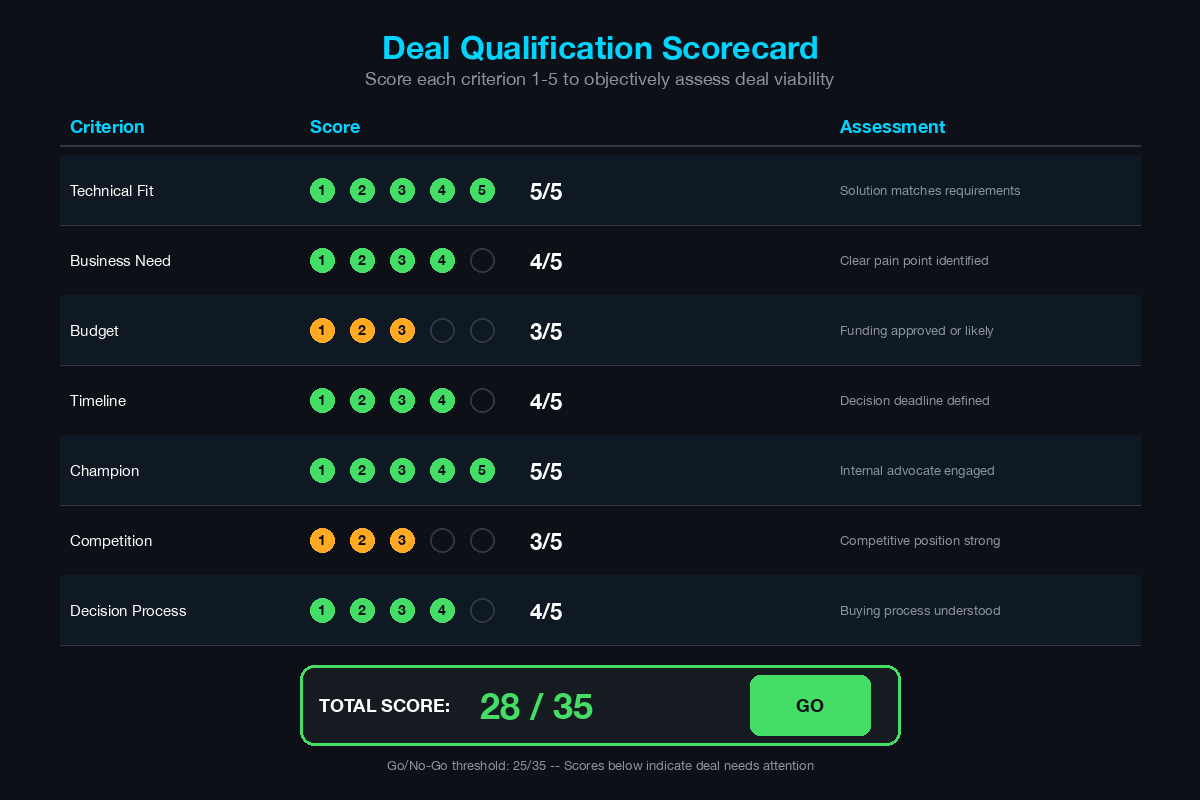
Use this scorecard to objectively assess deal quality. Score each criterion 1-5 and calculate the total. Deals scoring below 15 need attention; deals below 10 may not be worth pursuing.
DEAL QUALIFICATION SCORECARD

Account: _______________
Opportunity: _______________
Date: _______________

SCORING (1-5 for each)

1. PAIN (Is there a real problem?)                    [  /5]
   1 = No identified pain
   3 = Pain exists but not urgent
   5 = Critical pain with executive visibility

2. CHAMPION (Do we have an internal advocate?)        [  /5]
   1 = No internal advocate
   3 = Technical champion but no executive access
   5 = Champion with executive influence and urgency

3. BUDGET (Is funding available?)                     [  /5]
   1 = No budget discussion
   3 = Budget identified but not approved
   5 = Budget approved and allocated

4. TIMELINE (Is there a decision deadline?)           [  /5]
   1 = No timeline established
   3 = Timeline exists but flexible
   5 = Hard deadline with consequences for missing it

5. DECISION PROCESS (Do we understand it?)            [  /5]
   1 = Unknown decision process
   3 = Know the stakeholders but not the process
   5 = Full understanding of process, criteria, stakeholders

6. TECHNICAL FIT (Does our solution match?)           [  /5]
   1 = Significant gaps in requirements
   3 = Meets most requirements with workarounds
   5 = Strong fit with differentiated capabilities

7. COMPETITIVE POSITION (Where do we stand?)          [  /5]
   1 = Competitor is heavily favored
   3 = Competitive situation is even
   5 = We are the preferred vendor

TOTAL SCORE:                                          [  /35]

ASSESSMENT
35-30: Strong deal — pursue aggressively
29-25: Solid deal — invest resources
24-20: Developing deal — qualify further before investing
19-15: Weak deal — address gaps before committing SE time
14-10: At risk — consider deprioritizing
Below 10: Not qualified — do not invest SE resources

ACTIONS NEEDED
Gap 1: _______________
Action: _______________

Gap 2: _______________
Action: _______________
Where to Go From Here
This toolkit is a starting point. The best version of it is the one you customize for your own workflow, your own product portfolio, and your own customer base. Copy these templates into your preferred tool - Notion, Obsidian, Google Docs, OneNote - and modify them as you use them. Delete what you do not need. Add sections that are specific to your products and market.
The SE who walks into every meeting with a structured approach, organized notes, and ready-to-use resources outperforms the SE who relies on memory and improvisation. Build your toolkit, maintain it, and use it consistently.
Related Posts in This Series
- How to Run a Technical Discovery Call for Security Deals - Discovery call templates are a core component of every SE toolkit
- How to Build a Home Lab - Your lab is where you test and refine the scripts in your toolkit
- How to Stay Current on Cybersecurity - Feed your toolkit with insights from your daily learning routine
- Translate a Pen Test Report Into a Sales Opportunity - Templates for turning pen test findings into actionable proposals
- SE Career Path in Cybersecurity - Your toolkit evolves as you advance through each career stage
Practice with free flashcards, quizzes, and hands-on lab scenarios at cciesec.it-learn.io — built specifically for the CCIE Security v6.1 written (350-701 SCOR) and lab exam.


