

If you have been managing Cisco network gear for any length of time you have a TACACS+ scar tissue collection. Mine includes a one-evening lockout that taught me three things about IOS-XE AAA. This post is the companion - the “right way” walkthrough that builds the same deployment from scratch without the postmortem story.
The goal: AD-authenticated SSH access to every switch, router, and WLC in the environment, with three privilege tiers (Helpdesk read-only, NetOps safe-troubleshooting, Admins full), every command logged to ISE for audit, and a break-glass local admin that always works regardless of what ISE does.
Why TACACS+ for device admin
The short answer: TACACS+ is what you use for logging into network devices. RADIUS is what you use for getting devices onto the network.
TACACS+ wins for device admin because:
- AAA is split into three independent transactions. ISE can grant authentication but deny per-command authorization. That granularity makes “this Helpdesk user can
showbut notconfigure terminal” possible. - The whole payload is encrypted - not just the password. The session is opaque to a passive sniffer on the management VLAN.
- TCP port 49 instead of UDP - sessions are stateful, retries are predictable, ordering is preserved.
- Per-command accounting. Every
show version, everyconfigure terminal, everywrite memorylands in the ISE TACACS+ logs with a timestamp, source IP, and username. Audit teams expect this.
RADIUS can do basic device admin (PAP login with a returned privilege level), but the moment you need per-command logging or per-command authorization, TACACS+ is the right choice.
The architecture
End-to-end, the system is three layers:
- The network device (NAD) - switch, router, WLC, firewall - initiates TACACS+ to ISE on every shell login attempt and every command the user types.
- ISE Device Admin Service (PSN persona) - listens on TCP 49, validates credentials against AD, matches the policy set, picks the shell profile + command set, and sends the response.
- Active Directory - the source of truth for user identity and group membership. ISE queries AD to determine which group the authenticating user belongs to (Domain Admins → Admin role, NetworkOps → Ops role, Helpdesk → Read-only).
The TACACS+ banner above shows this topology. The Active Directory layer is shared with the rest of the ISE deployment (see the AD integration post for the identity-store side).
Configuration walkthrough
There are six phases. Do them in this order - skipping ahead causes silent failures that are hard to diagnose.
Phase 1: Enable the Device Admin Service persona
Administration → System → Deployment → <PSN node> → Personas → Enable Device Admin Service
This is the toggle the lockout postmortem called out - without it, every TACACS+ object you create in the rest of the configuration responds 200 OK but port 49 stays closed because the daemon is not running. A nc -zv ise-psn 49 from any NAD will fail until this persona is enabled.
This is also a licensing checkpoint. Device Admin Service requires the Device Admin license tier. Check Administration → System → Licensing to confirm coverage before proceeding.
Phase 2: Add network devices and assign the TACACS+ shared secret
Administration → Network Resources → Network Devices → Add
For each device, configure:
- Name - match your inventory naming convention
- IP address - the source IP the device will use when sending TACACS+ packets (usually the management interface)
- Device Type - assign to a Network Device Group like
Device Type#All Device Types#Switchso the policy set can match by type - Location - assign to a Location NDG like
Location#All Locations#Datacenter - TACACS+ Authentication Settings → check the box, enter a Shared Secret (use a strong random string, store in your password vault)
This is the step where the NAD becomes a known principal to ISE. Without it, ISE rejects the TACACS+ request with “Unknown NAS” - a confusing error because the device IS sending the request, it just is not recognized.
Phase 3: Create command sets
Work Centers → Device Administration → Policy Elements → Results → TACACS Command Sets → Add
A command set is a list of permit / deny rules evaluated in order against every command the user types. Three command sets cover most environments:
ReadOnly-Cmds
  PERMIT  show .*
  PERMIT  ping .*
  PERMIT  traceroute .*
  PERMIT  exit
  PERMIT  enable
  PERMIT  disable
  DENY    .*
  Permit any command not in above list: NO

SafeOps-Cmds (NetworkOps)
  PERMIT  show .*
  PERMIT  ping .*
  PERMIT  traceroute .*
  PERMIT  clear counters .*
  PERMIT  clear mac address-table .*
  PERMIT  reload in .*
  PERMIT  no shutdown
  DENY    configure terminal
  DENY    .*
  Permit any command not in above list: NO

PermitAllCmds (Admin)
  Permit any command not in above list: YES
The order matters - ISE evaluates rules top-down and stops at the first match. The final DENY .* is the safety net for Helpdesk and NetOps. For Admin, Permit any command not in above list: YES is the catch-all.
Naming caveat: ISE has historically rejected TACACS command set names with hyphens (Helpdesk-ReadOnly). Use underscores or spaces (Helpdesk_ReadOnly or Helpdesk ReadOnly). The lockout postmortem flagged this as a paper-cut; it is still real in ISE 3.4.
Phase 4: Create shell profiles
Work Centers → Device Administration → Policy Elements → Results → TACACS Profiles → Add
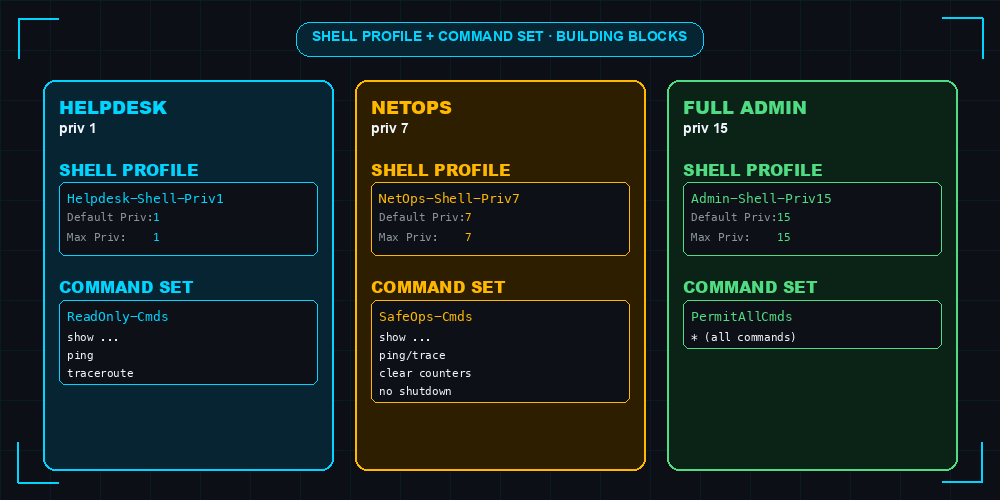
A shell profile is the set of attributes pushed to the NAD when the user lands. Configure three:
| Profile | Default Privilege | Maximum Privilege | Notes |
|---|---|---|---|
Helpdesk_Shell_Priv1 | 1 | 1 | Locked to priv 1; cannot escalate via enable |
NetOps_Shell_Priv7 | 7 | 7 | Custom priv level that the IOS device must define |
Admin_Shell_Priv15 | 15 | 15 | Full enable |
For the NetOps_Shell_Priv7 to actually work, the IOS device side needs privilege exec level 7 <command> mappings configured - otherwise priv 7 is functionally identical to priv 1. This is the IOS half of the puzzle, not an ISE configuration. Typically the NetOps mappings are deployed via a config-as-code template (your Ansible repo, Catalyst Center, etc.).
The shell profile + command set combination is the actual building block:
Phase 5: Create the Device Admin policy set
Work Centers → Device Administration → Device Admin Policy Sets → Add
A policy set is the top-level container that scopes a set of AuthN + AuthZ rules to a subset of devices.
Policy Set: DeviceAdmin-Switches
  Condition:  Device Type EQUALS All Device Types#Switch
              OR Device Type EQUALS All Device Types#Router
              OR Device Type EQUALS All Device Types#WLC

  Authentication Policy:
    Default Rule: Use [dcloud_AD] as identity source

  Authorization Policy:
    Rule 1:  Admins
      Condition:  AD Group EQUALS dcloud.cisco.com/Users/Domain Admins
      Shell Profile: Admin_Shell_Priv15
      Command Set:   PermitAllCmds

    Rule 2:  NetOps
      Condition:  AD Group EQUALS dcloud.cisco.com/Users/NetworkOps
      Shell Profile: NetOps_Shell_Priv7
      Command Set:   SafeOps-Cmds

    Rule 3:  Helpdesk
      Condition:  AD Group EQUALS dcloud.cisco.com/Users/Helpdesk
      Shell Profile: Helpdesk_Shell_Priv1
      Command Set:   ReadOnly-Cmds

    Default: DenyAccess
The decision flow looks like this:
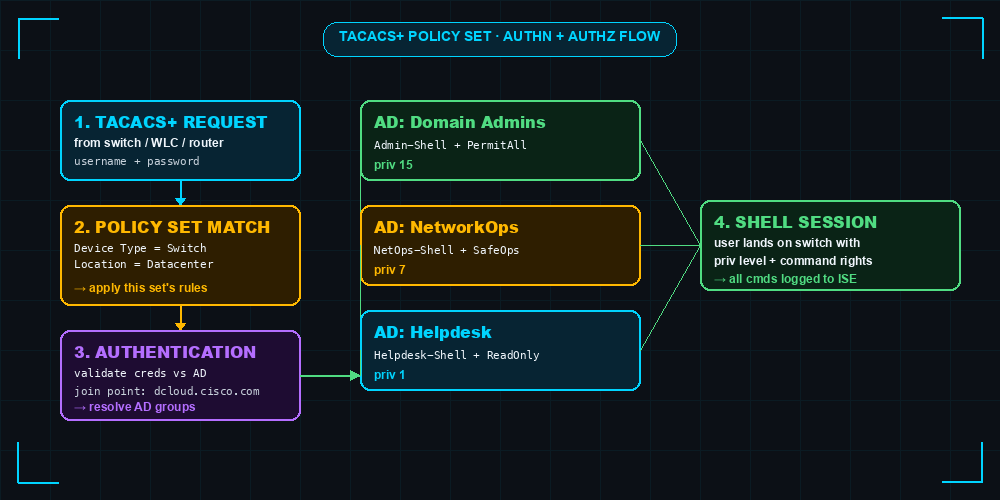
The “Default: DenyAccess” at the bottom of the AuthZ section is critical. Without it, an AD user who is not in any of the three groups would get whatever the catch-all rule says - and forgetting to define a catch-all is how teams accidentally grant admin to every AD user.
Phase 6: Configure the NAD-side AAA - the safe pattern
This is where the lockout postmortem lessons get applied. There are two AAA chain patterns. One is broken. One is safe.
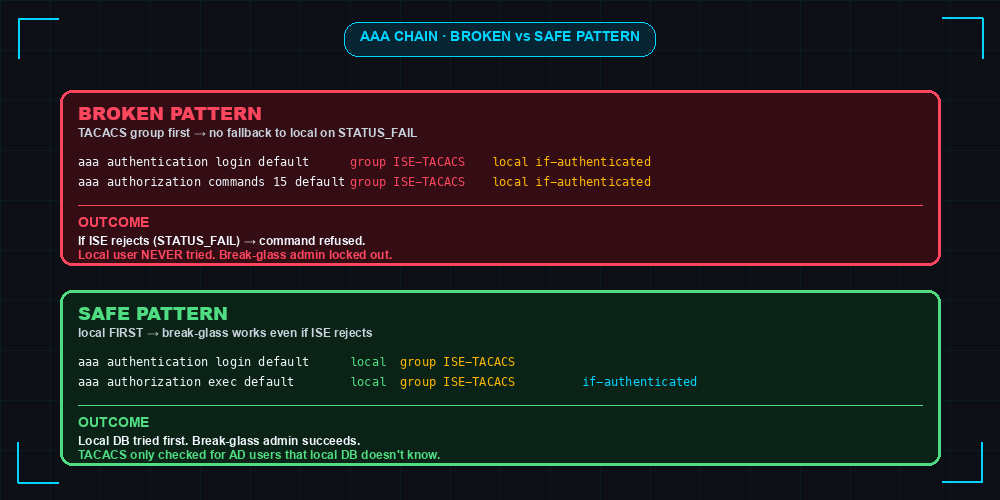
The safe IOS-XE configuration:
! Define the TACACS+ server and group
tacacs server ISE-PSN
 address ipv4 198.18.133.27
 key 7 <encoded-shared-secret>
 timeout 5

aaa group server tacacs+ ISE-TACACS
 server name ISE-PSN

! Local break-glass user (never let this account be only in ISE)
username break-glass privilege 15 secret <strong-local-password>

! AAA chain — local FIRST, then TACACS
aaa new-model
aaa authentication login default local group ISE-TACACS
aaa authentication enable default enable
aaa authorization exec default local group ISE-TACACS if-authenticated
aaa accounting exec default start-stop group ISE-TACACS
aaa accounting commands 15 default start-stop group ISE-TACACS

! Apply to vty (SSH)
line vty 0 15
 transport input ssh
 login authentication default
What this gets you:
- Local user
break-glassauthenticates against the IOS local database first, succeeds, and never queries ISE. This is your safety net - if ISE goes down, gets misconfigured, or rejects every request, the break-glass account still works. - AD users not in the local database fall through to TACACS+ (ISE), which validates them against AD and applies the policy-set rules. They get the shell profile + privilege level matching their AD group.
- Per-command authorization is intentionally skipped (
aaa authorization commandsis not configured). Authorization happens at exec level via the priv-level returned by ISE; the priv level itself naturally restricts commands. This is the postmortem’s third lesson. - Accounting is on for both exec sessions and priv 15 commands - every admin login and every change command lands in ISE’s TACACS+ accounting logs for audit.
Bonus: console line stays separate
line con 0 typically does not have authorization commands applied. This is intentional - physical console access is your last-resort recovery path. Do not put per-command authorization on the console line unless you have a documented out-of-band recovery procedure that does not depend on it.
Verification
After configuring, validate from a fresh SSH session:
1$ ssh helpdesk-user@switch01
2Password: ********
3switch01> show version       # works (Helpdesk_Shell_Priv1 + ReadOnly cmd set)
4switch01> configure terminal
5% Invalid input detected at '^' marker.   # priv 1 cannot enter config mode
Then verify in ISE: Operations → TACACS → Live Logs. You should see:
- An authentication event for
helpdesk-user - AuthZ resolution naming
Helpdesk_Shell_Priv1andReadOnly-Cmds - Command accounting events for
show versionand the rejectedconfigure terminal
If the Live Logs show “Failed Authorization” but the user got in anyway, your AAA chain is misconfigured - TACACS rejected but the chain fell through to a permissive fallback. Re-check the safe-pattern config above.
Operational gotchas
1. Port 49 stays closed if Device Admin Service persona is not enabled. Phase 1 is non-negotiable. If your nc -zv ise-psn 49 fails, this is almost always the cause.
2. The joinDomainWithAllNodes API endpoint returns 500. Documented in the ISE automation post. For automation: do the AD join via the GUI once, then automate everything else.
3. Command sets reject hyphens in names. Use underscores or spaces. The error message ISE returns is unhelpful.
4. IOS-XE 17.09 silently drops address ipv4 when stale TACACS server names exist. Delete any TACACS_SERVER_AUTH_1-style auto-named servers from prior dCloud bootstrap scripts before adding your new ISE-PSN server.
5. The service-type AVPair matters for some platforms. Some Cisco platforms (older WLCs, certain switches running classic IOS) require the shell profile to include Service-Type = Login or Shell:cli=yes as a custom AVPair. If TACACS authentication succeeds but the user lands in privilege 0 with no commands available, this is likely the cause.
6. ISE 3.4 TACACS Live Logs lag by ~5 seconds. Do not panic if a command does not show up immediately. Refresh after 10 seconds.
7. Accounting and authorization are independent. Disabling accounting does not affect command authorization. They are configured by separate aaa accounting and aaa authorization directives.
Common questions answered
“Do I need command authorization for compliance?” - Usually no. Per-command authorization is a high-risk control that delivers marginal benefit over priv-level enforcement. For PCI-DSS, NIST 800-53, ISO 27001 - command accounting (which logs every command) typically satisfies the audit requirement without the lockout risk.
“Can I federate with other identity sources, not just AD?” - Yes. ISE supports LDAP, SAML, OAuth/OpenID Connect (for the portal), and external RADIUS as identity stores for TACACS+ authentication. AD is the most common because most enterprise device-admin users are already AD-joined.
“What about ISE backup admin access if AD is down?” - Two-layered defense: (a) the local IOS break-glass user is always available, (b) ISE supports Internal Users as a fallback identity store. Add a small local-admin Internal User account that has emergency access for when AD itself is unreachable.
“Does this work with non-Cisco devices?” - Yes for any device that speaks TACACS+ (most enterprise networking gear). Configuration details vary; Juniper, Arista, Aruba all have slightly different AAA syntax but the ISE side is unchanged.
Related Posts
- The TACACS+ Lockout That Taught Me Three Things About IOS-XE AAA - the postmortem this guide is built on
- Building a Production-Grade Cisco ISE Deployment in One Sitting - the automation playbooks that bootstrap TACACS+ device admin alongside wireless 802.1X and MAB
- Cisco ISE Active Directory Integration: Complete Guide - the AD identity-store half of the device admin chain
- Cisco ISE Profiling: Device Fingerprinting Configuration Guide - yesterday’s post on the parallel profiling-driven NAC flow
- Cisco ISE BYOD Onboarding Guide - tomorrow’s post on the third major ISE use case
Configuration tested against Cisco ISE 3.4 with C9800-CL 17.09 and CSR8000V 17.04 acting as TACACS+ clients, AD identity source via dcloud join point.
Practice with free flashcards, quizzes, and hands-on lab scenarios at cciesec.it-learn.io — built specifically for the CCIE Security v6.1 written (350-701 SCOR) and lab exam.


