
The hard truth about securing AI applications today: most of the security stack you already paid for wasn’t designed for any of the threats that matter. Firewalls don’t catch prompt injection. WAFs don’t see system-prompt leakage. DLP doesn’t recognize that the response to a benign-looking question just exposed somebody’s training data. EDR has no opinion on whether your model is being jailbroken.
Cisco AI Defense is Cisco’s answer to that gap - a security product purpose-built for the AI era that plugs into the Cisco Security Cloud so you don’t have to bolt yet another inspection plane onto your environment. This post is a technical walkthrough from a solutions engineer’s chair: the five capability pillars, the closed loop that makes the architecture interesting, the three places you can enforce, and what setup actually looks like.
The problem AI Defense is built for
Five threat categories your existing controls don’t cover well:
- Prompt injection and model jailbreaks - an attacker (or unwitting user) crafts input that overrides the model’s safety alignment. Your WAF cannot parse intent.
- Training-data and PII leakage - the model emits something it learned during training, or repeats sensitive data from its context window, in the response. Your DLP doesn’t inspect model outputs.
- Poisoned models and malicious MCP tools - open-source models from Hugging Face, MCP servers from random GitHub repos. Your existing software supply-chain tooling has no idea how to scan a model file.
- Shadow AI - employees pasting customer data into ChatGPT, Claude, or any of the 100+ public GenAI tools that exist today. Your CASB might see the destination but not what’s leaving.
- Excessive agent capability - agents with tool access doing things you didn’t intend, sometimes because an attacker convinced them to. Traditional IAM doesn’t model this.
AI Defense is structured around five capability pillars that each take a specific cut at that problem space. Visually, the surface looks like this:
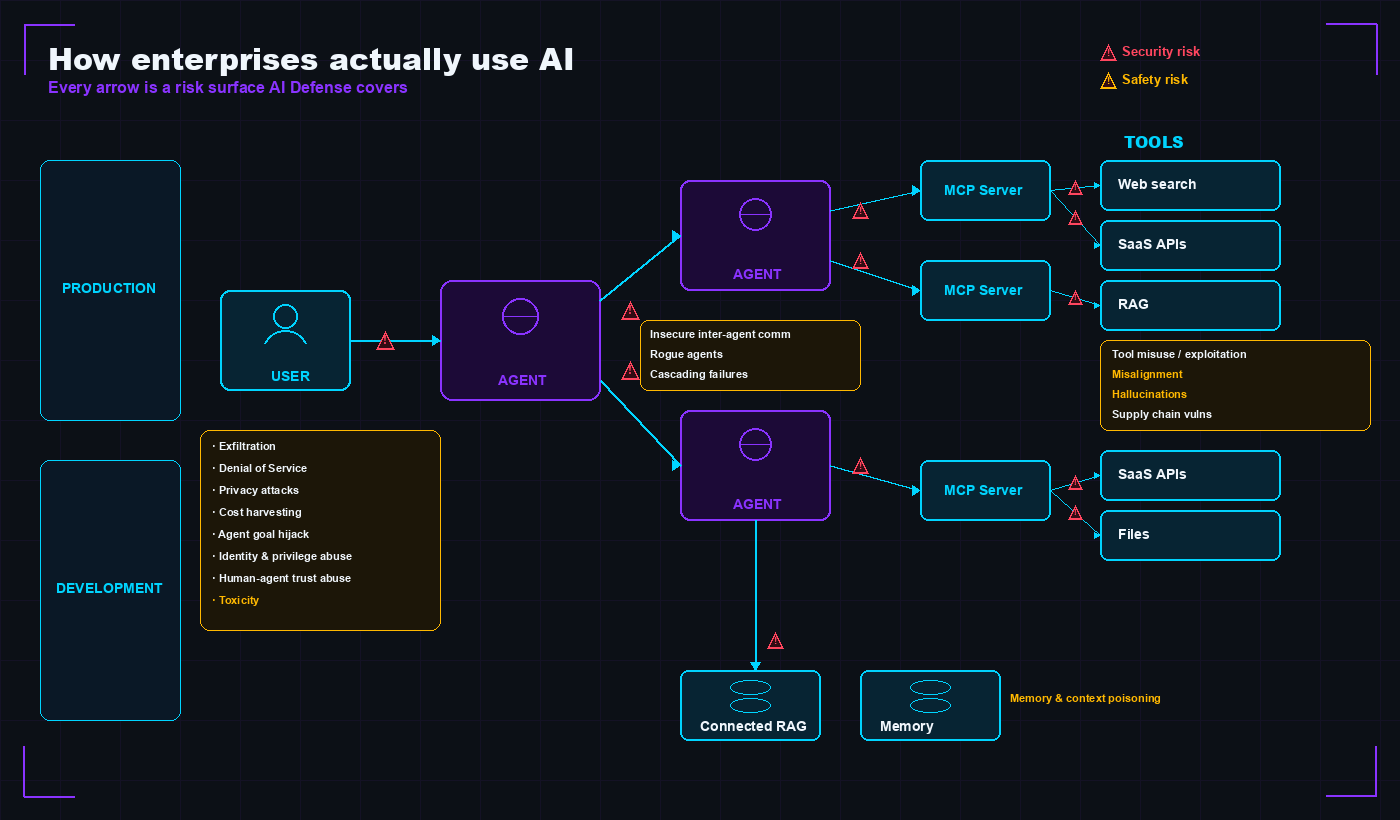
Every arrow in that diagram is a risk surface AI Defense covers. The user-to-agent edge is where prompt injection and exfiltration live. The inter-agent edges are where rogue agents and insecure communication live. The agent-to-MCP-server edges are where tool misuse and unexpected code execution live. The memory loop at the bottom is where context poisoning lives. Traditional security tools mostly see the first hop (user to LLM) at best - the rest is invisible.
The five capability pillars
1. AI Cloud Visibility & Discovery
Auto-discovers AI models, agents, and assets running across AWS, Azure, and GCP. This is the “you can’t protect what you don’t know about” pillar. It connects to your cloud providers (CloudTrail for AWS, equivalent for Azure/GCP) and populates an inventory of where AI is actually running - including the models a developer spun up “just to test something” that have been answering production traffic for six months.
If you do nothing else with the product, running Discovery answers the most common CISO question of 2026: how many AI applications do we actually have?
2. AI Model & Application Validation (Automated Red-Teaming)
An algorithmic vulnerability assessment that runs thousands of adversarial tests against your models and applications. Think of it as Burp Suite for LLMs - it doesn’t replace a human red-teamer, but it runs continuously, scales infinitely, and produces standards-aligned reports.
Validation works against three classes of target:
- AI Defense-managed systems - models and apps you’ve onboarded
- External/third-party inference APIs - useful for evaluating a vendor model before integration
- Custom-goal scenarios - you define an objective (e.g., “get the model to reveal the system prompt”) and the engine attempts to achieve it through varied attack paths
The output maps to OWASP Top 10 for LLM Applications (2025) and MITRE ATLAS - so when audit asks “how do you know you’re testing the right things?” you point at a published taxonomy instead of a homegrown list.
Practically, the “recommended actions” pane that surfaces after a validation run is the closed loop in UI form - each finding can spawn a runtime policy with one click, which is the validation→runtime link you’d otherwise have to wire up manually.
3. AI Runtime Protection
Real-time inspection of prompts and responses, with blocking or alerting on detected violations. This is the workhorse pillar - the thing actually running in front of your live LLM traffic.
Each protected application has one or more connections (one per LLM API being protected), and each connection gets a runtime protection policy. Policies are built from guardrails, which are built from rules. Each rule scans the prompt, the response, or both, and every rule maps back to OWASP LLM or MITRE ATLAS.
The four guardrail families:
| Guardrail | Detects | Scope |
|---|---|---|
| Security | Jailbreaks, prompt injection, system-prompt leakage - anything attempting to override model alignment | Prompt + response |
| Privacy | PII and sensitive-data exposure (DLP-style detection adapted for AI) | Prompt + response |
| Safety | Harmful, unsafe, or policy-violating content across hundreds of categories | Prompt + response |
| Japanese-language | Equivalent coverage tuned for Japanese-language input/output | Prompt + response |
On a policy violation, AI Defense raises an event in the Events log and (if configured) blocks the content from reaching the model - or, on the response side, blocks it from reaching the user.
4. AI Supply Chain Security
Scans model files, repositories, and MCP servers / agent traffic for malicious or vulnerable components. The model-file scanning catches the model-as-malware vector (a Hugging Face download that decodes a malicious pickle on load). The MCP scanning is newer and more important than people realize - every MCP tool you connect to your agent is effectively a privileged plugin running in your trust boundary.
GitHub integration covers MCP code scanning, MCP registry scanning, and model-repository scanning. This is the pillar that grows fastest as the AI ecosystem matures.
5. Application Discovery (AI Access)
The shadow-AI pillar - discovers and controls employee use of third-party LLMs and GenAI apps, with DLP and guardrails. Delivered via Cisco Secure Access (the SSE/Zero Trust component of the Security Cloud), which gives it the right vantage point: it sees the traffic from every endpoint to every public AI service.
This is the answer to “our staff are pasting customer data into ChatGPT - what do we do?” AI Access can discover the usage, classify the app, apply DLP rules to outbound content, and apply guardrails (block sensitive categories, allow read-only research, etc.).
The five pillars at a glance
Stacked as a single feature list, here’s the coverage AI Defense gives you in one platform:
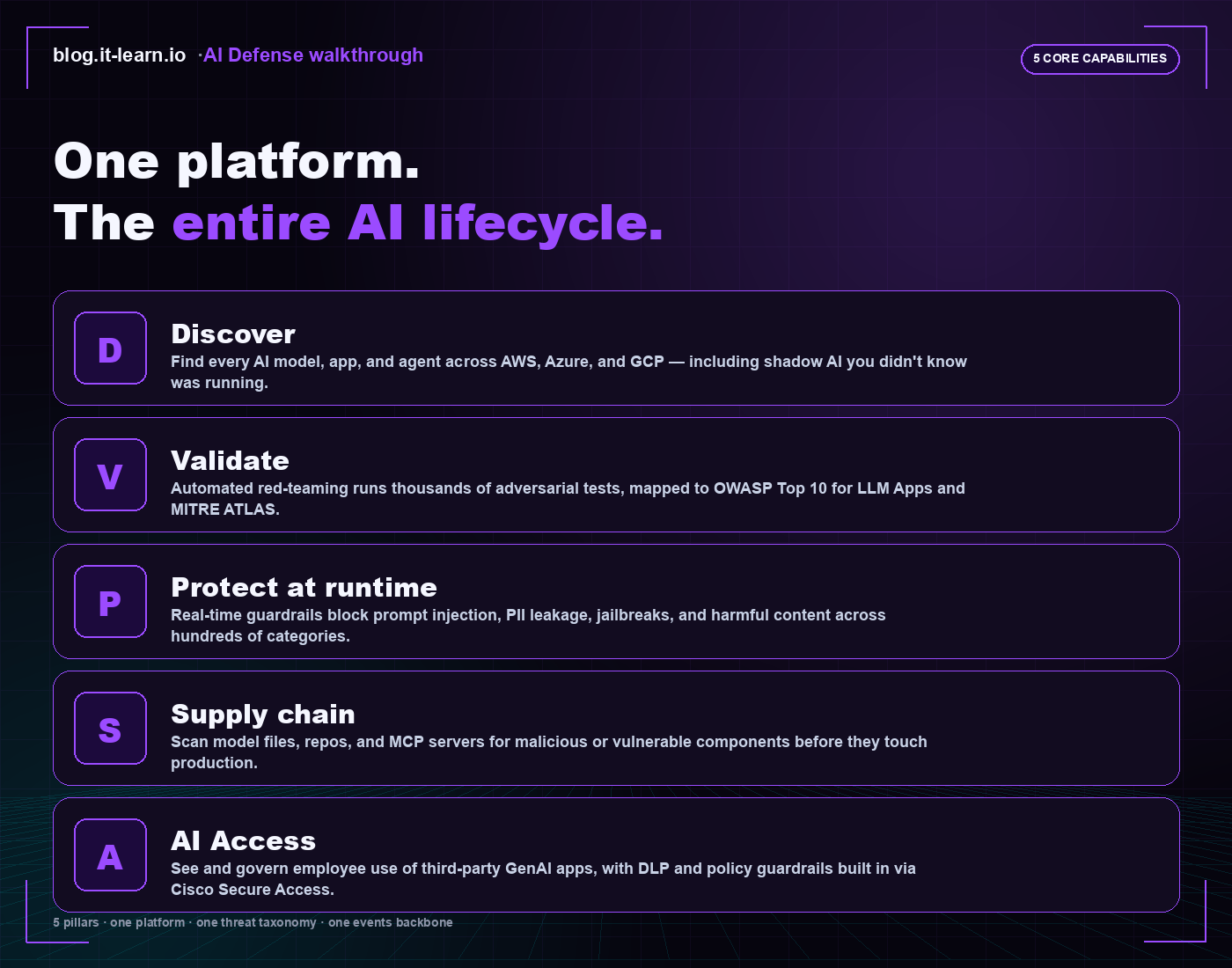
That’s the framing I lead with in customer conversations. Most AI security tools own one of those five - usually validation or runtime - and you end up bolting four tools together to cover the same surface. The integrated product story is the single events backbone underneath, so the SOC sees AI events in the same SIEM as everything else.
And what does it look like when all five are running together? Roughly this - an executive view of the AI security posture in one console:
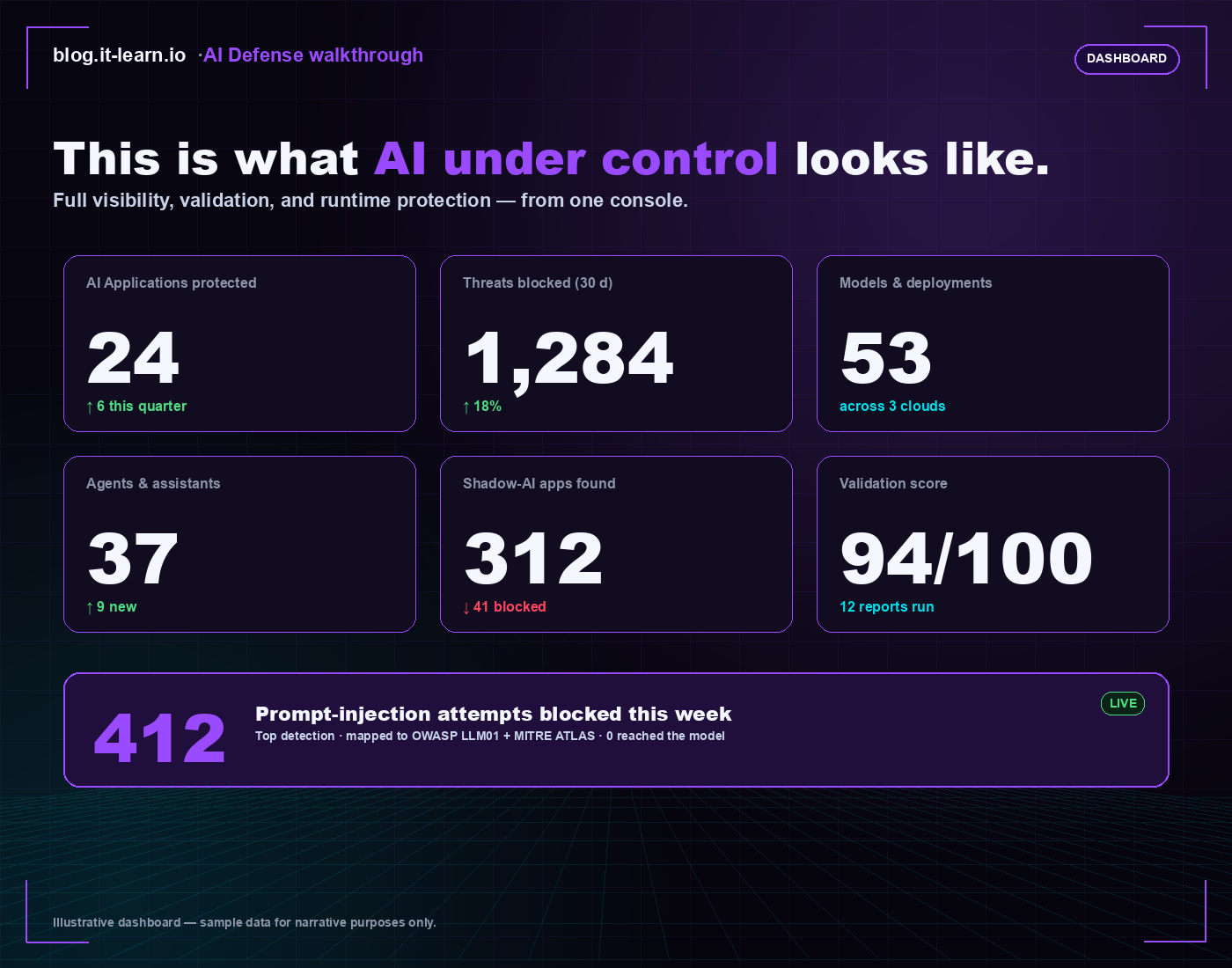
The number that lands with executives is the bottom strip - 412 prompt-injection attempts blocked this week, zero reached the model. That’s the headline metric AI Defense exists to produce. Everything else in the dashboard is supporting evidence - coverage breadth (apps, models, agents), discovery results (shadow AI), and validation maturity (test score, reports run).
The closed loop that ties it together
This is the architecture detail worth understanding because it’s the structural differentiator from point-tool competitors.
Validation feeds Runtime. You red-team a model. The validation report identifies that the model fails on a specific class of prompt - say, a particular jailbreak pattern. That finding feeds directly into the runtime guardrail policies - the rule that detects that pattern gets enabled (or tuned, or weighted) on the connection serving production traffic.
The loop:
       ┌──────────────────────────────────────────┐
       │                                          │
       ▼                                          │
┌──────────────┐    ┌───────────┐    ┌─────────────────┐
│  Validation  │ → │  Findings  │ → │ Runtime Policy  │
│ (red-team)   │   │  (report)  │    │ (guardrails)    │
└──────────────┘    └───────────┘    └─────────────────┘
       ▲                                          │
       │                                          ▼
       │                                  ┌──────────────┐
       └────  retest on real traffic ←───│   Events     │
                                          └──────────────┘
The product makes a structural claim that few competitors deliver in one platform: test → harden → watch, with the test results directly informing what you watch. The alternative (which most teams do today) is to red-team in one tool, write guardrails by hand in another, and hope the two stay in sync as both threat catalogs evolve.
The three enforcement points - pick the one that fits
A runtime protection policy has to be enforced somewhere. AI Defense gives you three options per connection, picked by deployment context.
Option A - Multicloud Defense (AI Guardrails)
Network-level enforcement via existing Cisco Multicloud Defense gateways. Best fit if you’re already running Multicloud Defense in your cloud - the AI inspection becomes another rule type at the same enforcement plane that already inspects everything else.
Practical advantage: no per-application onboarding, no app team coordination. The traffic is intercepted at the network boundary regardless of which app generated it.
Option B - AI Defense Gateway
A proxy placed in front of the LLM endpoint. Apps talk to the Gateway URL instead of (e.g.) api.openai.com directly; the Gateway inspects, applies policy, and forwards to the real LLM.
Practical advantage: zero code changes in the application. You change the LLM endpoint URL in the app config. Fastest path to “inline protection live.”
Option C - AI Defense Inspection API
The application calls the AI Defense Inspection API directly from its own code. Inspect the prompt before sending to the LLM, inspect the response before showing to the user.
Practical advantage: maximum control. The application can decide what to do with the inspection result programmatically - modify the prompt, surface a warning, log to its own observability stack. Required for use cases where the inspection result feeds back into application logic, not just block/allow.
How to choose
| Situation | Pick |
|---|---|
| Already running Multicloud Defense | Multicloud Defense AI Guardrails |
| Need inline protection without touching app code | AI Defense Gateway |
| App team wants programmatic control + custom remediation | Inspection API |
| Hybrid app - mix of self-hosted and third-party LLMs | Often Gateway for third-party + Inspection API for in-house |
The threat taxonomy you can point at in an audit
Every guardrail rule maps to OWASP Top 10 for LLM Applications (2025) and MITRE ATLAS. Worth memorizing the OWASP set because it shows up in every AI-security RFP this year:
| ID | Risk | ID | Risk |
|---|---|---|---|
| LLM01 | Prompt Injection | LLM06 | Excessive Agency |
| LLM02 | Sensitive Information Disclosure | LLM07 | System Prompt Leakage |
| LLM03 | Supply Chain | LLM08 | Vector & Embedding Weaknesses |
| LLM04 | Data & Model Poisoning | LLM09 | Misinformation |
| LLM05 | Improper Output Handling | LLM10 | Unbounded Consumption |
The combined OWASP + MITRE mapping is what makes the reports audit-ready. When a board asks how the AI security program is structured, you can point at two published taxonomies and a continuously-updated tool that maps to both - instead of a homegrown spreadsheet.
I covered the OWASP LLM landscape and how prompt injection actually works in Prompt Injection Attacks - Making AI Do What It Shouldn’t - worth reading alongside this post for the threat-model context.
Deployment models - SaaS vs hybrid
Default is SaaS. Cisco hosts everything; you onboard via Security Cloud Control (SCC) and start protecting in hours, not weeks. For regulated industries or organizations with data-sovereignty requirements, hybrid puts the inspection plane inside the customer environment.
| Model | Where it runs | Notes |
|---|---|---|
| SaaS | Cisco-hosted | Default; fastest onboarding |
| Hybrid - AWS | Customer AWS EKS cluster | VPC + EKS prep, connector + runtime gateway; CloudFormation template provided |
| Hybrid - Azure | Customer AKS cluster | Resource group / VNet + AKS prep, connector deploy |
| Hybrid - GCP | Customer GKE cluster | Cluster prep + connector deploy |
| Hybrid - Cisco AI PODs | On-prem OpenShift (bare metal or vSphere) | OCP cluster + connector - the option for fully on-prem |
The hybrid connector follows a lifecycle of deploy → manage → update → delete, with health monitoring per platform. The Cisco AI PODs option is the differentiator against pure-SaaS competitors - if your industry says “no inspection data leaves our boundary,” you have a path.
What setup actually looks like
The end-to-end runbook from purchase to working protection is shorter than I expected the first time I went through it:
- Activate in SCC. Log in to Security Cloud Control, select your enterprise, click Claim Subscription, enter the claim code from your purchase confirmation.
- Connect integrations. Wire up the cloud providers (CloudTrail for AWS, equivalent for Azure/GCP), your LLM provider (e.g. AWS Bedrock), and Cisco Secure Access for AI Access.
- Run Discovery. Populate your AI inventory across the connected clouds. This is the “what AI do we actually have” answer.
- Configure Validation. Set up validation targets, profiles, and any custom goals. Run a baseline test against your most important model.
- Set up Runtime protection. Create applications, define connections (one per LLM endpoint), apply guardrail policies, pick an enforcement point per connection.
- Monitor the Events log. Watch for violations. Feed findings back into validation tuning and policy refinement.
Steps 3–6 are the ongoing loop. Steps 1–2 are one-time setup. A reasonably-sized environment can go from claim code to inline protection on the first application in a single afternoon.
The integrations that matter
AI Defense plugs into the broader Cisco Security Cloud rather than running as a silo. The integrations worth knowing:
| Integration | Used for |
|---|---|
| AWS CloudTrail | Direct cloud connection for AI asset discovery |
| Multicloud Defense | Alternate asset discovery + network-level guardrail enforcement |
| Cisco Secure Access | AI application/model discovery + AI Access (shadow-AI control + DLP) |
| LLM API providers (Bedrock, etc.) | Connect the provider hosting your models for validation + protection |
| Splunk | Forward AI Defense logs/events to your SIEM |
| GitHub | MCP code scanning, MCP registry scanning, model-repository scanning |
The Splunk integration is the one to highlight to security-operations leaders - AI Defense events flow into the same SIEM where every other security event already lives, so AI threats appear in the same dashboards and the same correlation rules as everything else. No separate console for the SOC analyst to monitor.
Where AI Defense fits in the larger picture
For solutions engineers walking customers through this for the first time, the framing that lands is this: AI security has three timelines, and most products address only one of them.
- Build-time security - red-team the model before it ships
- Run-time security - inspect prompts and responses while it’s serving traffic
- Use-time security - control how employees use third-party AI
AI Defense covers all three in a single platform with a single threat taxonomy and a single events backbone. Point tools that cover one timeline well often don’t share data with tools covering another. The closed-loop architecture - validation findings becoming runtime policy - is what makes the integration concrete rather than marketing copy.
The other framing that resonates: traditional security controls fail open against AI threats. Your firewall says yes to the HTTPS connection to OpenAI. Your DLP doesn’t recognize the model response as a leak. Your CASB knows the user accessed a “generative AI” category but doesn’t know whether they pasted source code. AI Defense isn’t competing with any of those tools - it’s covering the gap they were never designed to cover.
Related reading on the blog
For the threat-model context behind why AI security needs purpose-built tooling, Prompt Injection Attacks - Making AI Do What It Shouldn’t walks through how prompt injection actually works at the model layer.
For the larger trend of AI-related vulnerabilities, Google Confirms First AI-Generated Zero-Day Exploit and Microsoft AI Discovers 16 Windows Zero-Days cover the offensive side of how AI is reshaping the vulnerability landscape.
For the adjacent identity-security gap that AI agents create (every agent is an identity, most of them non-human, most of them under-governed), Non-Human Identity Security - The 451 NHI Crisis in 2026 is the foundational read.
And for the role itself - the SE/security engineer who increasingly has to translate between AI teams and security teams - The AI Security Engineer - The Job Nobody Knew Existed covers what that career path actually looks like in 2026.
My take, from the SE chair
Cisco AI Defense lands at the right time. AI adoption is moving faster than security can keep up, and the gap is the single biggest blocker to enterprise AI in every account conversation I have. The customers who say “we’re holding off on AI until we know how to secure it” are not being unreasonable - they’re being correctly cautious about a class of risk their existing stack doesn’t address.
The architectural choice that matters most is the closed loop. Most AI security products are either red-teaming tools or runtime guardrails - rarely both, almost never integrated. AI Defense being one product where validation findings directly become runtime policy is the difference between “we have AI security tools” and “we have an AI security program.”
If you’re standing up an AI security capability from zero and you’re already in the Cisco Security Cloud, this is the obvious starting point. If you’re not yet a Cisco customer, the question is whether the closed-loop architecture and the OWASP/ATLAS mapping outweigh whatever other ecosystem you’re already invested in. For most security organizations, the answer leans toward the integrated product because the alternative - managing 4–5 disconnected AI security tools - is exactly the operational debt the program is trying to avoid.
Internal note: this walkthrough summarizes capability and architecture from the public Cisco AI Defense User Guide (securitydocs.cisco.com/docs/ai-def) as of May 2026. Verify licensing tiers, entitlements, and feature availability with your Cisco account team before any customer commitment.


