Call recording is an interesting topic for me and it’s sometimes hard to understand, but It’s easy when you break it down to get what it is all about.
My experience varies from different vendors and most of it comes to the same place, at least when preparing CUCM for Recording services. This post is just to go over what is involved form CUCM’s preparation and a bit of an explanation when possible :)
This is going to be my Feedback on the Breakout sessions, as expected Cisco was ready for the challenge and the questions.
I really don’t know if CLUS had the ability for you to join a Spark room simultaneously to the session, at least not in my previous CLUS over in 2014, when I guess it was called Project Squared. My experience was really good with this new feature and helped very much to be engaged in the conversation.
I keep hearing about many engineers out there with issues related to the UCCX certificates and the ECDSA certificate used by few services on UCCX. I wanted to create this quick post to help others and Document the procedure.
The certificates Overview I will go back a bit to give you a quick overview on the UCCX certificates, but not too far back. UCCX uses Self-Signed certificates out of the box for Secure connectivity using your browser (Nothing new here) - However, since UCCX 11.5 there is a new Tomcat Certificate called Elliptic Curve Digital Signature Algorithm, ECDSA for short. If you want to find out more about these type of certificates feel free to visit (https://www.maximintegrated.com/en/app-notes/index.mvp/id/5767)
Yesterday I got bitten by this one… It really has been my first encounter with this issue. In all honesty I did not know this was a thing until yesterday. So I hope that you can use this to your advantage and on the planning of a successful UCCX Deployment.
The Issue Replication was not working properly after adding the secondary node. As stated in the Administration Guide “Hostname must be in lower case and the character limit is 24 characters.”
I love the Cisco Support community, and credit should be given to all the people out there that work very hard on UC and Collaboration.
Last night I was trying to turn up a PRI (Yeah, old technology right?) - So a client is terminating a PRI back to back with their equipment and on my CUBE router (ISR4331) I’m terminating the PRI and sending the calls to IPFLEX, sound like fun!
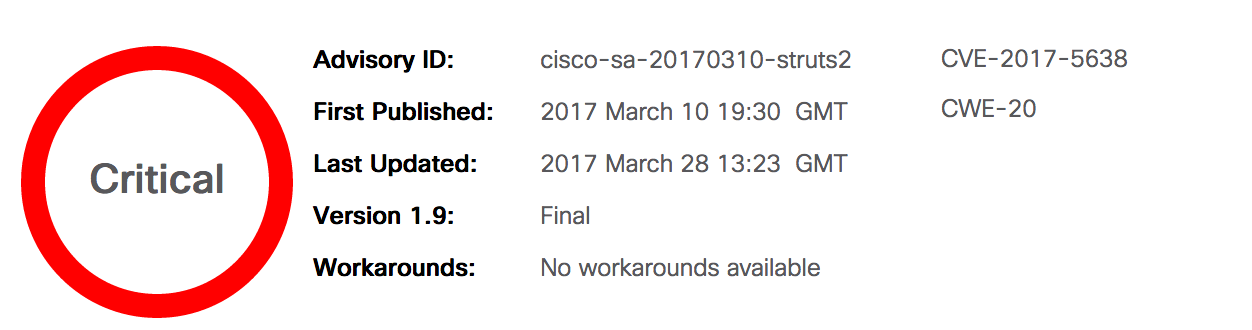
I rarely post twice in the same day and most if it is scheduled from days before, however, I thought this one was important. Cisco just released the following fix that looks to address/patch this vulnerability.
Here is the CCO Link to download and install the patch on your new and upgraded UCCX 11.5 servers
Here is the link to (http://www.cisco.com/web/software/280840578/134989/ReadMe-UCCX-11.5-struts2-fix.pdf) (Not really much information on what the whole thing, but just the installation instructions)
As a way to complete my very long post from last week, I decided that I needed a nice and easy way to keep myself in check when configuring and installing UCCX, so I decided to create the flow you see in the picture above. All to help me and others
The Content The idea of this quick diagram is to guide you/me through a successful installation of a Cisco Contact Center Express.
9-12-2019 Edit –> Added the Excel Spreadsheet on Planning a successful Contact Center implementation using Cisco UCCX.xslx
As you may know, I’m very much into contact center stuff, and I have been creating different videos, but I really got worried because there are so many things to show and do on UCCX, and I did not have a road-map or a document to use to base my configurations on.
I decided that I needed a Design and a Planning session with myself and created this document.
I’m a bit surprised and impressed on the capabilities of Tropo, and this small post will show you why.
Here is a quick and short tutorial on how to create a Voicemail application at the Tropo site
The Code [PYTHON] Here is the sample code in Python, I believe this one is more readable for me… JavaScript is the next best option
record(“Please leave your message at the beep. Press pound when finished to listen to your recording.”, { “beep”:true, “timeout”:10, “silenceTimeout”:7, “maxTime”:60, “terminator”:"#", “recordURI”:“http://www.example.com/recording.py", “transcriptionOutURI”:“mailto:you@example.com”, “onRecord”: lambda event : say(“You said " + event.recordURI) })
In case you are interested in getting your hands dirty with Tropo, here is some handy information
What is Tropo? Tropo is a company that Cisco aquired not too long ago, but to be short and sweet, Tropo is a “cloud API platform that simplifies the addition of real-time communications and collaboration capabilities within applications” from Wikipedia
What is possible with Tropo? I’m a UC and Collaboration guy, and the first time I heard of Tropo so many ideas came to my mind.