Let’s see, it has been a while since the last time you heard from me, but this time I will spare you the excuse!
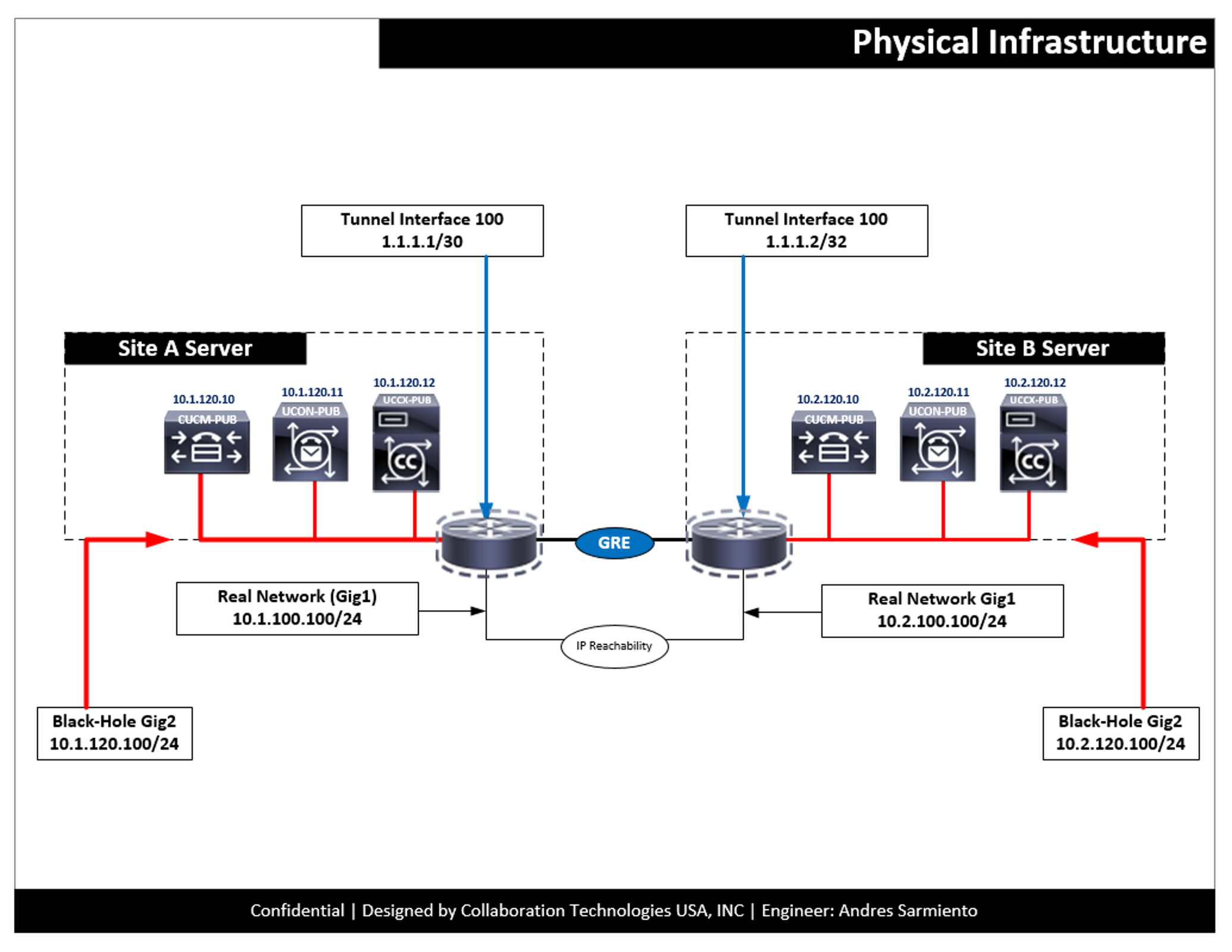
What is a Zero Downtime Upgrade? This is an upgrade where no matter from which version of VOS (CUCM, UNITY, and UCCX) you are coming from can be done with very little or zero downtime
The Reasoning behind Look I have always worked with companies that like their stuff done quickly, efficiently and with minimal downtime. I’m also very lazy, or very practical, so if I don’t have to spend all night doing an upgrade, I simply don’t do it. Now, like everything else, there are a lot of exceptions to the scenario I will be going over on this Post, so keep reading!
I’m making contact back from Cisco Live with many interesting things to show and tell, so I decided I would write small pieces of the information I digested from the conference.
I will start it off by mentioning where to locate the presentation that was used for this session, to follow along with all the things that I will be covering. Eventually all videos on the session will be uploaded to the ciscolive.com on Demand Library
As you have been seeing over the last couple of months, I have been actively creating videos and posts about UCCX in General. So I wanted to create a new Post which will mark the first milestone of the series of UCCX Labs.
Video Collection: The following list compiles all the videos that I have created, using my approach to create a Successful Contact Center deployment.
Integrating CUCM and UCCX
A quick video on how to upgrade from version 10.6 to 11.5 - also some good information on the process.
The Video The Content On this video I go over the Upgrade from UCCX 10.6 to 11.5
What to look Forward to? I have created these videos to help others on how to get familiar with UCCX. I will continue creating more videos as I’m going, I hope you enjoy them!
This video goes over working with the UCCX Script editor and the Steps
The Video The Content Looking at the Script Logic, how to use Labels, GoTo’s, Menus and a bit more
What to look Forward to? Expect more videos coming in the next days
About the Author: Andres Sarmiento, CCIE # 53520 (Collaboration) With more than 13 years of experience, Andres is specialized in the Unified Communications and Collaboration technologies. Consulted for several companies in South Florida, also Financial Institutions on behalf of Cisco Systems. Andres has been involved in high-profile implementations including Cisco technologies; such as Data Center, UC & Collaboration, Contact Center Express, Routing & Switching, Security and Hosted IPT Service provider infrastructures.
This video looks at resources to get more information on how to use UCCX and the Scripts configuration. Also goes over the configuration of a queuing script using the stock ICD script
The Video The Content DevNet Resources Script Repository Modifying the ICD Script
What to look forward to? More videos are coming
About the Author: Andres Sarmiento, CCIE # 53520 (Collaboration) With more than 13 years of experience, Andres is specialized in the Unified Communications and Collaboration technologies. Consulted for several companies in South Florida, also Financial Institutions on behalf of Cisco Systems. Andres has been involved in high-profile implementations including Cisco technologies; such as Data Center, UC & Collaboration, Contact Center Express, Routing & Switching, Security and Hosted IPT Service provider infrastructures.
Yesterday I got bitten by this one… It really has been my first encounter with this issue. In all honesty I did not know this was a thing until yesterday. So I hope that you can use this to your advantage and on the planning of a successful UCCX Deployment.
The Issue Replication was not working properly after adding the secondary node. As stated in the Administration Guide “Hostname must be in lower case and the character limit is 24 characters.”
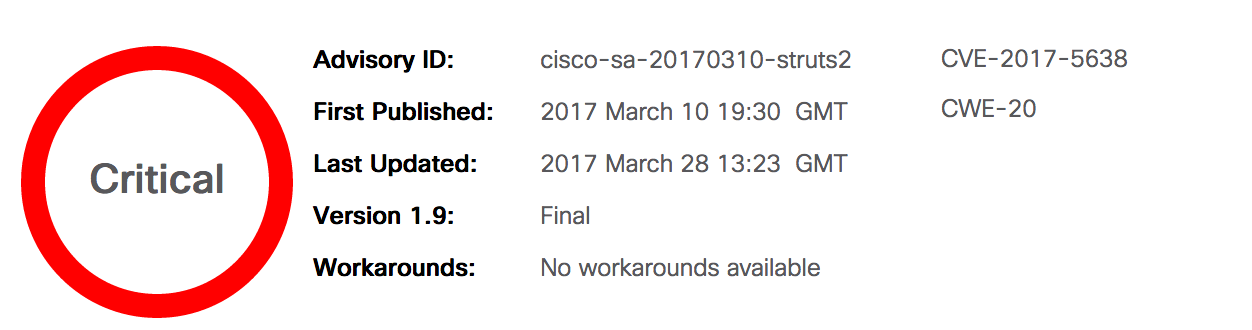
I rarely post twice in the same day and most if it is scheduled from days before, however, I thought this one was important. Cisco just released the following fix that looks to address/patch this vulnerability.
Here is the CCO Link to download and install the patch on your new and upgraded UCCX 11.5 servers
Here is the link to (http://www.cisco.com/web/software/280840578/134989/ReadMe-UCCX-11.5-struts2-fix.pdf) (Not really much information on what the whole thing, but just the installation instructions)
As a way to complete my very long post from last week, I decided that I needed a nice and easy way to keep myself in check when configuring and installing UCCX, so I decided to create the flow you see in the picture above. All to help me and others
The Content The idea of this quick diagram is to guide you/me through a successful installation of a Cisco Contact Center Express.
9-12-2019 Edit –> Added the Excel Spreadsheet on Planning a successful Contact Center implementation using Cisco UCCX.xslx
As you may know, I’m very much into contact center stuff, and I have been creating different videos, but I really got worried because there are so many things to show and do on UCCX, and I did not have a road-map or a document to use to base my configurations on.
I decided that I needed a Design and a Planning session with myself and created this document.