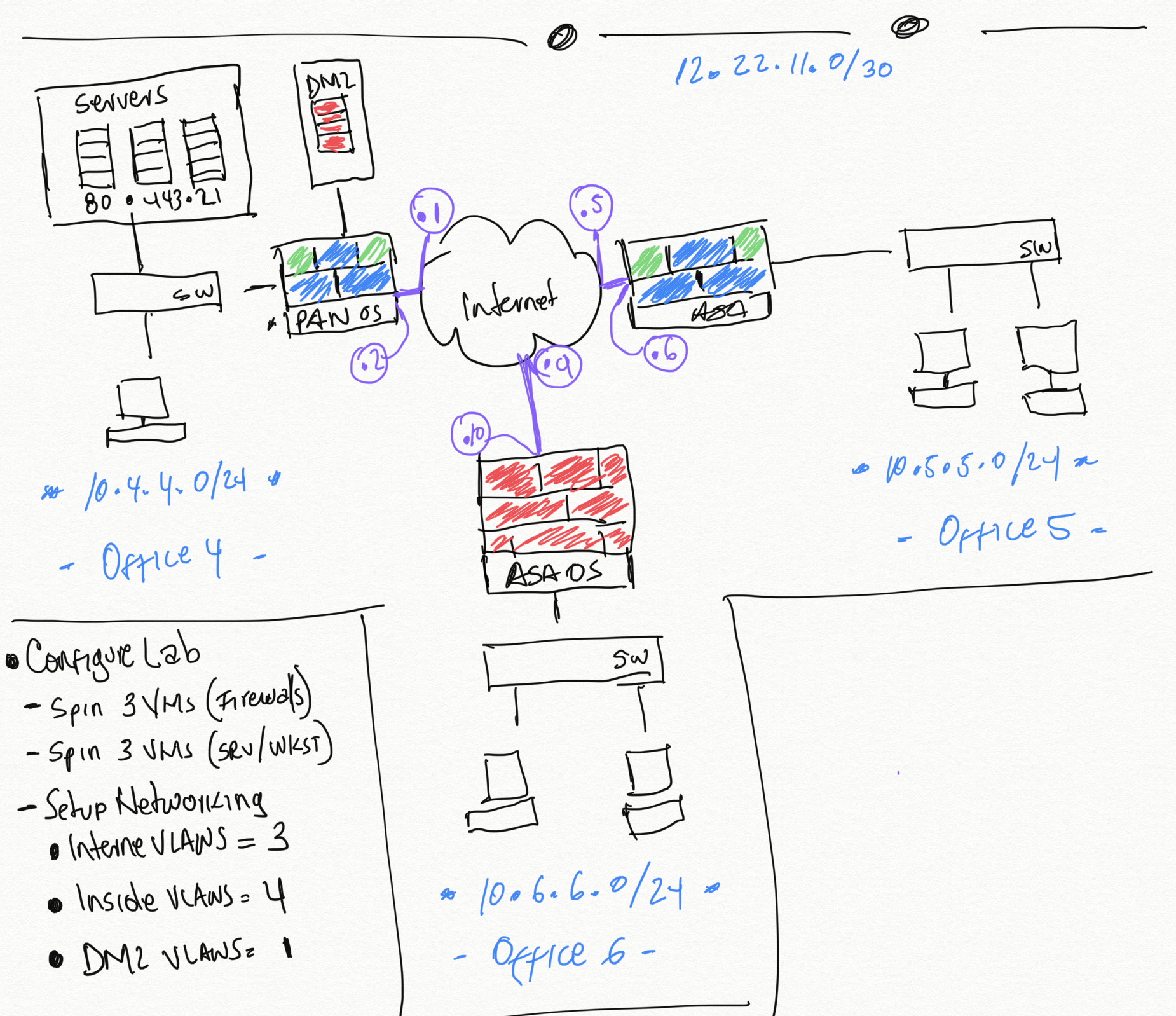
I have a very modest lab setup and have been putting the PAN-VM 100 to the test, in this case, I have 2 firewalls setup to handle the internet of the internal VMs in my lab
Here I a quick snapshot of the all the junk I have been running So I decided that I want to use the PANVM as my primary internet, due to some limitations of speed with the ASA5506X (Only 250Mbps) - I’m running currently a 1Gbps internet for the lab so I wanted to make sure I could use all my bandwidth! (I want my money and I want it now!!)
One thing that I really appreciate from Palo Alto is that their Firewalls have this nice way to save your configuration. As I move with labbing my experience with the Firewalls and products, I really wanted to highlight this.
Configuration Management This section relates to the ability to different functions you can use to practically save your configurations, this is very handy because you can save a good known configuration, and ue at later time.
The last post was very long and a bit crazy all over the place, but here we are continuing with it. To illustrate how to crate a destination NAT, we will be opening FTP to one of our DMZ server, so lets get started
Create Object Under Objects -> Services we will create our new FTP Object
Destination NAT Policy We are pretty much following the same flow we initially followed when we were playing with the Source NAT Policies, with few minor changes that will make sense
So I continue my journey to get this cert, I think I have procrastinated for too long and I need to get back to learning all the ins and outs for the technology. Again this certification is very heavy on configuration, HA concepts and maybe scattered between all their main Objectives. We are going to get working with Initial Configuration
Admin Roles Like any other appliance out there, you have the ability to create different Admin roles and different permissions based on their job function
This quick lab is going to be about creating Zones, assigning them to interfaces, Management Interface configuration
Creating a Zone We will create the Outside Zone and we are going to add a name + selecting the type, nothing fancy, but later in the lab we will use it and go through configuring more features Create an Interface Management Profile We are going to quickly create a Management profile and assign to an interface
Create Tags One thing that I really appreciate from PANOS is the introduction of TAGs, they are very handy when you are looking for policies, objects and many different things in your firewall. I know many of you out there appreciate the feature.
Tags are color-coded labels and enable you to group, sort, and filter objects using keywords or phrases. Tags can be applied to Address objects, Address Groups (static and dynamic), services, Service Groups, and policy rules. Tags can be assigned a color that makes the results of a search easier to find in the web interface.
As with any certification that I attempt I go into it with a mindset of learning by reading, watching videos and doing… Being doing the strongest one in my list of things to do. I want to make sure all the things that I have seen listed in the PCNSE Study Guide I can do, with the exception of the High Availability piece, which I will have. Bait of a hard time using since I only have access to 1 VM.
As the new year hits, I have new resolutions, and these entail getting my feet wet with Palo Alto Networks, due to my job and many other factors I’m open to learning and get certified on the PCNSE, which stands for Palo Alto Networks Certified Network Security Engineer
The Certification Requirements This exam contains 75 questions and over 80 minutes - The intended audience are engineers that currently work with Next-generation firewalls and would like to take their knowledge to the next level. They recommend having 3 to 5 years of experience